User Profile

MarkusOE
Brass Contributor
Joined Jun 28, 2021


User Widgets
Recent Discussions
Re: HCW fails to detect an Exchange Server
SOLVED. I don't understand the root cause. However I could work around the issue by having my admin-account which I use to execute HCW from the protected users group temporarily. Thanks to everybody who contributed and thanks to Lenovo for the following support article which reported the same cause in a different context. https://support.lenovo.com/nz/de/solutions/ht5158671.3KViews1like0CommentsRe: HCW fails to detect an Exchange Server
Thanks AndresGorzelany . Exchange Management Shell works fine on the servers when I start it from the start menue. However when I start it from the HCW panel after pressing F12, it fails to load with the error message I posted in my inital post. I start the HCW directly on MYNEWEXCHANGESERVER01 and there is no firewall since the Windows Firewall is disabled for all networks.385Views1like0CommentsRe: HCW fails to detect an Exchange Server
Thanks AnnTaeYoun. I ran your command using username format domain.local\adm-xyz from powershell.exe (not Exchange Management Shell) and it was accepted. However afterwards there were no Exchange CMDlets available like get-exchangeserver or get-mailbox.490Views0likes3CommentsHCW fails to detect an Exchange Server
I'd like to acquire a free hybrid license using the Hybrid Configuration Wizard. However to me that seems to require HCW detects the Exchange Server on the second page. However it doesn't detect any of my two Exchange Servers (yes, that worked in the past with the older one). No matter on which of both servers I execute HCW, it doesn't detect any of both servers. To me it appears like the cause is a remote powershell (Exchange Management Shell) session failing to be initiated. ECP and Exchange Management Shell work fine. I get the following error messages in the HCW log: ERROR 10085 (and 10084) Client UX, Activity Detection, Thread 6 Fehler bei der Remoteserververbindung mit der folgenden Fehlermeldung: Beim Verbinden mit dem Remoteserver MYNEWEXCHANGESERVER01 ist folgender Fehler aufgetreten: Eine angegebene Anmeldesitzung ist nicht vorhanden. Sie wurde gegebenenfalls bereits beendet (a specified logon session does not exist. it may already have been terminated) Could not connect to MYNEWEXCHANGESERVER01 When I try to start the Exchange Management Shell from the HCW window using F12 I get the following error, too: New-Pssession : MYNEWEXCHANGESERVER01 Beim Verbinden mit dem Remoteserver "MYNEWEXCHANGESERVER01" ist folgender Fehler aufgetreten: Eine angegebene Anmeldesitzung ist nicht vorhanden. Sie wurde gegebenenfalls bereits beendet. Der Domänen- oder Computername wurde nicht mit den angegebenen Anmeldeinformationen hinzugefügt. Beispiel: DOMAIN\UserName oder COMPUTER\UserName.Solved914Views0likes8CommentsRe: DMARC hacked bypassed with empty header.from or only semicolon
To me it appears like that "Non-compliant RFC 5322 P2 FROM header detection" in "November 2024 Exchange Server Security Updates" partly addresses my issue. However transport rules would still be needed in order to Honor DMARC. Furthermore it's not clear to me yet, if those transport rules had consequences on emails passing DMARC though detected by this mechanism. Released: November 2024 Exchange Server Security Updates | Microsoft Community Hubhttps://techcommunity.microsoft.com/blog/exchange/released-november-2024-exchange-server-security-updates/4293125122Views0likes0CommentsDMARC hacked bypassed with empty header.from or only semicolon
WRAP UP On the 26th of September 2024 an email was delivered to one of our Exchange Online mailboxes from the Internet through EOP that spoofes one of our accepted domains although this domain is protected by a DMARC reject policy and by DKIM and SPF nobody as allowed to use this domain as a sender domain. INTRODUCTION Microsoft Support refused to support this case more or less because I insisted on the DKIM and SPF configuration being perfectly fine. They pointed me at community or their paid support. The domain in question (here: spoofeddomain.de) is only kept by me as an accepted domain in Exchange Online for the purpose of receiving email, but for sending email. The MX points at EOP. I have disabled DKIM in order to make sure nobody can get a DKIM pass and to contribute to nobody can get a DMARC pass using this domain as sender domain. For the same reason I have set the SPF record "v=spf1 -all" prohibiting any IP to send in the name of this domain. ANALYSIS Outlook shows the following as sender: f.last@ <spoofeddomain.de email address removed for privacy reasons> Clicking on properties Outlook shows... Displayname: f.last@ Email-Address: spoofeddomain.de email address removed for privacy reasons The Authentication Results Header shows the following: Authentication-Results-Original spf=fail (sender IP is 81.17.30.196) smtp.mailfrom=spoofeddomain.de; dkim=none (message not signed) header.d=none;dmarc=none action=none header.from=; CAUSE The attacker seems to be able to work around the mechanism of the EOP that determines the header.from. As a consequence he is able to spoof spoofeddomain.de because the EOP has no header.from domain that it could get a DMARC policy for. If it had, it would have come to a DMARC fail, because we have DKIM disabled and "v=spf1 -all". ASSESSMENT I think the best way to argue Microsoft is right, is to say that spoofeddomain.de is not the actual header.from according to RFC. Furthermore the sender shown in Outlook is not unambigous. However if a user wants to determine the sender domain from this, which domain should he or she determine but spoofeddomain.de? MITIGATION I put transport rules in place that quarntine emails with Authentication-Results or Authentication-Results-Original "header.from=;". However since I have not established a testing process yet, I'm not sure if they will work.480Views1like1CommentSOLVED ADOperationException when Enable-RemoteMailbox with Management Role
I ran into the following error when I was enabling remote mailboxes in a post-hybrid environment using Exchange management tools 2019 (Add-PSSnapin Microsoft.Exchange.Management.PowerShell.SnapIn). I found neighboring threads on the Internet, but for this attribute and CMDlet (combination). Solution: proxyAddresses attribute already had a value. After making sure the attribute has no values, I was able to run the command successfully. PS C:\Users\adm-xyz01> Enable-RemoteMailbox 'xyz@domain.custom' -RemoteRoutingAddress 'email address removed for privacy reasons' Enable-RemoteMailbox : Fehler bei Active Directory-Vorgang mit dc.domain.local. Bei diesem Fehler ist kein Wiederholungsversuch möglich. Zusätzliche Informationen: Der Attributwert kann nicht entfernt werden, da er beim Objekt nicht vorhanden ist. Active Directory-Antwort: 00002085: AtrErr: DSID-03152B62, #1: 0: 00002085: DSID-03152B62, problem 1001 (NO_ATTRIBUTE_OR_VAL), data 0, Att 200d2 (proxyAddresses):len 38 In Zeile:1 Zeichen:1 + Enable-RemoteMailbox 'xyz@domain.custom' -RemoteRoutingAddress 'xyz@doma ... + ~~~~~~~~~~~~~~~~~~~~~~~~~~~~~~~~~~~~~~~~~~~~~~~~~~~~~~~~~~~~~~~~~~~~~ + CategoryInfo : NotSpecified: (:) [Enable-RemoteMailbox], ADOperationException + FullyQualifiedErrorId : [Server=EXMANAGEMENT,RequestId=removed,TimeStamp=removed] [FailureCategory=Cmdlet-ADOperationException] 2F307682,Microsoft.Exchange.Management.RecipientTasks.EnableRemoteMailbox842Views0likes0CommentsRe: Adding MailboxFolderPermission to certain user fails with Powershell as well as OWA
Solved. I'm sorry for not being able to mention everything and everybody that contributed to finding the solution. It helped a lot to find many articles mentioning the relation of this problem to converting between shared and user mailbox as well as changes in name, upn, etc. Both was the case here. As far as I remember i was the following article that led my directly to the cause as well as the solution: https://answers.microsoft.com/en-us/msoffice/forum/all/the-attribute-accountdisabled-changing-for-true/40b3ed9a-3351-4272-9b91-d447db126c1f THIS IS HOW I FOUND THE MAILBOX IN EXCHANGE ONLINE WHEN THE ISSUE OCCURED get-mailbox xyz | select ExchangeUserAccountControl,AccountDisabled,RecipientType,RecipientTypeDetails ExchangeUserAccountControl : AccountDisabled, NormalAccount AccountDisabled : True RecipientType: User : Mailbox RecipientTypeDetails : UserMailbox WHEN I TRIED TO ENABLE THE MAILBOX IT TOLD ME IT WAS A SHARED MAILBOX ALTHOUGH IT SHOWED UP AS A USER MAILBOX IN EXCHANGE ONLINE ADMIN CENTER AS WELL AS IN POWERSHELL set-mailbox xyz -AccountDisabled $false WARNUNG: Das freigegebene Postfach "email address removed for privacy reasons" kann nicht aktiviert werden. From now on I assumed that the cause was a party failed re-conversion from a shared to a user mailbox in the past. Although the user account was enabled in Entra, it was disabled in Exchange. Therefore there was no (active) Exchange security principal that permissions could have been assigned to. SOLUTION a) RemoteMailbox (Exchange Management Shell) Get-RemoteMailbox xyz | Set-RemoteMailbox -Type shared Invoke-Command -ComputerName servername -ScriptBlock {start-adsyncsynccycle -policytype delta} Get-RemoteMailbox xyz | Set-RemoteMailbox -Type regular Invoke-Command -ComputerName servername -ScriptBlock {start-adsyncsynccycle -policytype delta} b) Mailbox (Exchange Online Powershell) get-mailbox xyz | Set-Mailbox -Type shared set-mailbox SchoSa1 -Type regular I could see in the Entra logs that all of my above changes were taking effect on the user object related to the mailbox. Now I was able to assign MailboxFolderPermissions to the security principal of the mailbox.1.4KViews0likes0CommentsAdding MailboxFolderPermission to certain user fails with Powershell as well as OWA
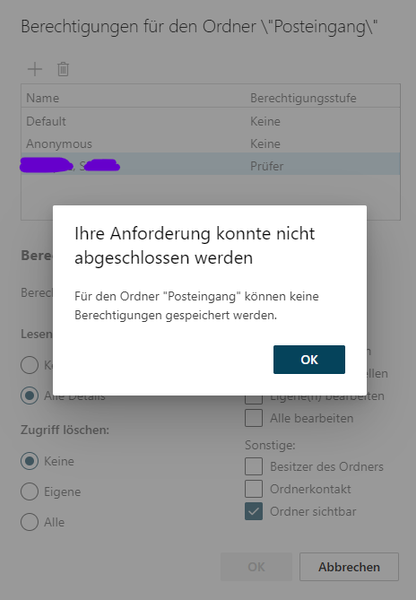
Hallo! I try to add a MailboxFolderPermission for the assistant to the inbox of the manager. That fails with Powershell as well as Outlook on the web. If instead I grant a MailboxFolderPermission on the managers inbox to my test user that works perfectly fine. We are in a Exchange hybrid setup. However all 3 mailboxes (manager, assistant, test user) are all hosted in Exchange Online (and represented with a RemoteMailbox OnPremise). The assistant changed her last name some time ago (supposedly married). However currently PrimarySmtpAddress = UserPrincipalName OnPremise (RemoteMailbox) as well as Online (UserMailbox). [PS] C:\Windows\system32>Get-ADUser (get-remotemailbox *assistantlastname*).guid.guid -Properties msexchrecipientdisplaytype msexchrecipientdisplaytype : -1073741818 Write-ErrorMessage : |Microsoft.Exchange.Management.StoreTasks.InvalidExternalUserIdException|Der Benutzer "email address removed for privacy reasons" ist entweder keine gültige SMTP-Adresse oder es ist keine übereinstimmende Informationen vorhanden. In C:\Users\adm-xyz02\AppData\Local\Temp\tmpEXO_iq3lu4l0.m3f\tmpEXO_iq3lu4l0.m3f.psm1:1191 Zeichen:13 + Write-ErrorMessage $ErrorObject + ~~~~~~~~~~~~~~~~~~~~~~~~~~~~~~~ + CategoryInfo : NotSpecified: (:) [Add-MailboxFolderPermission], InvalidExternalUserIdException + FullyQualifiedErrorId : [Server=GVXP194MB1735,RequestId=777a9f1a-076f-058f-2c1c-f1e6afd8ba64,TimeStamp=Mon, 22 Apr 2024 15:19:43 GMT],Write-ErrorMessage If I use the ExchangeGUID (Exchange Online) of the assistant as identifier, I get the following message: Write-ErrorMessage : |Microsoft.Exchange.Management.StoreTasks.InvalidInternalUserIdException|Der Benutzer "Last, First" wurde in Active Directory gefunden, ihm können aber keine Berechtigungen zugewiesen werden. Versuchen Sie stattdessen ein SMTP-Adresse. In C:\Users\adm-xyz01\AppData\Local\Temp\tmpEXO_iq3lu4l0.m3f\tmpEXO_iq3lu4l0.m3f.psm1:1191 Zeichen:13 + Write-ErrorMessage $ErrorObject + ~~~~~~~~~~~~~~~~~~~~~~~~~~~~~~~ + CategoryInfo : NotSpecified: (:) [Add-MailboxFolderPermission], InvalidInternalUserIdException + FullyQualifiedErrorId : [Server=GVXP194MB1735,RequestId=650eac4d-4cf5-73ac-a860-574b4946988d,TimeStamp=Mon, 22 Apr 2024 14:57:04 GMT],Write-ErrorMessage Any ideas how to fix this?Solved2KViews0likes1CommentRe: Shared Calendars are not loading in Outlook
Some of our users report that, too. My entry point was throttling. Because user reported the same issue some weeks or months ago. And indeed it seems like I can temporarily work around the issue with a script that wipes away all Outlook Windows configuration from the user profile (HKCU Software, appdata and localappdata). However the problem keeps coming back. By the way we have calendar improvements disabled by policy.3.3KViews0likes0CommentsRe: Cant set smtp tls certificate for send-connector
Summary: Export your certificate including private key as .pfx and then re-import it either using Exchange Management Shell or ECP (not: MMC!). Approved solution method: a) [PS] $bincert = Export-ExchangeCertificate -BinaryEncoded -Thumbprint <Certificate Thumbprint> -Password (Get-Credential).password b) [PS] [System.IO.File]::WriteAllBytes('C:\users\user\desktop\wildcard23.pfx', $bincert.FileData) c) Delete the certificate from your computer using MMC d) [PS] Import-ExchangeCertificate -Server <servername> -FileData ([System.IO.File]::ReadAllBytes('\\localhost\c$\users\user\desktop\wildcard23.pfx')) -Password (Get-Credential).password7.8KViews0likes0Comments
Recent Blog Articles
No content to show