User Profile

Jeffl1000
Copper Contributor
Joined Apr 07, 2021


User Widgets
Recent Discussions
Re: Is there any way to FORCE removal of an unwanted shared mailbox from Outlook?
I added a user manually (all full access users had been manually removed previously), then successfully executed the two commands at https://www.nucleustechnologies.com/blog/remove-outlook-auto-mapping-for-a-mailbox-in-exchange/#:~:text=%20Automapping%20came%20into%20existence%20since%20Exchange%20Server,access%20the%20mailbox%20%28including%20shared%20mailboxes%29.%20More%20 It made no difference at all. The problem mailbox remains fixed in exerbody's Outlook. Does the version of Exchange make a difference? This is an old 2010 version.5.9KViews0likes1CommentIs there any way to FORCE removal of an unwanted shared mailbox from Outlook?
I very much want to get a no-longer-needed shared mailbox out of everyone’s Outlook 365, and have found it to be impossible using available documentation. When you try to close it, it tells you to remove it from account settings. But it’s not there … just the primary account. I saw in one article that you can remove it by removing the permissions from the mailbox in Exchange, but this didn’t work either. Is there any registry or powershell script workaround?6.4KViews0likes3CommentsWant to get rid of unwanted, useless popup
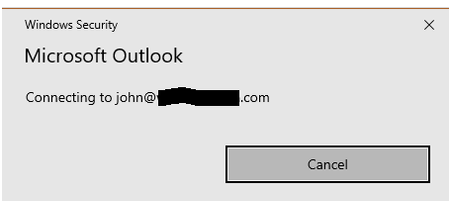
All of the Outlook 365's in my organization have started displaying this prompt at the start of a session: All you can do is hit cancel. Everything works and you are connected to the Exchange Server, but it keeps repeating at the start every time. Outlook displays a "password needed" message at the bottom of the frame, but if you click it, it just displays the useless prompt again. If you click Outlook in the taskbar while the message is displayed, it identifies the popup window as "Microsoft Outlook Credentials." The credentials HAVE to have been accepted, or Outlook would be unusable. Isn't there any way I can get rid of this nuisance?1.6KViews0likes4Comments
Recent Blog Articles
No content to show