update management
1026 TopicsCrowdStrike Secure Boot Lifecycle Management Content Pack
CrowdStrike has recently released the Secure Boot Lifecycle Management Content Pack. This new feature helps Falcon for IT module users manage Windows Secure Boot certificate updates ahead of these certificates’ expiration beginning in late June 2026. The dashboard provides an at‑a‑glance view of Secure Boot–enabled devices, showing which systems are already compliant with the updated 2023 Secure Boot certificate, which are in progress, and which are blocked or require opt‑in to a managed rollout. It also highlights certificate update failures that may require investigation. In addition, overall readiness is summarized through a compliance gauge, while a 30‑day trend shows how pass and fail counts change as remediation progresses. Filters by operating system, server edition, hostname, and update status help administrators quickly identify devices that need action to help ensure systems remain secure after the certificates expire. The feature also provides management options to opt devices into Microsoft's managed rollout for gradual, tested deployment, and to block updates on hardware with known compatibility issues to prevent boot failures. Note that this feature is available as part of CrowdStrike's Falcon for IT module. CrowdStrike Endpoint Detection and Response (EDR) customers who are not licensed for this module can enable a free trial from the CrowdStrike Store. To learn more about this feature, please see the content pack tutorial video.31Views0likes0CommentsComment desinstaller windows 10 pour installer windows 11 proprement sur mon PC
Avec la fin du support de Windows 10 qui approche, je voudrais mettre à niveau mon ordinateur vers Windows 11. Le problème est que je préfère repartir de zéro et desinstaller windows 10 pour installer windows 11 proprement plutôt que de faire une simple mise à jour. Je ne suis cependant pas sûr de la meilleure méthode pour effectuer cette installation propre sans rencontrer d’erreurs. J’ai vu qu’il est possible de créer une clé USB bootable avec l’ISO de Windows 11, puis de démarrer le PC dessus pour supprimer les anciennes partitions. Est-ce la bonne méthode pour desinstaller windows 10 pour installer windows 11 ? Est-ce que je dois formater le disque avant ou l’installateur de Windows 11 s’en charge automatiquement ?50Views0likes7Comments
Windows 11 24H2/25H2 System Freeze After January 2026 Updates – Lenovo ThinkPad G2
Dear Microsoft Support Team, We would like to raise a high-priority technical support case regarding a stability issue observed after installing the January 2026 cumulative updates on our Windows 11 devices. Environment Details: Device Model: Lenovo ThinkPad G2 (multiple units) OS Versions: Windows 11 24H2 and 25H2 Update Installed: January 2026 Patch Tuesday cumulative update (KB number can be provided) Deployment Method: WSUS / Intune / Windows Update (specify accordingly) BIOS Version: (Installed Latest available from Lenovo) Issue Description: After installing the January 2026 cumulative updates, devices intermittently experience a complete system freeze. The system becomes fully unresponsive: Mouse and keyboard input stop responding No BSOD is displayed Task Manager cannot be opened System recovery is only possible via hard reboot (power button) Frequency: The issue occurs randomly, both during active use and idle state. Multiple users across our environment are impacted. Troubleshooting Performed: Reinstalled OEM-certified Lenovo display drivers Disabled Fast Startup Ran SFC and DISM health checks (no integrity violations) Updated BIOS to latest version Setting power idle mode, then work normally Request: - Please confirm whether this is a known global issue under investigation. - Advise if any hotfix, Known Issue Rollback (KIR), or registry-based mitigation is available. - Provide guidance on additional diagnostic logging required at kernel or driver level. - Confirm whether crash dump analysis is recommended for this scenario. We are prepared to provide additional diagnostic logs, memory dumps, or reproduction steps upon request. Kindly treat this as a priority case due to multi-user impact in a production environment. Thank you for your support. #Windows11, #Windows 11 24H2, Windows Update, Cumulative Update, System Freeze, Lenovo ThinkPad, Display Driver, Enterprise2.4KViews11likes23CommentsBluetooth driver disappears after every restart/sleep on Windows 11
Dear Support Team, I am writing this complaint out of sheer frustration after enduring a critical Bluetooth driver issue on my Windows 11 laptop for an unreasonably long time. Every single time I restart my system or wake it up from sleep, the Bluetooth driver completely disappears from the system. It is not just disabled — it is gone. Bluetooth vanishes from Device Manager, settings, and system controls as if the hardware itself never existed. The only way to restore Bluetooth functionality is to reinstall the driver manually every time. This issue occurs: After every restart After waking the system from sleep Randomly during normal usage The frequency is so high that I have been forced to keep a Bluetooth driver installer shortcut permanently on my desktop — something that feels absolutely absurd for a modern operating system in 2025. Let me be very clear: This is not a user error This is not a one-off bug This is not acceptable behaviour for a premium Windows device I have tried: Reinstalling drivers multiple times Using official OEM drivers Updating Windows fully Disabling power management options Troubleshooting through Device Manager Running system diagnostics None of these provides a permanent fix. The core issue is painfully obvious: Windows 11 (or its driver/power management stack) is failing to reliably retain or initialise the Bluetooth driver across restarts and sleep cycles. This is a basic OS-level responsibility. As a long-time Windows user, I find it shocking that in a system where I spent a considerable amount, I am dealing with an issue that feels more appropriate for an unstable experimental build, not a consumer-ready operating system. To be completely honest, this experience has pushed me to the point where I am seriously considering abandoning Windows altogether and switching to macOS, despite having used Windows on my personal machines for years. The idea of paying that amount again just to escape such basic reliability problems is becoming more appealing than continuing to fight my own laptop daily. This is not just a “bug report” — this is a usability failure that affects: Work productivity Meetings Audio devices Input devices Everyday usability I expect: A clear acknowledgement of the issue A concrete explanation of why this happens A permanent fix, not temporary workarounds Or an official statement admitting the limitation I am documenting this issue publicly and will be sharing it across relevant forums and feedback channels unless a meaningful resolution is provided. Windows users should not have to reinstall core drivers every day to use basic hardware features. I look forward to a serious response. Sincerely, A very frustrated but still hopeful Windows user269Views0likes5Comments
Windows 11 upgrade failed as it says "The PC must support TPM 2.0"
I have a powerful gaming PC built a few years ago with an Intel i7 8th gen processor, 16GB RAM, RX 560 4G graphics card and 512GB SSD. This error pops up when I was planning to upgrade Windows 10 to Windows 11 on my pc: This PC must support TPM 2.0 It directly comes from Windows 11 setup utility and tells me this pc doesn't currently meet windows 11 system requirements. How can I fix "This PC must support TPM2.0" error so I can finished updating to Windows 11 from Windows 10.Solved18KViews0likes11Comments
Is the Nvidia Windows Update KB5074109 Fixed?
I was wondering if the Nvidia bug for windows update KB5074109 was fixed as it caused artifacting and FPS drops on Nvidia GPU’s, I had my GPU sent for testing and there is nothing wrong with it so it must be the update, I reinstalled windows 11 so I presume I can’t roll back the update either right?206Views0likes3CommentsHow to fix windows 11 version 25h2 install error on my pc?
I have a PC running an outdated Windows 11 23H2 OS. Recently, I want to upgrade this pc to latest Windows 11 25H2. However, the process keeps failing with error code. I tried a few solutions recommended online but none of them worked. I don't know if it is related to my pc hardware specs. Can someone point out a way to fix Windows 11 version 23h2 install error on my pc?273Views0likes8Comments
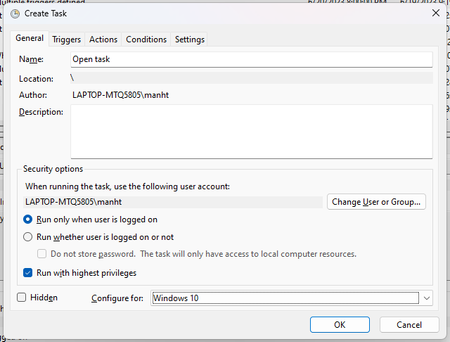
Create a task which runs for all user
I want to use Task Schedule to run an app at log-on for all users on my PC using admin rights. How can I do that? I tried to choose to start at log-on for any user in the tab Triggers but the task only runs on my admin account. When I log out and log in to my user accounts it doesn't work. Thank you for reading.2.1KViews0likes4Comments
How can I easily install pending Windows updates on my PC?
Call 1-855-535-7109. To install pending Windows updates easily on your Windows PC, follow these steps: Open Windows Settings: Press Windows + I to quickly open the Settings menu. Go to Update & Security: In the Settings window, select Update & Security. Check for Updates: Under the Windows Update section, click Check for updates. Windows will search for any pending updates. Install Updates: If updates are available, click on Install to begin the installation process. Windows will automatically download and install the updates. Restart Your Computer: After updates are installed, a restart may be required. Windows will prompt you to restart, or you can manually restart your PC. Use Windows Update Troubleshooter (if issues occur): If updates aren’t installing properly, try using the Windows Update Troubleshooter. Go to Settings > Update & Security > Troubleshoot > Additional troubleshooters, then select Windows Update and run the troubleshooter.60KViews3likes3Comments