compliance
945 Topics
Azure Key Vault Replication: Why Paired Regions Alone Don’t Guarantee Business Continuity
As customers modernize toward multi‑region architectures in Azure, one question comes up repeatedly: “If my region goes down, will Azure Key Vault continue to work without disruption?” The short answer: it depends on what you mean by “work.” Azure Key Vault provides strong durability and availability guarantees, but those guarantees are often misunderstood—especially when customers assume paired‑region replication equals full disaster recovery. In reality, Azure Key Vault replication is designed for survivability, not uninterrupted write access or customer‑controlled failover. This post explains: How Azure Key Vault replication actually works (per Microsoft Learn) Why paired‑region failover does not equal business continuity Two reference architectures that implement true multi‑region Key Vault availability, with Terraform How Azure Key Vault Replication Works (Per Microsoft Learn) Azure Key Vault includes multiple layers of Microsoft‑managed redundancy. In‑Region and Zone Resiliency Vault contents are replicated within the region. In regions that support availability zones, Key Vault is zone‑resilient by default. This protects against localized hardware or zone failures. Paired‑Region Replication If a Key Vault is deployed in a region with an Azure‑defined paired region, its contents are asynchronously replicated to that paired region. This replication is automatic and cannot be configured, observed, or tested by customers. Microsoft‑Managed Regional Failover If Microsoft declares a full regional outage, requests are automatically routed to the paired region. After failover, the vault operates in read‑only mode: ✅ Read secrets, keys, and certificates ✅ Perform cryptographic operations ❌ Create, update, rotate, or delete secrets, keys, or certificates This is a critical distinction. Paired‑region replication preserves access — not operational continuity. Why Paired‑Region Replication Is Not Business Continuity From a reliability and DR perspective, several limitations matter: Failover is Microsoft‑initiated, not customer‑controlled No write operations during regional failover No secret rotation or certificate renewal No way to test DR Accidental deletions replicate No point‑in‑time recovery without backups Microsoft Learn explicitly states that critical workloads may require custom multi‑region strategies beyond built‑in replication. For many customers, this means Azure Key Vault becomes a single‑region dependency in an otherwise multi‑region application design. The Multi‑Region Key Vault Pattern The two GitHub repositories below implement a common architectural shift: Multiple independent Key Vaults deployed in separate regions, with customer‑controlled replication and failover. Instead of relying on invisible platform replication, the vaults become first‑class, region‑scoped resources, aligned with application failover. Solution 1: Private, Locked‑Down Multi‑Region Key Vault Replication Repository: 👉 https://github.com/jclem2000/KeyVault-MultiRegion-Replication-Private Architecture Highlights Independent Key Vault per region Private Endpoints only No public network exposure Terraform‑based deployment Controlled replication using Event Based synchronization What This Enables ✅ Full read/write access during regional outages ✅ Continued secret rotation and certificate renewal ✅ Customer‑defined failover and RTO ✅ DR testing and validation ✅ Strong alignment with zero‑trust and regulated environments Trade‑offs Higher operational complexity Requires automation and application awareness of multiple vaults Solution 2: Low‑Cost Public Multi‑Region Key Vault Replication Repository: 👉 https://github.com/jclem2000/KeyVault-MultiRegion-Replication-Public Architecture Highlights Independent Key Vault per region Public endpoints Minimal networking dependencies Terraform‑based Controlled replication using Event Based synchronization Optimized for simplicity and cost What This Enables ✅ Full read/write availability in any region ✅ Clear and testable DR posture ✅ Lower cost than private endpoint designs ✅ Suitable for many non‑regulated workloads Trade‑offs Public exposure (mitigated via firewall rules, RBAC, and conditional access) Not appropriate for all compliance requirements Requires automation and application awareness of multiple vaults Azure Native Replication vs Customer‑Managed Multi‑Region Vaults Capability Azure Paired Region Multi‑Region Vaults Read access during outage ✅ ✅ Write access during outage ❌ ✅ Secret rotation during outage ❌ ✅ Customer‑controlled failover ❌ ✅ DR testing ❌ ✅ Isolation from accidental deletion ❌ ✅ Predictable RTO ❌ ✅ Azure Key Vault’s native replication optimizes for platform durability. The multi‑region pattern optimizes for application continuity. When to Use Each Approach Paired‑Region Replication Is Often Enough When: Secrets are mostly static Read‑only access during outages is acceptable RTO is flexible You prefer Microsoft‑managed recovery Multi‑Region Vaults Are Recommended When: Secrets or certificates rotate frequently Applications must remain writable during outages Deterministic failover is required DR testing is mandatory Regulatory or operational isolation is needed Closing Thoughts Azure Key Vault behaves exactly as documented on Microsoft Learn—but it’s important to be clear about what those guarantees mean. Paired‑region replication protects your data, not your ability to operate. If your application is designed to survive a regional outage, Key Vault must follow the same multi‑region design principles as the application itself. The reference architectures above show how to extend Azure’s native durability model into true operational resilience, without waiting for a platform‑level failover decision.372Views0likes1CommentThe Indentity Verification step failed due to Microsoft Trusted IDV AU10TIX issue
JillArmour is there a way to get this resolved? My company has been and still Authorized and Active Microsoft Partner for more than 8 year. Without any reason (no changes to Legal Info, no changes in Primary or Security Contacts, etc.), the Indentity Verification was triggered in Partner Dashboard on June 24, 2026. I followed the steps to verify via Microsoft's only trusted IDV AU10TIX ( https://www.au10tix.com ). The driver's license was correctly OCR-ed, etc. Yet, the VerifiedID that was issued by AU10TIX platform had the Last Name completely missing! As the result the Indentity Verification failed due to a basic name mismatch, the Verification status switched to Rejected, and the Resolve button no longer available for me to retry again. I opened two support tickets already 2606250010001105 (this one was closed without even reading my request details, and I re-opened it again and re-sent the details asking to re-start the Indentity Verification step, so I could retry) and 2606260010001921 (since there has been no reply at all to the first ticket, despite 8 business hours of response SLA that is mentioned in the official support ticket confirmation email) My company's benefits package is up for renewal and we cannot now publish our ISV offering on the Marketplace also. Now, I'm not even sure how the retry is going to work, will the trusted IDV AU10TIX issue a new VerifiedID or it will tell me that it already issued one for that email address...?
How Karambit.AI and Microsoft Bring Software Authenticity to 14 Billion Files Per Month
The Problem: Static Analysis Without Context Traditional static analysis treats every file as an island. Scan a binary, match against known signatures, flag what you recognize. The approach is well-understood and increasingly insufficient against modern threats. The fundamental limitation is the absence of context. Without it, a packer is just a packer. A network call is just a network call. An obfuscation routine is just an obfuscation routine. Whether that behavior is normal or anomalous, whether it belongs in this software, in this ecosystem, performing this function, is invisible to tools that evaluate files in isolation. Attackers exploit this gap. They hide malicious behavior inside legitimate software patterns, evolve their techniques between versions, and distribute intent across multiple components so that no single artifact triggers a detection in a context-free scan. Context-Aware Behavior Analysis Context-aware analysis inverts the model. Instead of asking "is this file bad?" it asks: "is this file behaving the way it should, given everything we know about this ecosystem?" This requires building and maintaining behavioral context across multiple dimensions: Ecosystem-level behavioral baselines: Understanding what behaviors are normal across the entire corpus and which should never appear. In a trusted software ecosystem, obfuscated or packed content is itself an anomaly worth enforcing policy against, regardless of whether the underlying payload is known-malicious. Behavioral chains with low false-positive rates: Individual API calls and instructions are ambiguous in isolation. Context-aware analysis identifies chains of behaviors, sequences where data staging feeds into exfiltration, or where privilege escalation is followed by persistence mechanisms, that reveal intent with high confidence. Cross-file and cross-instance correlation: Behaviors observed in one file are evaluated against patterns seen across millions of other files and scan instances. Shared behavioral fingerprints reveal family relationships, evolutionary lineage, and coordinated campaigns that single-file analysis cannot surface. Historical behavioral deltas: What changed between version N and version N+1? New behaviors in an update, especially behaviors that don't correspond to documented changes, are flagged not because they match a signature, but because they deviate from the established behavioral profile. The result: dramatically higher detection confidence, lower false-positive rates, and the ability to enforce behavioral policy at the ecosystem level. Case Study: Packer_Dictator, Behavioral Detection Under Adversary Adaptation Adversaries must change their Tactics, Techniques, and Procedures (TTPs) over time. When a detection capability catches them, they adapt to evade it. This is expected behavior and it is precisely why general detections at the behavior level are more durable than signature-based approaches. Behavioral patterns are fundamentally harder for adversaries to change without breaking their own tooling. The packer family tracked as packer_dictator illustrates this dynamic clearly. Initial Detection: Obvious Indicators Early variants of packer_dictator used conspicuous binary section names: authoritarian and politically-themed strings that made identification straightforward for anyone examining the PE headers. These were low-hanging indicators, but Karambit.AI's detection wasn't built on them. The system flagged these samples based on their behavioral profile: the entropy characteristics of their packed sections, the structure of their unpacker initialization routines, and the other patterns used to unpack and execute hidden payloads. Adversary Adaptation: Surface Changes, Persistent Behavior As detections rolled out, the users of this packer had to adapted. The obvious section names disappeared, replaced by more benign alternatives: .upx0, standard "unpacked" section names, and other strings designed to blend in with legitimate software. But the underlying behavior didn't change because it couldn't, not without fundamentally rearchitecting the packer itself. Entropy Analysis: Seeing Through Surface Changes Sliding-window entropy analysis reveals why surface-level changes are insufficient to evade behavioral detection. The entropy profiles of packer_dictator samples, even after the section name changes, maintain a characteristic signature: Both profiles exhibit the same structural pattern: a low-entropy region corresponding to the unpacker stub, followed by a sharp transition to a high-entropy plateau spanning the packed payload. This entropy profile is indicative of hidden behaviors, content that has been deliberately obscured, though not necessarily malicious content on its own. The profile shape, transition points, and entropy floor/ceiling ratios form a behavioral fingerprint that persists across variants regardless of metadata changes. Unpacker Initialization: Common Structure Enables Generalized Detection At the disassembly level, packer_dictator variants share a common unpacker initialization sequence that enables generalized analysis across the family. Examining the entry-point code of two samples reveals the structural similarity: Both samples exhibit a characteristic pattern: Register preservation: PUSH R9/PUSH R11 followed by PUSHFQ to save register state and flags before the unpack routine modifies them. Immediate constant loading: Large immediate values loaded into registers (MOV R9, 0x689f8c87eebd998c / MOV R11, 0x6592b8afc22b0736) that serve as decryption keys or XOR masks for the unpacking routine. Arithmetic flag manipulation: Sequences of TEST, NEG, OR, CMP, NOT, and SETNS instructions that compute control flow decisions based on the loaded constants — a form of opaque predicate that obscures the true branch target. Stack-based payload resolution: MOV instructions referencing [RSP + local_120] / [RSP + 0x8] with additional immediate constants written to the stack, setting up parameters for the decompression/decryption loop. The structural template is consistent even as the specific constants, register assignments, and opaque predicate formulations change between variants. This is what makes behavioral detection durable: the adversary can rotate constants and rename sections, but the computational structure required to unpack the payload is constrained by the packer's architecture. By generalizing detection to this structural level, Karambit.AI's engine identifies new packer_dictator variants, and structurally related packer families, without requiring signature updates for each iteration. And this is only one example of the resilience of Karambit.AI’s resilience in the face of constantly advancing adversaries. From Karambyte to Karambiner: Engineering for Billions Karambyte: Building the Context Karambyte was Karambit.AI's original analysis engine, purpose-built for deep behavioral extraction from compiled binaries. Its core function was to extract behavioral context, disassemble control flow, API call chains, entropy profiles, packer identification, behavioral intent classification, and store it for comparison and reference. Karambyte proved the model. It demonstrated that context-aware behavioral analysis could identify threats that traditional static analysis missed, by building rich behavioral profiles and comparing them across software versions and file populations. The system extracted context and maintained it internally, enabling the cross-file and cross-version correlation that drove detections like packer_dictator. But Karambyte's architecture, extracting and storing context within the same system, created a scaling constraint. As adoption grew and the target moved from hundreds of thousands to billions of files per month, the tight coupling between analysis and context storage became the bottleneck. Karambiner: Externalizing Context for Scale Karambiner re-architected the relationship between analysis and context. Rather than each analysis instance maintaining its own behavioral context store, Karambiner externalized the context layer into a dedicated reference that can then be customized for the specific organizational context. This separation enabled three critical capabilities at scale: Horizontal analysis throughput: Analysis scales independently of the context store. Adding processing capacity doesn't require replicating the full behavioral knowledge base. Context enrichment: Behavioral context extracted from collective scans can be used in the massively scalable analysis engine. Ecosystem-wide policy enforcement: With externalized behavioral context, the system can enforce policies across a large-scale ecosystem, such as blocking all obfuscated or packed content. The move from Karambyte to Karambiner was the architectural shift that made scanning of 14 billion files per month possible: a configurable depth of behavioral analysis, with context that scales to the size of the ecosystem rather than the capacity of individual analysis nodes. The Result: Software Behavior Analysis in Microsoft's Pipeline Today, Karambiner is integrated into Microsoft's operational pipeline for build/release and plays a critical role in performing context-aware behavioral analysis across billions of files monthly. The operational impact: Ecosystem-level behavioral policy enforcement: Obfuscated and packed content that has no legitimate reason to exist in the ecosystem is blocked by policy, informed by the scaled behavioral analysis. Durable detection under adversary adaptation: The packer_dictator lineage demonstrates that behavioral detection survives TTP changes that defeat signature-based approaches. Adversaries can change section names, rotate constants, and vary metadata, but the structural behaviors required to execute their payloads remain detectable. Low false-positive rates at scale: Because detection decisions are driven by behavioral understanding and optimizing for scale, the system maintains precision even at 14 billion files per month. Understanding AI capabilities: Behavior analysis can include understanding of where and how AI is used in an ecosystem. Deep understanding of the software going to production: Developers don't always know what components and behaviors make it to the production software, behavior analysis has allowed us to catch unexpected components developers didn’t realize were going to deployment. What's Next The partnership between Karambit.AI and Microsoft demonstrates that context-aware behavior analysis operates on a massive scale in production. As software supply chain attacks grow more sophisticated and adversaries continue evolving their TTPs and the use of AI agents to develop code, the ability to understand what software actually does, in context, across billions of files, is foundational infrastructure. Software authenticity isn't about checking a signature or trusting a certificate. It's about confirming that every binary does what it should, and nothing more. Karambit.AI is the software authenticity platform, ensuring software does only what the developer intended — nothing more. Learn more at karambit.ai.
Microsoft Leads a New Era of Software Supply Chain Transparency
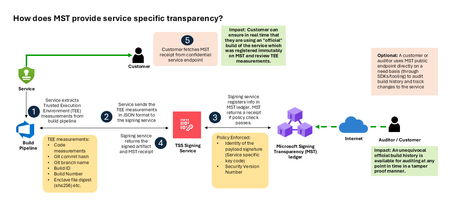
Today, Microsoft announces the general availability of Microsoft’s Signing Transparency (MST) – a first-of-its-kind capability that brings unprecedented visibility and trust to our software supply chain. With this release, Microsoft is leading the industry by recording the build of critical cloud services into a publicly readable and verifiable SCITT standard (Supply Chain Integrity, Transparency, and Trust) compliant blockchain ledger. This means every production software build for in scope services like Azure Attestation and Azure Managed HSM (Hardware Security Module), Azure confidential ledger, Microsoft Signing Transparency itself (and others over time) – is now logged in an immutable, tamper-evident record. Only builds that are in the MST ledger are deployed to production; this gives customers confidence that the supply chain for these critical services can be audited at anytime. Notably, the MST ledger is fully open source and built to align with the emerging IETF SCITT standard. By embracing SCITT’s principles and open protocols, Microsoft ensures that MST not only secures our own ecosystem but also contributes to a broader industry movement toward standardized supply chain transparency. The open-source MST ledger serves as a verifiable trust anchor that any organization or researcher can inspect, audit, or even integrate with their own tooling. MST itself meets the highest levels of transparency, backed by a tamper-proof confidential ledger, open-source, and independently verified. Specifically, we are making the foundation of our trust model transparent and accessible to everyone – reinforcing that trust must be earned through proof, not just promises. This launch marks a major milestone in our commitment to Zero Trust principles, extending “never trust, always verify” all the way into the build itself. Building on a public preview introduced late last year, MST’s general availability delivers verifiable transparency at the software level. It transforms traditional code signing with an additive trust layer that is accessible via an open verification model. Every new software update is accompanied by a publicly auditable proof of integrity, enabling security teams to proactively confirm that each update is authentic and unaltered. To help organizations get the most out of this capability, we are also introducing a free tool to explore the contents – Ledger Explorer – an offline tool that allows security teams to examine MST ledger entries, verify cryptographic proofs, and even validate the ledger’s integrity independently. This tool, combined with MST’s open design, ensures that every Microsoft customer – and the broader community – can hold us accountable in real time for the software we run on their behalf. Key Benefits of Microsoft’s Signing Transparency (MST) Verified Code Integrity – Every software release is cryptographically logged in MST’s ledgers. This makes each build tamper-evident and traceable. If an attacker attempts to inject malicious code or sign an unauthorized update, it will be evident through the well-defined validation step built into the SCITT standard. Organizations gain the assurance that code integrity can be independently confirmed at any time. Independent Verification & Zero Trust – MST enables customers and auditors to verify software authenticity on their own, without having to solely rely on vendor attestations. For each update, Microsoft provides a transparency “receipt” (proof of logging) that you can use to prove the update was officially published and unaltered. This fosters a “don’t just trust, verify” approach, empowering security teams to double-check everything running in their environment aligns with what Microsoft intended. Audit-Trail & Compliance – The transparency ledger creates a permanent, auditable timeline of code deployments. Every entry is a record of what was released and when, backed by cryptographic proofs. This simplifies compliance reporting and accelerates forensic analysis. In the event of an incident, you can quickly audit the ledger to see if any unexpected code was introduced. For highly regulated industries, MST offers concrete evidence of software integrity and policy compliance over time. Leadership & Open Standards – We are delivering real transparency now, encouraging a future where all critical software is released with verifiable integrity. MST’s open source implementation and SCITT-compliant design exemplify our commitment to openness and collaboration. We believe widespread adoption of these standards will strengthen supply chain security for everyone, making trust verification a universal practice. Next Steps Microsoft’s Signing Transparency is more than a new security feature and shapes the advances in trust technology. As threats grow more sophisticated, we must evolve the way we assure our customers about the software they depend on. With MST now generally available, we are leading by example: proving that it is possible to open up the traditionally opaque process of software deployment and turn it into a source of strength and trust, i.e., empowering each person with verifiable transparency. We invite the industry to join us on this journey and get started by reading the documentation and exploring Ledger Explorer today! Together, by embracing transparency and open standards, we can turn “trust but verify” from a slogan into an everyday reality for digital infrastructure.I built a free, open-source M365 security assessment tool - looking for feedback
I work as an IT consultant, and a good chunk of my time is spent assessing Microsoft 365 environments for small and mid-sized businesses. Every engagement started the same way: connect to five different PowerShell modules, run dozens of commands across Entra ID, Exchange Online, Defender, SharePoint, and Teams, manually compare each setting against CIS benchmarks, then spend hours assembling everything into a report the client could actually read. The tools that automate this either cost thousands per year, require standing up Azure infrastructure just to run, or only cover one service area. I wanted something simpler: one command that connects, assesses, and produces a client-ready deliverable. So I built it. What M365 Assess does https://github.com/Daren9m/M365-Assess is a PowerShell-based security assessment tool that runs against a Microsoft 365 tenant and produces a comprehensive set of reports. Here is what you get from a single run: 57 automated security checks aligned to the CIS Microsoft 365 Foundations Benchmark v6.0.1, covering Entra ID, Exchange Online, Defender for Office 365, SharePoint Online, and Teams 12 compliance frameworks mapped simultaneously -- every finding is cross-referenced against NIST 800-53, NIST CSF 2.0, ISO 27001:2022, SOC 2, HIPAA, PCI DSS v4.0.1, CMMC 2.0, CISA SCuBA, and DISA STIG (plus CIS profiles for E3 L1/L2 and E5 L1/L2) 20+ CSV exports covering users, mailboxes, MFA status, admin roles, conditional access policies, mail flow rules, device compliance, and more A self-contained HTML report with an executive summary, severity badges, sortable tables, and a compliance overview dashboard -- no external dependencies, fully base64-encoded, just open it in any browser or email it directly The entire assessment is read-only. It never modifies tenant settings. Only Get-* cmdlets are used. A few things I'm proud of Real-time progress in the console. As the assessment runs, you see each check complete with live status indicators and timing. No staring at a blank terminal wondering if it hung. The HTML report is a single file. Logos, backgrounds, fonts -- everything is embedded. You can email the report as an attachment and it renders perfectly. It supports dark mode (auto-detects system preference), and all tables are sortable by clicking column headers. Compliance framework mapping. This was the feature that took the most work. The compliance overview shows coverage percentages across all 12 frameworks, with drill-down to individual controls. Each finding links back to its CIS control ID and maps to every applicable framework control. Pass/Fail detail tables. Each security check shows the CIS control reference, what was checked, what the expected value is, what the actual value is, and a clear Pass/Fail/Warning status. Findings include remediation descriptions to help prioritize fixes. Quick start If you want to try it out, it takes about 5 minutes to get running: # Install prerequisites (if you don't have them already) Install-Module Microsoft.Graph, ExchangeOnlineManagement -Scope CurrentUser Clone and run git clone https://github.com/Daren9m/M365-Assess.git cd M365-Assess .\Invoke-M365Assessment.ps1 The interactive wizard walks you through selecting assessment sections, entering your tenant ID, and choosing an authentication method (interactive browser login, certificate-based, or pre-existing connections). Results land in a timestamped folder with all CSVs and the HTML report. Requires PowerShell 7.x and runs on Windows (macOS and Linux are experimental -- I would love help testing those platforms). Cloud support M365 Assess works with: Commercial (global) tenants GCC, GCC High, and DoD environments If you work in government cloud, the tool handles the different endpoint URIs automatically. What is next This is actively maintained and I have a roadmap of improvements: More automated checks -- 140 CIS v6.0.1 controls are tracked in the registry, with 57 automated today. Expanding coverage is the top priority. Remediation commands -- PowerShell snippets and portal steps for each finding, so you can fix issues directly from the report. XLSX compliance matrix -- A spreadsheet export for audit teams who need to work in Excel. Standalone report regeneration -- Re-run the report from existing CSV data without re-assessing the tenant. I would love your feedback I have been building this for my own consulting work, but I think it could be useful to the broader community. If you try it, I would genuinely appreciate hearing: What checks should I prioritize next? Which security controls matter most in your environment? What compliance frameworks are most requested by your clients or auditors? How does the report land with non-technical stakeholders? Is the executive summary useful, or does it need work? macOS/Linux users -- does it run? What breaks? I have tested it on macOS, but not extensively. Bug reports, feature requests, and contributions are all welcome on GitHub. Repository: https://github.com/Daren9m/M365-Assess License: MIT (free for commercial and personal use) Runtime: PowerShell 7.x Thanks for reading. Happy to answer any questions in the comments.2.5KViews2likes2Comments
Verified - still no hardware developer program access
It took eight weeks under ticket 2604250040000011 to be verified. Now that I am verified, I do not have any developer program access or roles to assign. I have raised a new ticket 2606160040010562. JillArmour is there a way to make this actually get resolved please? It's great that I am finally verified, but the intention of the original request was to be able to use the program. I feel they have not understood and have closed the request. ThanksOffice 365 Mailbox Export to PST - Third Party Tools: What’s Your Experience?
Exporting Office 365 mailboxes to PST is still a common requirement in many Microsoft 365 environments, especially for backup, compliance, and migration scenarios. While Microsoft offers native options like Purview eDiscovery and Outlook export, many administrators also consider third-party tools when dealing with large mailboxes or bulk export requirements. In real-world scenarios, factors like speed, ease of use, permission handling, and consistency of exported data often influence the choice of tool. Some teams prefer native methods for compliance control, while others explore third-party solutions to simplify large-scale or repeated export tasks. For those working with Microsoft 365, what has your experience been with third-party PST export tools? Have they helped in your environment, or do you still rely mainly on Microsoft’s native options?152Views1like3CommentsAutomating Daily MDE Compliance Monitoring Across Azure VMs
The Problem We’re Solving Most security teams have no automated way to know when a VM silently falls out of MDE coverage, whether because the agent stopped, the VM was newly provisioned without onboarding, or the device stopped reporting. This Logic App closes that gap and puts the right information in front of the right people every day. Disclaimer: This solution is designed for Azure Virtual Machines only. For non-Azure VMs onboarded to Microsoft Defender for Endpoint through Azure Arc, a separate companion blog will be published soon to cover that scenario. What changes once you deploy this Challenge Without This Logic App How This Logic App Helps Security gaps go undetected for days or weeks Any VM that is not onboarded or has stopped reporting is caught within 24 hours of the daily run No automated owner notification The VM's ServerOwner tag is read automatically, and the owner is emailed directly with full compliance details VMs with no owner fall through the cracks Flagged explicitly in the IT summary report with instructions for how to assign the tag Manual compliance reporting is time-consuming Full CSV report auto-attached to every daily IT summary; no manual extraction needed Agents silently stop reporting after onboarding Detects "Onboarded, Not Reporting" as a distinct status, separate from "Not Onboarded" Large multi-subscription environments are hard to cover Paginated queries across all enabled subscriptions; every running VM is checked Compliance States Detected Compliance Status Priority What It Means Not Onboarded P2, High The VM is running in Azure but has never appeared in MDE. There is zero security telemetry for this machine. Onboarded, Not Reporting P3, Medium The VM was previously enrolled but has not checked in within the configured window. The MDE agent may be stopped or the VM may have lost network connectivity to MDE. Compliant No alert VM is onboarded and checked in within the required time window. It is excluded from all notifications. Running VMs Only: This workflow queries Azure Resource Graph with a filter of powerState == "VM running". Deallocated, stopped, and powered-off VMs are intentionally excluded — they are not expected to report to MDE while offline. Only machines that are turned on are evaluated. Workflow Architecture The workflow runs as a sequential daily pipeline. All Azure VM data and MDE device data are collected into memory first, then each VM is evaluated in a single For Each loop. Execution Pipeline Recurrence trigger fires daily at 08:00 IST. CONFIG compose action reads MDE_LASTSEEN_HOURS (default 24). This defines the compliance window: how recently a VM must have reported to MDE to be considered Compliant. Init-varITTeamEmail and Init-varSenderEmail load the configurable email addresses used for sending and receiving notifications. Get-AllSubscriptions calls the Azure Management API to discover all subscriptions in the tenant. ForEach-Subscription runs a paginated Azure Resource Graph query per enabled subscription, collecting all running VMs along with Private IP, OS Type, Location, ServerOwner tag, and VM UUID. Init-MDEVariables then Paginate-MDEDevices call the MDE Security Center API in pages of 10,000 to load every enrolled device into the AllMDEDevices array. ForEach-AzureVM looks each Azure VM up in AllMDEDevices and determines compliance status and priority. Non-compliant handling builds HTML and CSV rows. If the VM has a ServerOwner tag, a compliance alert email goes to the owner with the IT Team CC'd. If there's no owner, the VM is appended to NoOwnerList. IT Summary email is sent once all VMs are processed. If any non-compliant VMs were found, the consolidated IT report is sent with the CSV attachment. Otherwise an All Clear email is sent. How Azure VM Data is Matched to MDE Data Each Azure VM is matched against the MDE device list using a two-level strategy. Both checks run for every VM on every run. Match Method How It Works Primary: Azure VM ID Compares azureVmId from the MDE device record (lowercase) against the VmId captured from Azure Resource Graph (lowercase). Immune to hostname changes; this is the preferred match. Fallback: Hostname + IP Checks that MDE computerDnsName starts with the Azure VM name (case-insensitive) AND lastIpAddress matches the Azure Private IP. Both conditions must be true. Not Found A synthetic MDE record with onboardingStatus: "NotFound" is created. The VM is treated as Not Onboarded and a P2 High alert is raised. Pagination Design The workflow handles large environments through two independent pagination mechanisms that run before any compliance evaluation begins. Data Source Page Size Mechanism Azure Resource Graph 1,000 VMs per page Uses $skipToken from the response. The Until loop re-queries with the token until no token is returned (last page). Variables VMSkipToken and VMFetchComplete manage loop state per subscription. Supports up to 50,000 VMs (50 pages). MDE Security Center API 10,000 devices per page Uses the $skip offset parameter. MDESkip is incremented by 10,000 each iteration. The loop stops when a page returns fewer than 10,000 records. Supports up to 500,000 MDE devices (50 pages × 10,000). Prerequisites Azure Resources Resource Requirement Notes Azure Logic App Standard plan, Stateful workflow Consumption plan also supported Managed Identity System-assigned on the Logic App Enable under Logic App > Identity Sender mailbox (varSenderEmail) Licensed Microsoft 365 account Emails are sent FROM this address IT Team email (varITTeamEmail) Valid email address or distribution list Receives all reports; CC'd on owner alerts Azure VMs Running, with ServerOwner tag (recommended) Tag value must be a valid email address MDE licensing Microsoft Defender for Endpoint P1 or P2 Tenant must be enrolled in MDE The ServerOwner Tag Server owner notifications rely on a VM-level Azure tag. Without it, the VM is included in the IT summary, but no individual alert is sent to an owner. Tag Name Expected Value Effect ServerOwner Valid email, e.g. john@yourcompany.com Compliance alert sent TO this address; IT Team CC'd If the tag is missing or empty, the VM is flagged in the Action Required: No Owner Tag Found section of the IT summary email, with step-by-step instructions for tagging it in the Azure Portal. Required Permissions & Why The Logic App's Managed Identity must be granted three API permissions. These are Application permissions that cannot be assigned through the Azure Portal UI, so the PowerShell script in Section 4.3 must be used. Admin consent is required. Permission Summary Permission API / Service AppId Why It Is Required user_impersonation Azure Management 797f4846-ba00-4fd7-ba43-dac1f8f63013 Allows the Managed Identity to call the Azure Resource Graph API to query VM inventory across all subscriptions. Without this, the workflow cannot discover VMs. WindowsDefenderATP.Read.All MDE Security Center fc780465-2017-40d4-a0c5-307022471b92 Allows reading all device records from the MDE API (/api/machines). This returns onboarding status, last seen time, and health status — the core compliance data. Mail.Send Microsoft Graph 00000003-0000-0000-c000-000000000000 Allows sending emails via the Graph /sendMail endpoint on behalf of the varSenderEmail mailbox. Without this, no alerts or reports can be sent. Important: The Azure Management and MDE permissions belong to separate service principals — they are NOT part of Microsoft Graph. Each permission must be assigned to its own service principal using the AppId shown above. The script in Section 4.2 handles this correctly. Where to find the required values Parameter Where to find it in Azure Portal $tenantID Azure Portal > Microsoft Entra ID > Overview > Tenant ID $managedIdentityObjectId Logic App > Settings > Identity > System assigned tab > Object (principal) ID Permission Assignment Script Run this in Azure Cloud Shell or any terminal with the Microsoft.Graph PowerShell module installed. Update $tenantID and $managedIdentityObjectId before running. # PowerShell # ── Update these two values before running ─────────────────────────── $tenantID = "<tenantID>" # Your Tenant ID $managedIdentityObjectId = "<objectID>" # MI Object ID # Install Microsoft.Graph if not already present if (!(Get-Module -ListAvailable -Name Microsoft.Graph)) { Install-Module -Name Microsoft.Graph -Scope CurrentUser -Force } # Connect to Microsoft Graph Connect-MgGraph -TenantId $tenantID ` -Scopes "AppRoleAssignment.ReadWrite.All","Application.Read.All" # MDE Compliance Logic App needs 3 permissions across 3 different service principals $permissions = @( @{ Permission="user_impersonation"; AppId="797f4846-ba00-4fd7-ba43-dac1f8f63013" }, @{ Permission="WindowsDefenderATP.Read.All"; AppId="fc780465-2017-40d4-a0c5-307022471b92" }, @{ Permission="Mail.Send"; AppId="00000003-0000-0000-c000-000000000000" } ) foreach ($entry in $permissions) { $sp = Get-MgServicePrincipal -Filter "AppId eq '$($entry.AppId)'" $appRole = $sp.AppRoles | Where-Object { $_.Value -eq $entry.Permission } if ($appRole -ne $null) { New-MgServicePrincipalAppRoleAssignment ` -ServicePrincipalId $sp.Id ` -PrincipalId $managedIdentityObjectId ` -ResourceId $sp.Id ` -AppRoleId $appRole.Id Write-Host "Assigned: $($entry.Permission)" -ForegroundColor Green } else { Write-Host "Not found: $($entry.Permission)" -ForegroundColor Yellow } } Write-Host "All permissions assigned." -ForegroundColor Green Verify Permissions Assigned # PowerShell # Run after the assignment script to verify all 3 permissions are present Get-MgServicePrincipalAppRoleAssignment ` -ServicePrincipalId $managedIdentityObjectId | Select-Object AppRoleId, PrincipalDisplayName | Format-Table -AutoSize Note: You should see three assignment rows in the output — one for each permission. If any are missing, re-run the assignment script. An error saying the assignment already exists is normal and can be safely ignored. Creating the Logic App Create the resource Azure Portal > search Logic Apps > + Create. Select your Subscription and Resource Group. Logic App name: la-mde-compliance-monitor. Plan type: Standard > Windows > select or create a Hosting Plan > Review + Create > Create. Once deployed, click Go to resource. Enable System-assigned Managed Identity Open the Logic App > left menu: Settings > Identity. On the System assigned tab, toggle Status to On. Click Save > Yes on the confirmation dialog. The Object (principal) ID appears. Copy this value for the PowerShell script. Run the Permissions Assignment script to assign all three permissions to this identity. Why Managed Identity: A System-assigned Managed Identity is automatically scoped to this Logic App and deleted when the Logic App is deleted. It authenticates to Azure Management API, MDE API, and Microsoft Graph without any stored passwords or client secrets. Create the workflow and import the JSON Logic App > left menu: Workflows > + Add. Workflow name: MDEComplianceMonitor. State type: Stateful. Click Create. Click the workflow name > left menu: Code. Press Ctrl + A > Delete to clear the editor completely. Paste the complete workflow JSON from the companion file (see Appendix A). Click Save. It should succeed with no validation errors. Important: Always use Stateful. Stateless workflows do not support run history, have a 5-minute timeout, and do not retain intermediate state — all of which are required by this workflow's pagination loops. Configuration: What You Can Change After importing the JSON, update only the values described below. Everything else runs automatically. Email Address Variables Variable Description Where to Update varITTeamEmail The IT Team email address. All IT Summary reports are sent TO this address. All per-VM owner emails CC this address. 3000 varSenderEmail The Microsoft 365 licensed account that emails are sent FROM via Graph API. Must have Mail.Send permission granted to the Managed Identity. 3000 Compliance look-up window: MDE_LASTSEEN_HOURS This setting in the CONFIG compose action defines how recently a VM must have reported to MDE to count as Compliant. Default is 24 hours. Value Behaviour 24 (default) Compliant if the VM checked in with MDE within the last 24 hours. Recommended starting point. 12 Stricter check; suitable for high-security environments requiring near-real-time coverage. 48 More relaxed; suitable for environments with scheduled maintenance windows or intermittent connectivity. Running VMs Only The Azure Resource Graph query includes a filter for powerState == "VM running". This means: Deallocated VMs are excluded (not expected to report to MDE while offline). Stopped (allocated) VMs are excluded. Newly started VMs are included and checked on the next daily run. To Change the Filter: To change the power state filter, locate the "query" string inside the Build-VMQuery-Paged action and modify the | where powerState == clause. For example, removing the filter entirely will check all VMs regardless of state. Sample Email Notifications The screenshots below show actual emails generated by this workflow. All sensitive data (email addresses, VM names, subscription IDs, IP addresses) has been redacted. Per-VM owner alert Sent to the server owner (ServerOwner tag) when their VM is non-compliant. The IT Team is CC'd. The email contains full server details, compliance status, priority, last MDE check-in time, and resolution SLA. Note: If no ServerOwner tag is set the VM is skipped here and included in the "No Owner Tag Found" section of the IT summary instead. IT Team Daily Summary Report Sent once per day to the IT Team after all owner emails are dispatched. Shows up to 20 VMs inline with a full CSV attachment containing the complete list, plus a dedicated section for VMs with no owner tag. Note: The CSV attachment always contains the complete list of all non-compliant VMs regardless of count. The inline HTML table is limited to 20 rows to keep the email size manageable. All Compliant VMs: If all VMs are compliant, you’ll see email like this: Post-Deployment Checklist Before you leave the workflow running unattended, walk through this checklist once. # Item 1 Logic App resource created (Standard plan, Stateful workflow) 2 System-assigned Managed Identity enabled; Object ID copied 3 PowerShell script run; user_impersonation, WindowsDefenderATP.Read.All, and Mail.Send assigned 4 Permissions verified using Get-MgServicePrincipalAppRoleAssignment (3 rows expected) 5 Workflow JSON pasted into Code view; saved without validation errors 6 varITTeamEmail updated to your IT security team or distribution list address 7 varSenderEmail updated to a licensed Microsoft 365 mailbox 8 MDE_LASTSEEN_HOURS reviewed (default 24, adjust if needed) 9 At least one Azure VM has the ServerOwner tag set with a valid email 10 Manual run triggered: Logic App > Overview > Run Trigger > Run 11 Run history shows Succeeded; no 401 or 403 errors on any HTTP action 12 IT Team received the daily summary email with CSV attachment 13 Server owner received a per-VM alert with the IT Team CC'd 14 Recurrence trigger confirmed running daily at 08:00 IST Wrapping Up What I love about this is how much it accomplishes with so little: a Logic App, a Managed Identity, and three permissions. No connectors, no secrets to rotate, no third-party services. Yet every morning, your security team starts the day knowing exactly which VMs are out of MDE coverage and which owners have already been notified. If you adopt this pattern, here are a few natural next steps to consider: Hook into Microsoft Sentinel by writing non-compliant VMs to a custom table for trend analysis. Auto-create ServiceNow or Jira tickets for VMs that remain non-compliant for more than 48 hours. Extend the match logic to include Arc-enabled servers, not just Azure VMs. Add a Teams adaptive card notification alongside email for faster response. I'd love to hear how you're solving MDE coverage gaps in your environment. Appendix A: Workflow JSON The complete Logic App workflow definition is provided below. To import it: open the Logic App in Azure Portal, navigate to the workflow, click Code view, press Ctrl + A to clear the existing content, paste the entire JSON, then click Save. { "definition": { "$schema": "https://schema.management.azure.com/providers/Microsoft.Logic/schemas/2016-06-01/workflowdefinition.json#", "contentVersion": "1.0.0.0", "triggers": { "Recurrence": { "recurrence": { "frequency": "Day", "interval": 1, "schedule": { "hours": [ "8" ], "minutes": [ 0 ] }, "timeZone": "India Standard Time" }, "evaluatedRecurrence": { "frequency": "Day", "interval": 1, "schedule": { "hours": [ "8" ], "minutes": [ 0 ] }, "timeZone": "India Standard Time" }, "type": "Recurrence" } }, "actions": { "CONFIG": { "runAfter": {}, "type": "Compose", "inputs": { "MDE_LASTSEEN_HOURS": 24 } }, "Set-ExcludedSubscriptions": { "runAfter": { "CONFIG": [ "Succeeded" ] }, "type": "Compose", "inputs": [] }, "Init-varITTeamEmail": { "runAfter": { "Set-ExcludedSubscriptions": [ "Succeeded" ] }, "type": "InitializeVariable", "inputs": { "variables": [ { "name": "varITTeamEmail", "type": "string", "value": "admin@contoso.onmicrosoft.com" } ] } }, "Init-varSenderEmail": { "runAfter": { "Init-varITTeamEmail": [ "Succeeded" ] }, "type": "InitializeVariable", "inputs": { "variables": [ { "name": "varSenderEmail", "type": "string", "value": "admin@contoso.onmicrosoft.com" } ] } }, "Get-AllSubscriptions": { "runAfter": { "Init-varSenderEmail": [ "Succeeded" ] }, "type": "Http", "inputs": { "uri": "https://management.azure.com/subscriptions?api-version=2022-12-01", "method": "GET", "headers": { "Content-Type": "application/json" }, "authentication": { "type": "ManagedServiceIdentity", "audience": "https://management.azure.com" }, "retryPolicy": { "type": "fixed", "count": 3, "interval": "PT60S" } } }, "Parse-AllSubscriptions": { "runAfter": { "Get-AllSubscriptions": [ "Succeeded" ] }, "type": "ParseJson", "inputs": { "content": "@body('Get-AllSubscriptions')", "schema": { "type": "object", "properties": { "value": { "type": "array", "items": { "type": "object", "properties": { "subscriptionId": { "type": "string" }, "displayName": { "type": "string" }, "state": { "type": "string" } } } } } } } }, "Init-AllVMs": { "runAfter": { "Parse-AllSubscriptions": [ "Succeeded" ] }, "type": "InitializeVariable", "inputs": { "variables": [ { "name": "AllVMs", "type": "array", "value": [] }, { "name": "VMSkipToken", "type": "string", "value": "INIT" }, { "name": "VMFetchComplete", "type": "boolean", "value": false } ] } }, "ForEach-Subscription": { "foreach": "@body('Parse-AllSubscriptions')?['value']", "actions": { "Check-SubscriptionEnabled": { "actions": { "Reset-VMSkipToken": { "type": "SetVariable", "inputs": { "name": "VMSkipToken", "value": "INIT" } }, "Reset-VMFetchComplete": { "runAfter": { "Reset-VMSkipToken": [ "Succeeded" ] }, "type": "SetVariable", "inputs": { "name": "VMFetchComplete", "value": false } }, "Until": { "actions": { "Build-VMQuery-Paged": { "type": "Compose", "inputs": { "subscriptions": [ "@{items('ForEach-Subscription')?['subscriptionId']}" ], "query": "Resources | where type == 'microsoft.compute/virtualmachines' | extend VMName = tostring(name), ResourceGroup = tostring(resourceGroup), Location = tostring(location), OSType = tostring(properties.storageProfile.osDisk.osType), VMSize = tostring(properties.hardwareProfile.vmSize), ServerOwner = tostring(tags.ServerOwner), Environment = tostring(tags.Environment), SubscriptionId = tostring(subscriptionId), nicId = tolower(tostring(properties.networkProfile.networkInterfaces[0].id)), VmId = tolower(tostring(properties.vmId)) | join kind=leftouter (Resources | where type == 'microsoft.network/networkinterfaces' | extend privateIP = tostring(properties.ipConfigurations[0].properties.privateIPAddress) | project nicId = tolower(id), privateIP) on nicId | join kind=leftouter (Resources | where type == 'microsoft.compute/virtualmachines' | extend powerState = tostring(properties.extended.instanceView.powerState.displayStatus) | project id, powerState) on id | where powerState == 'VM running' | project VMName, ResourceGroup, Location, OSType, VMSize, ServerOwner, Environment = 'Azure', SubscriptionId, PrivateIP = privateIP, VmId, CloudEnvironment = 'Azure'", "options": { "$skipToken": "@if(equals(variables('VMSkipToken'), 'INIT'), '', variables('VMSkipToken'))" }, "$top": 1000 } }, "Get-VMs-Paged": { "runAfter": { "Build-VMQuery-Paged": [ "Succeeded" ] }, "type": "Http", "inputs": { "uri": "https://management.azure.com/providers/Microsoft.ResourceGraph/resources?api-version=2021-03-01", "method": "POST", "headers": { "Content-Type": "application/json" }, "body": "@outputs('Build-VMQuery-Paged')", "authentication": { "type": "ManagedServiceIdentity", "audience": "https://management.azure.com" } }, "runtimeConfiguration": { "contentTransfer": { "transferMode": "Chunked" } } }, "ForEach-VM-Result-Paged": { "foreach": "@body('Get-VMs-Paged')?['data']", "actions": { "Append-SingleVM-Paged": { "type": "AppendToArrayVariable", "inputs": { "name": "AllVMs", "value": "@items('ForEach-VM-Result-Paged')" } } }, "runAfter": { "Get-VMs-Paged": [ "Succeeded" ] }, "type": "Foreach" }, "Check-VMSkipToken": { "actions": { "Set-VMFetchComplete": { "type": "SetVariable", "inputs": { "name": "VMFetchComplete", "value": true } } }, "runAfter": { "ForEach-VM-Result-Paged": [ "Succeeded" ] }, "else": { "actions": { "Set-VMSkipToken": { "type": "SetVariable", "inputs": { "name": "VMSkipToken", "value": "@body('Get-VMs-Paged')?['$skipToken']" } } } }, "expression": { "or": [ { "equals": [ "@string(body('Get-VMs-Paged')?['$skipToken'])", "" ] } ] }, "type": "If" } }, "runAfter": { "Reset-VMFetchComplete": [ "Succeeded" ] }, "expression": "@equals(variables('VMFetchComplete'), true)", "limit": { "count": 50, "timeout": "PT1H" }, "type": "Until" } }, "else": { "actions": {} }, "expression": { "and": [ { "equals": [ "@items('ForEach-Subscription')?['state']", "Enabled" ] } ] }, "type": "If" } }, "runAfter": { "Init-AllVMs": [ "Succeeded" ] }, "type": "Foreach" }, "Init-MDEVariables": { "runAfter": { "ForEach-Subscription": [ "Succeeded" ] }, "type": "InitializeVariable", "inputs": { "variables": [ { "name": "AllMDEDevices", "type": "array" }, { "name": "MDESkip", "type": "integer", "value": 0 }, { "name": "MDEFetchComplete", "type": "boolean", "value": false } ] } }, "Paginate-MDEDevices": { "actions": { "Get-MDEDevices-Page": { "type": "Http", "inputs": { "uri": "https://api.securitycenter.microsoft.com/api/machines?$select=computerDnsName,id,osPlatform,lastSeen,onboardingStatus,healthStatus,lastIpAddress&$top=10000&$skip=@{variables('MDESkip')}", "method": "GET", "headers": { "Content-Type": "application/json" }, "authentication": { "type": "ManagedServiceIdentity", "audience": "https://api.securitycenter.microsoft.com" }, "retryPolicy": { "type": "fixed", "count": 3, "interval": "PT60S" } }, "runtimeConfiguration": { "contentTransfer": { "transferMode": "Chunked" } } }, "Parse-MDEPage": { "runAfter": { "Get-MDEDevices-Page": [ "Succeeded" ] }, "type": "ParseJson", "inputs": { "content": "@body('Get-MDEDevices-Page')", "schema": { "type": "object", "properties": { "value": { "type": "array", "items": { "type": "object", "properties": { "computerDnsName": { "type": [ "string", "null" ] }, "id": { "type": [ "string", "null" ] }, "osPlatform": { "type": [ "string", "null" ] }, "lastSeen": { "type": [ "string", "null" ] }, "onboardingStatus": { "type": [ "string", "null" ] }, "healthStatus": { "type": [ "string", "null" ] }, "lastIpAddress": { "type": [ "string", "null" ] }, "azureVmId": { "type": [ "string", "null" ] } } } } } } } }, "Append-MDEPage-ToArray": { "foreach": "@body('Parse-MDEPage')?['value']", "actions": { "Append-SingleMDEDevice": { "type": "AppendToArrayVariable", "inputs": { "name": "AllMDEDevices", "value": "@items('Append-MDEPage-ToArray')" } } }, "runAfter": { "Parse-MDEPage": [ "Succeeded" ] }, "type": "Foreach" }, "Check-PageSize": { "actions": { "Set-FetchComplete-True": { "type": "SetVariable", "inputs": { "name": "MDEFetchComplete", "value": true } } }, "runAfter": { "Append-MDEPage-ToArray": [ "Succeeded" ] }, "else": { "actions": { "Increment-MDESkip": { "type": "IncrementVariable", "inputs": { "name": "MDESkip", "value": 10000 } } } }, "expression": { "and": [ { "less": [ "@length(body('Parse-MDEPage')?['value'])", 10000 ] } ] }, "type": "If" } }, "runAfter": { "Init-MDEVariables": [ "Succeeded" ] }, "expression": "@equals(variables('MDEFetchComplete'), true)", "limit": { "count": 50, "timeout": "PT1H" }, "type": "Until" }, "Init-Variables": { "runAfter": { "Paginate-MDEDevices": [ "Succeeded" ] }, "type": "InitializeVariable", "inputs": { "variables": [ { "name": "EmailsSent", "type": "array", "value": [] }, { "name": "NoOwnerList", "type": "array", "value": [] }, { "name": "NonCompliantList", "type": "array", "value": [] }, { "name": "SummaryStats", "type": "object", "value": { "TotalNonCompliant": 0, "P1Critical": 0, "P2High": 0, "P3Medium": 0, "P4Low": 0, "EmailsSent": 0, "NoOwnerFound": 0 } }, { "name": "HTMLRows", "type": "string" }, { "name": "NonCompliantCount", "type": "integer", "value": 0 }, { "name": "CSVRows", "type": "string", "value": "@{concat('\"VM Name\",\"Private IP\",\"OS Type\",\"Location\",\"Server Owner\",\"MDE Status\",\"Last Seen\",\"Priority\",\"Action Taken\",\"Subscription ID\"', decodeUriComponent('%0A'))}" }, { "name": "HTMLRowCount", "type": "integer", "value": 0 } ] } }, "ForEach-AzureVM": { "foreach": "@variables('AllVMs')", "actions": { "Find-VMInMDE-Filter": { "type": "Query", "inputs": { "from": "@variables('AllMDEDevices')", "where": "@or(and(not(equals(item()?['azureVmId'], null)), not(equals(item()?['azureVmId'], '')), equals(toLower(item()?['azureVmId']), toLower(items('ForEach-AzureVM')?['VmId']))), and(or(equals(item()?['azureVmId'], null), equals(item()?['azureVmId'], '')), startsWith(toLower(item()?['computerDnsName']), toLower(items('ForEach-AzureVM')?['VMName'])), equals(item()?['lastIpAddress'], items('ForEach-AzureVM')?['PrivateIP'])))" } }, "Find-VMInMDE": { "runAfter": { "Find-VMInMDE-Filter": [ "Succeeded" ] }, "type": "Compose", "inputs": "@if(greater(length(body('Find-VMInMDE-Filter')), 0), first(body('Find-VMInMDE-Filter')), json('{\"computerDnsName\":\"NOT_FOUND\",\"onboardingStatus\":\"NotFound\",\"lastSeen\":\"1900-01-01T00:00:00Z\",\"lastIpAddress\":\"N/A\",\"healthStatus\":\"Unknown\"}'))" }, "Get-ComplianceStatus": { "runAfter": { "Find-VMInMDE": [ "Succeeded" ] }, "type": "Compose", "inputs": "@if(equals(outputs('Find-VMInMDE')?['computerDnsName'], 'NOT_FOUND'), 'Not Onboarded', if(equals(outputs('Find-VMInMDE')?['onboardingStatus'], 'Onboarded'), if(greater(outputs('Find-VMInMDE')?['lastSeen'], addHours(utcNow(), mul(-1, outputs('CONFIG')?['MDE_LASTSEEN_HOURS']))), 'Compliant', 'Onboarded - Not Reporting'), 'Not Onboarded'))" }, "Get-Priority": { "runAfter": { "Get-ComplianceStatus": [ "Succeeded" ] }, "type": "Compose", "inputs": "@if(equals(outputs('Get-ComplianceStatus'), 'Not Onboarded'), 'P2 - High', if(equals(outputs('Get-ComplianceStatus'), 'Onboarded - Not Reporting'), 'P3 - Medium', if(equals(outputs('Get-ComplianceStatus'), 'Compliant'), 'Compliant', 'P4 - Low')))" }, "Is-NonCompliant": { "actions": { "Append-CSVRows": { "type": "AppendToStringVariable", "inputs": { "name": "CSVRows", "value": "\"@{items('ForEach-AzureVM')?['VMName']}\",\"@{if(equals(items('ForEach-AzureVM')?['PrivateIP'], ''), 'N/A', items('ForEach-AzureVM')?['PrivateIP'])}\",\"@{items('ForEach-AzureVM')?['OSType']}\",\"@{items('ForEach-AzureVM')?['Location']}\",\"@{if(equals(items('ForEach-AzureVM')?['ServerOwner'], ''), 'No Owner Tag', items('ForEach-AzureVM')?['ServerOwner'])}\",\"@{outputs('Get-ComplianceStatus')}\",\"@{if(equals(outputs('Find-VMInMDE')?['onboardingStatus'], 'Onboarded'), if(equals(outputs('Find-VMInMDE')?['lastSeen'], '1900-01-01T00:00:00Z'), 'Never', concat(convertTimeZone(outputs('Find-VMInMDE')?['lastSeen'], 'UTC', 'India Standard Time', 'dd-MM-yyyy HH:mm:ss'), ' (', string(div(sub(ticks(utcNow()), ticks(outputs('Find-VMInMDE')?['lastSeen'])), 864000000000)), ' days ago)')), concat(outputs('Find-VMInMDE')?['onboardingStatus'], ' - Last Seen: ', convertTimeZone(outputs('Find-VMInMDE')?['lastSeen'], 'UTC', 'India Standard Time', 'dd-MM-yyyy HH:mm:ss')))}\",\"@{outputs('Get-Priority')}\",\"@{if(equals(items('ForEach-AzureVM')?['ServerOwner'], ''), 'IT Team Notified', 'Email sent to Server Owner')}\",\"@{items('ForEach-AzureVM')?['SubscriptionId']}\"@{decodeUriComponent('%0A')}" } }, "Check-HTMLRowCount": { "actions": { "Append-HTMLRows": { "type": "AppendToStringVariable", "inputs": { "name": "HTMLRows", "value": "<tr><td style=\"padding:8px 10px;border:1px solid #ddd;font-weight:600;\">@{items('ForEach-AzureVM')?['VMName']}</td><td style=\"padding:8px 10px;border:1px solid #ddd;word-wrap:break-word;\">@{if(equals(items('ForEach-AzureVM')?['PrivateIP'], ''), 'N/A', items('ForEach-AzureVM')?['PrivateIP'])}</td><td style=\"padding:8px 10px;border:1px solid #ddd;word-wrap:break-word;\">@{items('ForEach-AzureVM')?['OSType']}</td><td style=\"padding:8px 10px;border:1px solid #ddd;word-wrap:break-word;\">@{items('ForEach-AzureVM')?['Location']}</td><td style=\"padding:8px 10px;border:1px solid #ddd;word-wrap:break-word;\">@{if(equals(items('ForEach-AzureVM')?['ServerOwner'], ''), 'No Owner Tag', items('ForEach-AzureVM')?['ServerOwner'])}</td><td style=\"padding:8px 10px;border:1px solid #ddd;color:#c80000;\">@{outputs('Get-ComplianceStatus')}</td><td style=\"padding:8px 10px;border:1px solid #ddd;word-wrap:break-word;\">@{if(equals(outputs('Find-VMInMDE')?['onboardingStatus'], 'Onboarded'), if(equals(outputs('Find-VMInMDE')?['lastSeen'], '1900-01-01T00:00:00Z'), 'Never', concat(convertTimeZone(outputs('Find-VMInMDE')?['lastSeen'], 'UTC', 'India Standard Time', 'dd-MM-yyyy HH:mm:ss'), ' (', string(div(sub(ticks(utcNow()), ticks(outputs('Find-VMInMDE')?['lastSeen'])), 864000000000)), ' days ago)')), concat(outputs('Find-VMInMDE')?['onboardingStatus'], ' - Last Seen: ', convertTimeZone(outputs('Find-VMInMDE')?['lastSeen'], 'UTC', 'India Standard Time', 'dd-MM-yyyy HH:mm:ss')))}</td><td style=\"padding:8px 10px;border:1px solid #ddd;word-wrap:break-word;\">@{outputs('Get-Priority')}</td><td style=\"padding:8px 10px;border:1px solid #ddd;word-wrap:break-word;\">@{if(equals(items('ForEach-AzureVM')?['ServerOwner'], ''), 'IT Team Notified', 'Email sent to Server Owner')}</td><td style=\"padding:8px 10px;border:1px solid #ddd;word-break:break-all;\">@{items('ForEach-AzureVM')?['SubscriptionId']}</td></tr>" } }, "Increment-HTMLRowCount": { "runAfter": { "Append-HTMLRows": [ "Succeeded" ] }, "type": "IncrementVariable", "inputs": { "name": "HTMLRowCount", "value": 1 } } }, "runAfter": { "Append-CSVRows": [ "Succeeded" ] }, "else": { "actions": {} }, "expression": { "and": [ { "less": [ "@variables('HTMLRowCount')", 20 ] } ] }, "type": "If" }, "Increment-NonCompliantCount": { "runAfter": { "Check-HTMLRowCount": [ "Succeeded" ] }, "type": "IncrementVariable", "inputs": { "name": "NonCompliantCount", "value": 1 } }, "Check-ServerOwner": { "actions": { "Send-OwnerEmail": { "type": "Http", "inputs": { "uri": "@{concat('https://graph.microsoft.com/v1.0/users/', encodeURIComponent(variables('varSenderEmail')), '/sendMail')}", "method": "POST", "headers": { "Content-Type": "application/json" }, "body": { "message": { "subject": "[@{outputs('Get-Priority')}] MDE Compliance Alert - @{items('ForEach-AzureVM')?['VMName']}", "body": { "contentType": "HTML", "content": "<html><body style=\"font-family:Segoe UI,Arial,sans-serif;color:#1a1a1a;\"><div style=\"max-width:680px;margin:24px auto;border:1px solid #e0e0e0;border-radius:8px;overflow:hidden;\"><div style=\"background:#c80000;padding:20px 28px;\"><h2 style=\"color:#fff;margin:0;\">MDE Compliance Alert</h2><p style=\"color:#ffcccc;margin:6px 0 0;font-size:13px;\">Priority: @{outputs('Get-Priority')}</p></div><div style=\"padding:28px;\"><p style=\"margin-top:0;font-size:14px;\">Your server <strong>@{items('ForEach-AzureVM')?['VMName']}</strong> has a Microsoft Defender for Endpoint compliance issue requiring immediate attention.</p><table style=\"width:100%;border-collapse:collapse;font-size:14px;\"><thead><tr style=\"background:#f5f5f5;\"><th style=\"text-align:left;padding:10px 14px;border:1px solid #ddd;width:38%;\">Field</th><th style=\"text-align:left;padding:10px 14px;border:1px solid #ddd;word-wrap:break-word;\">Value</th></tr></thead><tbody><tr><td style=\"padding:9px 14px;border:1px solid #ddd;font-weight:600;\">Server Name</td><td style=\"padding:9px 14px;border:1px solid #ddd;word-wrap:break-word;\">@{items('ForEach-AzureVM')?['VMName']}</td></tr><tr style=\"background:#fafafa;\"><td style=\"padding:9px 14px;border:1px solid #ddd;font-weight:600;\">Private IP</td><td style=\"padding:9px 14px;border:1px solid #ddd;word-wrap:break-word;\">@{if(equals(items('ForEach-AzureVM')?['PrivateIP'], ''), 'N/A', items('ForEach-AzureVM')?['PrivateIP'])}</td></tr><tr><td style=\"padding:9px 14px;border:1px solid #ddd;font-weight:600;\">OS Type</td><td style=\"padding:9px 14px;border:1px solid #ddd;word-wrap:break-word;\">@{items('ForEach-AzureVM')?['OSType']}</td></tr><tr style=\"background:#fafafa;\"><td style=\"padding:9px 14px;border:1px solid #ddd;font-weight:600;\">Location</td><td style=\"padding:9px 14px;border:1px solid #ddd;word-wrap:break-word;\">@{items('ForEach-AzureVM')?['Location']}</td></tr><tr><td style=\"padding:9px 14px;border:1px solid #ddd;font-weight:600;\">Compliance Status</td><td style=\"padding:9px 14px;border:1px solid #ddd;color:#c80000;font-weight:700;\">@{outputs('Get-ComplianceStatus')}</td></tr><tr style=\"background:#fafafa;\"><td style=\"padding:9px 14px;border:1px solid #ddd;font-weight:600;\">Priority</td><td style=\"padding:9px 14px;border:1px solid #ddd;font-weight:700;\">@{outputs('Get-Priority')}</td></tr><tr><td style=\"padding:9px 14px;border:1px solid #ddd;font-weight:600;\">MDE Onboarding Status</td><td style=\"padding:9px 14px;border:1px solid #ddd;word-wrap:break-word;\">@{outputs('Find-VMInMDE')?['onboardingStatus']}</td></tr><tr style=\"background:#fafafa;\"><td style=\"padding:9px 14px;border:1px solid #ddd;font-weight:600;\">Last Seen in MDE (IST)</td><td style=\"padding:9px 14px;border:1px solid #ddd;word-wrap:break-word;\">@{if(equals(outputs('Find-VMInMDE')?['lastSeen'], '1900-01-01T00:00:00Z'), 'Never', concat(convertTimeZone(outputs('Find-VMInMDE')?['lastSeen'], 'UTC', 'India Standard Time', 'dd-MM-yyyy HH:mm:ss'), ' (', string(div(sub(ticks(utcNow()), ticks(outputs('Find-VMInMDE')?['lastSeen'])), 864000000000)), ' days ago)'))}</td></tr><tr><td style=\"padding:9px 14px;border:1px solid #ddd;font-weight:600;\">Resource Group</td><td style=\"padding:9px 14px;border:1px solid #ddd;word-wrap:break-word;\">@{items('ForEach-AzureVM')?['ResourceGroup']}</td></tr><tr style=\"background:#fafafa;\"><td style=\"padding:9px 14px;border:1px solid #ddd;font-weight:600;\">Subscription ID</td><td style=\"padding:9px 14px;border:1px solid #ddd;word-break:break-all;\">@{items('ForEach-AzureVM')?['SubscriptionId']}</td></tr></tbody></table><br/><table style=\"width:100%;border-collapse:collapse;\"><tr style=\"background:#fff8e1;\"><td style=\"padding:10px 14px;border:1px solid #ffe082;font-size:13px;\"><strong>Resolution SLA:</strong> P1 Critical - 24hrs | P2 High - 48hrs | P3 Medium - 72hrs</td></tr></table><br/><p style=\"font-size:13px;color:#555;\">For assistance contact IT Security: <a href=\"mailto:@{variables('varITTeamEmail')}\">@{variables('varITTeamEmail')}</a></p></div></div></body></html>" }, "toRecipients": [ { "emailAddress": { "address": "@{items('ForEach-AzureVM')?['ServerOwner']}" } } ], "ccRecipients": [ { "emailAddress": { "address": "@variables('varITTeamEmail')" } } ] }, "saveToSentItems": "true" }, "authentication": { "type": "ManagedServiceIdentity", "audience": "https://graph.microsoft.com" }, "retryPolicy": { "type": "fixed", "count": 2, "interval": "PT60S" } }, "runtimeConfiguration": { "contentTransfer": { "transferMode": "Chunked" } } }, "Append-EmailsSent": { "runAfter": { "Send-OwnerEmail": [ "Succeeded" ] }, "type": "AppendToArrayVariable", "inputs": { "name": "EmailsSent", "value": "@{items('ForEach-AzureVM')?['VMName']} → @{items('ForEach-AzureVM')?['ServerOwner']}" } } }, "runAfter": { "Increment-NonCompliantCount": [ "Succeeded" ] }, "else": { "actions": { "Append-NoOwnerList": { "type": "AppendToArrayVariable", "inputs": { "name": "NoOwnerList", "value": "<tr><td style=\"padding:8px 10px;border:1px solid #ddd;font-weight:600;\">@{items('ForEach-AzureVM')?['VMName']}</td><td style=\"padding:8px 10px;border:1px solid #ddd;word-wrap:break-word;\">@{if(equals(items('ForEach-AzureVM')?['PrivateIP'], ''), 'N/A', items('ForEach-AzureVM')?['PrivateIP'])}</td><td style=\"padding:8px 10px;border:1px solid #ddd;word-wrap:break-word;\">@{outputs('Get-ComplianceStatus')}</td><td style=\"padding:8px 10px;border:1px solid #ddd;font-weight:700;\">@{outputs('Get-Priority')}</td></tr>" } } } }, "expression": { "and": [ { "not": { "equals": [ "@items('ForEach-AzureVM')?['ServerOwner']", "" ] } } ] }, "type": "If" } }, "runAfter": { "Get-Priority": [ "Succeeded" ] }, "else": { "actions": {} }, "expression": { "and": [ { "not": { "equals": [ "@outputs('Get-ComplianceStatus')", "Compliant" ] } } ] }, "type": "If" } }, "runAfter": { "Init-Variables": [ "Succeeded" ] }, "type": "Foreach", "runtimeConfiguration": { "concurrency": { "repetitions": 1 } } }, "Check-AnyNonCompliant": { "actions": { "Send-ITSummaryEmail": { "type": "Http", "inputs": { "uri": "@{concat('https://graph.microsoft.com/v1.0/users/', encodeURIComponent(variables('varSenderEmail')), '/sendMail')}", "method": "POST", "headers": { "Content-Type": "application/json" }, "body": { "message": { "subject": "MDE Compliance Report (Azure Workloads) - @{variables('NonCompliantCount')} Non-Compliant VMs Found", "body": { "contentType": "HTML", "content": "<html><body style=\"font-family:Segoe UI,Arial,sans-serif;color:#1a1a1a;\"><div style=\"max-width:1400px;margin:24px auto;border:1px solid #e0e0e0;border-radius:8px;\"><div style=\"background:#0078d4;padding:20px 28px;\"><h2 style=\"color:#fff;margin:0;\">MDE Compliance Daily Report</h2><p style=\"color:#cce4ff;margin:6px 0 0;font-size:13px;\">Generated: @{convertTimeZone(utcNow(), 'UTC', 'India Standard Time', 'dd-MM-yyyy HH:mm:ss')} IST</p></div><div style=\"padding:28px;\"><table style=\"border-collapse:collapse;font-size:14px;margin-bottom:28px;\"><thead><tr style=\"background:#f0f0f0;\"><th style=\"padding:10px 18px;border:1px solid #ddd;word-wrap:break-word;\">Metric</th><th style=\"padding:10px 18px;border:1px solid #ddd;word-wrap:break-word;\">Value</th></tr></thead><tbody><tr><td style=\"padding:9px 18px;border:1px solid #ddd;word-wrap:break-word;\">Total Non-Compliant VMs</td><td style=\"padding:9px 18px;border:1px solid #ddd;font-weight:700;color:#c80000;\">@{variables('NonCompliantCount')}</td></tr><tr style=\"background:#fafafa;\"><td style=\"padding:9px 18px;border:1px solid #ddd;word-wrap:break-word;\">Server Owners Notified</td><td style=\"padding:9px 18px;border:1px solid #ddd;color:#107c10;font-weight:600;\">@{length(variables('EmailsSent'))}</td></tr><tr><td style=\"padding:9px 18px;border:1px solid #ddd;word-wrap:break-word;\">No Owner Tag</td><td style=\"padding:9px 18px;border:1px solid #ddd;color:#e65100;font-weight:600;\">@{length(variables('NoOwnerList'))}</td></tr></tbody></table><p style=\"background:#fff3cd;border:1px solid #ffc107;padding:10px 14px;border-radius:4px;font-size:13px;margin-bottom:16px;\">This report shows the first <strong>20 non-compliant VMs</strong> only. <strong>Please check the attached CSV file</strong> for the complete list.</p><table style=\"width:100%;table-layout:fixed;border-collapse:collapse;font-size:13px;\"><colgroup><col style=\"width:120px\"><col style=\"width:90px\"><col style=\"width:70px\"><col style=\"width:100px\"><col style=\"width:160px\"><col style=\"width:110px\"><col style=\"width:165px\"><col style=\"width:80px\"><col style=\"width:90px\"><col style=\"width:195px\"></colgroup><thead><tr style=\"background:#0078d4;color:#fff;\"><th style=\"padding:10px 12px;border:1px solid #005a9e;\">VM Name</th><th style=\"padding:10px 12px;border:1px solid #005a9e;\">Private IP</th><th style=\"padding:10px 12px;border:1px solid #005a9e;\">OS Type</th><th style=\"padding:10px 12px;border:1px solid #005a9e;\">Location</th><th style=\"padding:10px 12px;border:1px solid #005a9e;\">Server Owner</th><th style=\"padding:10px 12px;border:1px solid #005a9e;\">MDE Status</th><th style=\"padding:10px 12px;border:1px solid #005a9e;\">Last Seen (IST)</th><th style=\"padding:10px 12px;border:1px solid #005a9e;\">Priority</th><th style=\"padding:10px 12px;border:1px solid #005a9e;\">Action Taken</th><th style=\"padding:10px 12px;border:1px solid #005a9e;\">Subscription ID</th></tr></thead><tbody>@{variables('HTMLRows')}</tbody></table><br/><h3 style=\"border-bottom:2px solid #e65100;padding-bottom:8px;\">Action Required - No Owner Tag Found</h3><div style=\"background:#fff8f0;border:1px solid #ffccbc;padding:16px;border-radius:4px;font-size:13px;margin-bottom:16px;\"><p style=\"margin:0 0 8px 0;\">The following <strong>@{length(variables('NoOwnerList'))}</strong> server(s) have no <strong>ServerOwner</strong> tag assigned.</p><ol style=\"margin:0;padding-left:20px;\"><li style=\"margin-bottom:6px;\">Identify the owner of each server below</li><li style=\"margin-bottom:6px;\">Go to the VM in Azure Portal → Tags → Add tag</li><li style=\"margin-bottom:6px;\"><strong>Tag Name:</strong> ServerOwner | <strong>Tag Value:</strong> owner email address</li><li>Once tagged, the next daily report will automatically notify the owner</li></ol></div><table style=\"width:100%;table-layout:fixed;border-collapse:collapse;font-size:13px;\"><thead><tr style=\"background:#e65100;color:#fff;\"><th style=\"padding:10px 12px;border:1px solid #bf360c;text-align:left;\">VM Name</th><th style=\"padding:10px 12px;border:1px solid #bf360c;text-align:left;\">Private IP</th><th style=\"padding:10px 12px;border:1px solid #bf360c;text-align:left;\">MDE Status</th><th style=\"padding:10px 12px;border:1px solid #bf360c;text-align:left;\">Priority</th></tr></thead><tbody>@{if(equals(length(variables('NoOwnerList')), 0), '<tr><td colspan=\"4\" style=\"padding:12px;text-align:center;\">None - All servers have owner tags assigned</td></tr>', join(variables('NoOwnerList'), ''))}</tbody></table></div></div></body></html>" }, "toRecipients": [ { "emailAddress": { "address": "@variables('varITTeamEmail')" } } ], "attachments": [ { "@@odata.type": "#microsoft.graph.fileAttachment", "name": "@{concat('MDE-Compliance-Report-', convertTimeZone(utcNow(), 'UTC', 'India Standard Time', 'dd-MM-yyyy'), '.csv')}", "contentType": "text/csv", "contentBytes": "@{base64(variables('CSVRows'))}" } ] }, "saveToSentItems": "true" }, "authentication": { "type": "ManagedServiceIdentity", "audience": "https://graph.microsoft.com" } }, "runtimeConfiguration": { "contentTransfer": { "transferMode": "Chunked" } } } }, "runAfter": { "ForEach-AzureVM": [ "Succeeded" ] }, "else": { "actions": { "Send-AllClearEmail": { "type": "Http", "inputs": { "uri": "@{concat('https://graph.microsoft.com/v1.0/users/', encodeURIComponent(variables('varSenderEmail')), '/sendMail')}", "method": "POST", "headers": { "Content-Type": "application/json" }, "body": { "message": { "subject": "[@{convertTimeZone(utcNow(), 'UTC', 'India Standard Time', 'dd-MM-yyyy')}] MDE Compliance Report - All VMs Compliant", "body": { "contentType": "HTML", "content": "<html><body style=\"font-family:Segoe UI,Arial,sans-serif;color:#1a1a1a;\"><div style=\"max-width:600px;margin:24px auto;border:1px solid #e0e0e0;border-radius:8px;overflow:hidden;\"><div style=\"background:#107c10;padding:20px 28px;\"><h2 style=\"color:#fff;margin:0;\">MDE Compliance Report</h2><p style=\"color:#c8e6c9;margin:6px 0 0;font-size:13px;\">Generated: @{convertTimeZone(utcNow(), 'UTC', 'India Standard Time', 'dd-MM-yyyy HH:mm:ss')} IST</p></div><div style=\"padding:28px;text-align:center;\"><h2 style=\"color:#107c10;\">All VMs Compliant</h2><p style=\"font-size:15px;color:#555;\">All Azure Virtual Machines are onboarded to Microsoft Defender for Endpoint and reporting within the required 24-hour window.</p><p style=\"font-size:13px;color:#888;\">No action required. The next report will be sent tomorrow at 08:00 IST.</p></div></div></body></html>" }, "toRecipients": [ { "emailAddress": { "address": "@variables('varITTeamEmail')" } } ] }, "saveToSentItems": "true" }, "authentication": { "type": "ManagedServiceIdentity", "audience": "https://graph.microsoft.com" } }, "runtimeConfiguration": { "contentTransfer": { "transferMode": "Chunked" } } } } }, "expression": { "and": [ { "greater": [ "@variables('NonCompliantCount')", 0 ] } ] }, "type": "If" } }, "parameters": { "$connections": { "type": "Object", "defaultValue": {} } } }, "parameters": { "$connections": { "type": "Object", "value": {} } } }Trust-based access denial—requesting manual review and scope clarification(TrkID#2606090040007541)
We are reaching out after exhausting standard support channels regarding a trust-based access denial on our Partner Center account. Our India entity, ConvergeSoft International Private Limited (PartnerGlobal ID: 6077036), received the following response from Microsoft support: "Microsoft runs on trust... we are unable to reactivate your access. This decision cannot be changed by opening a new support case." Our account verification status shows Authorized. We have no outstanding invoices, no history of fraudulent or abusive activity, and are a legitimate 30-person software consulting firm serving enterprise clients across custom development, Salesforce consulting, and AI solutions. We respectfully request: 1. Escalation to the Partner Vetting / Trust & Safety team for manual review 2. Clarification on whether this decision extends to our US-incorporated entity (ConvergeSol Inc., New Jersey) or is limited to the India entity 3. Any documentation we can provide to support a formal review Tracking ID: #2606090040007541
Request to Reopen Account Workspace - Employment Verification Failure (Sole Trader Domain Alignment)
Hello Partner Compliance Team, I am writing to request a manual review and escalation to reopen my Partner Center verification workspace. My application was recently rejected at the Employment Verification stage, and my portal is currently displaying a locked banner stating that no appeals are available. Case Context: Legal Entity Name: Tim Martin Trading as TIM S IT Service Partner ID: 7123007 Structure: Registered Australian Sole Trader Root Cause & Corrective Action: The automated system appears to have flagged a domain misalignment because my primary login/contact email was initially set to a legacy domain (email address removed for privacy reasons). Because I operate as a sole trader, this legacy domain and my primary business domain are both fully registered under my exact same Australian Business Number (ABN). Furthermore, my official corporate business domain is already fully DNS-verified and linked directly as an active domain inside this exact same Microsoft tenant. Because the portal is currently locked, I am unable to modify the primary contact fields or upload supporting documentation to clear this automated flag. Request: Could a verification analyst please manually reopen my legal info workspace? This will allow me to align the primary contact email with the tenant's primary verified business domain and provide our official Australian Business Register (ABR) documentation to complete the process. Thank you for your time and assistance in resolving this loop.