Forum Discussion

Wrong Date Calculation - SharePoint
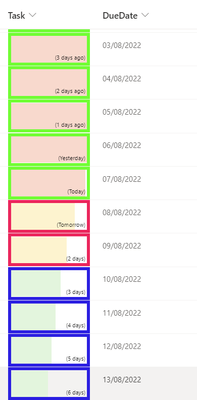
- Aug 08, 2022
May be because of time zone issue.
You can also try to create Calculated column instead of SharePoint JSON column formatting.You can use below formula for SharePoint Calculated column, in my case it gives correct result now.
=CONCATENATE("(",IF(TEXT(DueDate,"mm/dd/yyyy")-TEXT(NOW(),"mm/dd/yyyy")=0,"Today",IF(TEXT(DueDate,"mm/dd/yyyy")-TEXT(NOW(),"mm/dd/yyyy")=-1,"Yesterday",IF(TEXT(DueDate,"mm/dd/yyyy")-TEXT(NOW(),"mm/dd/yyyy")=1,"Tomorrow",IF(TEXT(DueDate,"mm/dd/yyyy")-TEXT(NOW(),"mm/dd/yyyy")>1,CONCATENATE(TEXT(DueDate,"mm/dd/yyyy")-TEXT(NOW(),"mm/dd/yyyy")," days"),IF(TEXT(DueDate,"mm/dd/yyyy")-TEXT(NOW(),"mm/dd/yyyy")<1,CONCATENATE(TEXT(NOW(),"mm/dd/yyyy")-TEXT(DueDate,"mm/dd/yyyy")," days ago"),""))))),")")Below is the output which I am getting now.
Hope it will helpful to you. Please mark and like this answer as best response if it works for you so that it can help to other people.


SP1 Check if toLocaleDateString() function in JSON formatting helps to convert both dates in same format & then apply your logic.
Documentation: JSON formatting - operators
Please click Mark as Best Response & Like if my post helped you to solve your issue. This will help others to find the correct solution easily. It also closes the item. If the post was useful in other ways, please consider giving it Like.

ganeshsanap and kalpeshvaghela
Found the root cause of the wrong date calculation of the problem -
e.g. (floor(Number(Date([$DueDate]) - Date(@now))/86400000)+1)==0,'Today'
The value is never = 0
its 0.283.. so the FLOOR value its rounding up is = -1 = hence its always Yesterday
The problem here is - Floor is not able to give the right number - hence all these errors