Forum Discussion

Nicholas Byng-Maddick
May 04, 2018Brass Contributor
SharePoint Access Requests Settings
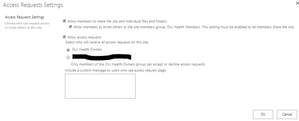
This has long been a problem but there appears to have been a subtle but significant change to the abilities here in SPO. It appears you can now specify the site owners group as the destination of t...

StephenRice Microsoft
May 07, 2018MicrosoftHi all,
I helped make this improvement happen so if you have any questions, hit me :) Message center post may have expired unfortunately but the documentation has been updated.
There were two pieces to the change:
1) Make it clear who is receiving access requests (especially since it used to default to "someone@example.com" which I'm pretty sure doesn't help ;). It's now clear if you're selecting the default (owners) or another e-mail address of your choice.
2) Show a custom message on the access request page.
Thanks!
Stephen Rice
OneDrive Program Manager II

Andrew Silcock
May 23, 2018Iron Contributor
This is a welcomed change, thanks Stephen.
I often have difficulties explaining the top two access request settings tick boxes.
Below is what I send to people, is it possible for the text to be change to explain things a bit better?
Please let me know if I have this wrong.
-------------
* Allow members to share the site and individual files and folders.
This tick box determines whether users (ignore the word members, it's misleading, this is for anyone with access to your site except owners) can share the site, files and folders with or without your permission first. If this is unticked, the access request person/group will receive an email asking them to approve every time someone on your site tries to share something.
* Allow members to invite others to the site members group, *your site here* Members. This setting must be enabled to let members share the site.
This tick box determines whether users (people actually in the member's group this time or with similar permissions, but not people in the visitor's group or with similar permissions) can share the site (not files or folders) with or without your permission first. If this is unticked, the access request person/group will receive an email asking them to approve every time people in the member's group try to share the site.
--------------------
Would it be possible to alter the text displayed to make things clearer?
I often have difficulties explaining the top two access request settings tick boxes.
Below is what I send to people, is it possible for the text to be change to explain things a bit better?
Please let me know if I have this wrong.
-------------
* Allow members to share the site and individual files and folders.
This tick box determines whether users (ignore the word members, it's misleading, this is for anyone with access to your site except owners) can share the site, files and folders with or without your permission first. If this is unticked, the access request person/group will receive an email asking them to approve every time someone on your site tries to share something.
* Allow members to invite others to the site members group, *your site here* Members. This setting must be enabled to let members share the site.
This tick box determines whether users (people actually in the member's group this time or with similar permissions, but not people in the visitor's group or with similar permissions) can share the site (not files or folders) with or without your permission first. If this is unticked, the access request person/group will receive an email asking them to approve every time people in the member's group try to share the site.
--------------------
Would it be possible to alter the text displayed to make things clearer?