Forum Discussion

"Get a Link" changed to "Copy Link?" When?
- Jun 27, 2017
Hi Matt Coats,
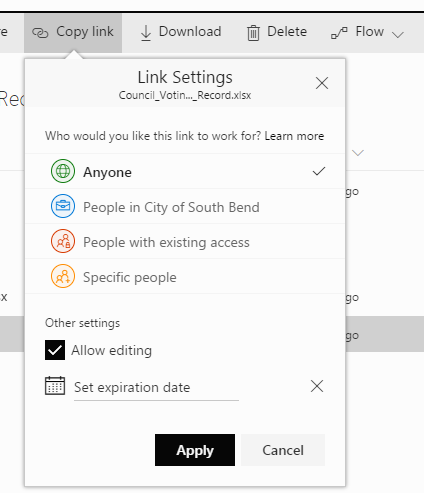
We changed over to "Copy Link" when we rolled out the new sharing dialog. This has been in-progress for the last two months so your tenant may have seen that changes anytime in that period.
Also, we currently have no feature that allows you to uncheck "Allow editing" by default. Stay tuned though... :)
Stephen Rice
OneDrive Program Manager II


After a few days of playing and getting user feedback, there are some parts of the changes that are confusing for me and our users.
In this scenario I want to share a file with someone, we have disabled anonymous access on our tenant so the user needs to give them direct access to the file, unfortunately our users might not know this or care, they just want to share a file as quick or quicker than it takes to attach a file in an email.
I select the file in my library and I click share from the ribbon, it says "Only you can access this item." to which I say to myself - I know this, but I'm going to share it so that's ok, no problem.
I then type in the person's email address that I want to share it with because I clicked share so obviously whoever I type in here it's going to share with right?
It then says "The recipient you entered doesn't have permission to access the item" and I'm now confused, it doesn't tell me that I need to explicitly give this person permissions and it doesn't automatically give this person permissions either.
From here I'm looking for a button or a something that tells me where to go from here, is there something that allows me to share it with the user or to give this user permissions to access it perhaps?
There isn't one, so I might give up here and people have started to do so. If I don't give up I start clicking around. I click on the yellow icon which takes me to a new set of options. Which defaults to the yellow icon again. In my mind, I've already tried the yellow icon, so I don't try that one. I start clicking around, realise there are no other options (we've disabled anonymous access). So I click back to the yellow icon, enter the email address of the user I want to share the file with. Make sure Allow editing is selected and click apply. Great, now my link has been shared right? Well, not quite yet, actually now I need to click send and finally, it tells me the link has been sent.
Assuming I know exactly what I'm doing it takes seven clicks to send a file to someone who hasn't yet been given direct permissions to the file.
We're finding users have given up way before the final few steps and have just gone back to Dropbox or something else.
I appreciate allowing anonymous access links would perhaps make this easier, but we have disabled these for a reason.
Is there anything we can do to make this process smoother, without having to train 5,000 staff? We're a bit stumped.

To be completely honest, I'm starting to lose patience with the number of changes being made to the sharing files and folders features in OneDrive & SharePoint. The changes are causing mass confusion across the organisation, and we're seeing users simply give up or flick to competing products & services which are just easier to use.
- StephenRiceAug 10, 2017
Microsoft
Hi dbetlow,
As Andrew mentioned, this is expected. What is happening is that the link you are currently trying to share is permissioned to some set of users (let's say X and Y) and then you are trying to share that link with Z.
To fix this, you just need to click on the link options and enter user "Z", then send the link as you were trying to do.
We've definitely heard feedback that this feels a little confusing and we're working on some changes to make it work more smoothly. Thanks!
Stephen Rice
OneDrive Program Manager II
- Andy5Aug 09, 2017Steel ContributorWhen you see "The recipient you entered doesn't have permission to access the item", it's not a bug, it's a valid message, but it's not clear where to go from here.
 dbetlowAug 09, 2017Iron Contributor
Sorry, having trouble following:
We are seeing this too:
"The recipient you entered doesn't have permission to access the item"
Is this a bug? Is there a workaround?
- Andy5Aug 06, 2017Steel ContributorThanks, Stephen, Yes some of these will be.
- StephenRiceAug 02, 2017
Hi Andrew,
MSA's are Microsoft accounts or Live ID's, or whatever else we've called them over the years! :) Users who authenticate at live.com. Thanks!
Stephen Rice
OneDrive Program Manager II
- Andy5Aug 02, 2017Steel ContributorHi Stephen,
Good to hear this is odd and not as expected. It's definitely happening with O365 accounts, can you confirm what you mean by an MSA accounts? Given the amount of different external accounts this is occurring on though, I imagine this is the case.
I've messaged you six different examples, with various error messages.
Thanks,
Andy. - StephenRiceAug 02, 2017
Oh that's very odd. Do you have a screenshot of the error experience they see by chance? And do you know if they are using an MSA account or an O365 account? Thanks!
Stephen Rice
OneDrive Program Manager II
- Andy5Aug 01, 2017Steel Contributor
Hi Stephen,
Thanks for replying. Yes, this is the first time we have tried sharing with this user, with any of their email aliases it also seems to happen if we try after successfully sharing with their username based email address.
The error occurs when the user clicks on the link in their inbox and prevents the user from ever opening the file with an access denied message.
The work around of sharing with the user's username based email address as123@company.com isn't going to be accepted by most users here, unfortunately.
- StephenRiceAug 01, 2017
And thanks for confirming I have all the feedback straightforward. I'll keep discussing it internally and see how we can improve the experience!
Stephen Rice
- StephenRiceAug 01, 2017
Hi Andrew,
I want to make sure I understand exactly what is happening. In your example, is this the first time you have ever tried to share with andrew.silock@company.com? Had you previously shared with that address or the as123@company.com account? Where does the error you are seeing occur? Are you not allowed to complete the share at all or is the recipient getting access denied?
Thanks!
Stephen Rice
OneDrive Program Manager II
- Andy5Jul 31, 2017Steel Contributor
Hi Stephen,
One other thing that we have finally worked out this morning when sharing externally.
If I share with someone's email alias, the external link doesn't work. It has to be shared with the username they use to log with.
For example I can't share with andrew.silcock@company.com I have to share with as123@company.com.
This is causing us with no ends of user issues here. Is this something that can be addressed by Microsoft or do we need to inform everyone of the work around?
Thanks,
Andy.
- Andy5Jul 31, 2017Steel ContributorHi Stephen,
That's great to hear it's all one team and exciting to hear the feedback is going to the right place.
1) When clicking share (and having the default set to "specific people"), users are seeing the link that "only works for them" and are making the assumption that when they add a new name, they'll be added to the link. They enter the target user's name and get an error message. At this point, they're stuck as they don't know where to go to fix this.
That's correct. They get "The recipient you entered doesn't have permission to access the item" and from here there's no indication what to do next.
2) Even when the user does click on the link options, they now believe that the "specific people" option won't work for them so they are still stuck.
That's correct, they're on the "Yellow" icon again. There's also no mention when you're in specific people option that you're in the specific people option. Which leads to further confusion.
3) And if the user makes it through (1) and (2), they don't understand that they need to click "send" to actually complete the share.
That's right, additionally, the Apply button and consequent thinking/loading screen is quite striking and gives the impression that perhaps they have been sent the link already.
4) When owner approval is required for sharing, the sharing dialog doesn't tell the user that there is an additional workflow required.
That's correct. It's assumed the sharing has completed until you notice an email in your Inbox.
5 - Something else I've noticed. When you click apply after providing an external user with permissions, before sending them an email. It adds them to the list of External User Invitations under: /pendingreq.aspx. It adds them with a status of pending, but until I click Send, nothing has actually happened in this workflow process.
6 - Also as mentioned in a previous thread, it would be great to be able to make a team member (already with access) aware of a file via Outlook, without giving them unique permissions to the file. As per: https://techcommunity.microsoft.com/t5/SharePoint/Make-colleagues-aware-of-a-file-without-explicitly-giving-them/m-p/91782#M8556
Thanks! - StephenRiceJul 31, 2017
Hi Andy5 and Deleted,
Apologies for the slow response, I've been out on vacation for the past few weeks and am now working on catching up with everything. We actually have one team that works on sharing for both OneDrive and SharePoint (as we're actually one team) so your feedback is going to the right place. To make sure I have the right feedback:
1) When clicking share (and having the default set to "specific people"), users are seeing the link that "only works for them" and are making the assumption that when they add a new name, they'll be added to the link. They enter the target user's name and get an error message. At this point, they're stuck as they don't know where to go to fix this.
2) Even when the user does click on the link options, they now believe that the "specific people" option won't work for them so they are still stuck.
3) And if the user makes it through (1) and (2), they don't understand that they need to click "send" to actually complete the share.
4) When owner approval is required for sharing, the sharing dialog doesn't tell the user that there is an additional workflow required.
Does this look about right?
Our goal with the new sharing dialog is to create one of the best sharing experiences we possibly can. This is the first step we are taking to make this happen but it in no way represents the end. Thanks!
Stephen Rice
OneDrive Program Manager II
- Andy5Jul 26, 2017Steel ContributorI'm with you on that one Tom. We're struggling with all the changes as well.
We've changed the default to "Only people in *Organisation* with the link can view and edit." which I'm hoping will alleviate some of the concerns.
Additionally, we're rethinking where we should be sharing from in the first place. People are used to sending emails with attachments, so with that in mind, we're starting to recommend people use Outlook and the attach file functionality instead of sharing directly through SharePoint/OneDrive.