Forum Discussion

Issue on One Drive in desktop
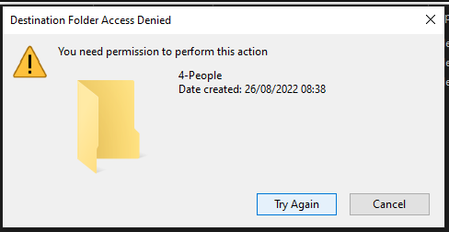

Hi ChristopherMRosa,
Here are some steps to resolve the issue:
-Did you try to uninstall and reinstall OneDrive App? if not please do and re -Sync the Files and folders
-Please clear browser cache
-Please check the Site permission settings: Customize SharePoint site permissions - SharePoint in Microsoft 365 | Microsoft Docs
Please check the behavior now!
If issue still persists, please do the following:
-Take ownership of the problematic file:
- Locate the directory that you can’t access, right-click it and choose Properties from the menu.
- Go to Security tab and click the Advanced button.
- In the Owner section on the top, click Change.
- Enter your username and click the Check Names button. If everything is in order, click OK to save changes.
- Now check Replace owner on subcointainers and objects and click Apply and OK to save changes.
Steps:
-After making these changes, you’ll have full ownership over the problematic directory and the Access denied message shall be gone.
Thanks 🙂

Ahmed_Masoud97 Hi, I do all this steps and some others and the issue still persists.
In fact I uninstall the OneDrive on my computer and install a new version, and when the library is been synchronized, I am able to create folders and load files, but since become synchronized, all the behavior returns.
I force the permissions and still have no effect. It looks like every synchronization that happen pulls me back to previous issue. The folders that I create become read only, and no matter what I do, they still remain on read only state.
- Ahmed_Masoud97Sep 14, 2022Steel ContributorOh, Sorry to hear that!
Please Do the following and try again:
1-Unlink OneDrive desktop
2-https://support.microsoft.com/en-us/office/reset-onedrive-34701e00-bf7b-42db-b960-84905399050c#:~:text=Select%20Applications.,Clear%20data%20and%20Clear%20cache.
3-https://answers.microsoft.com/en-us/msoffice/forum/all/cached-credentials/d6cc7f1f-3d78-4f4e-9d3f-b87a14abbe3c
4-Link it again!
And share with me the results- ChristopherMRosaSep 14, 2022Copper ContributorI do that... It works for some few time, and them stop again
- Ahmed_Masoud97Sep 14, 2022Steel ContributorCould you please try in a new Windows profile?