Forum Discussion

Files on Demand randomly downloading and filling hard drives
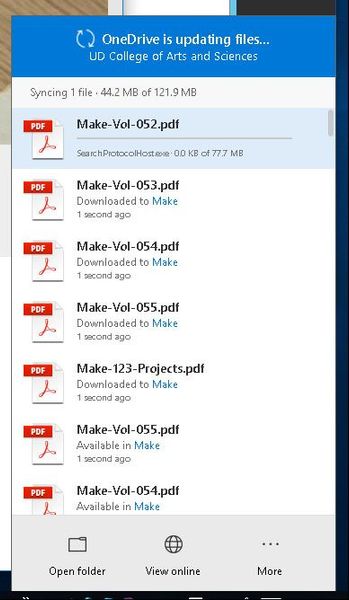

I have three customers with the same issue, and myself. One I found was a Dell optimization tool that had Antivirus built into it. Each time the antivirus touched the file on demand it would download it. I have a couple open tickets with MS, but nothing resolved yet.

Quite sure that the antivirus are not «files on demand» compatible. Quick out of my head I see 4 ways of fixing it. Number one and the best, use built in windows defender instead. Windows defender are now on of the best AV, had a bad rep for a while but totaly trustworthy know and free. Number 2, get a newer version of AV or another vendor. Number 3 exclude the path to the onedriver folders, this might be risky since the files will not be scanned regularary, but most AV would scan them while they are being downloaded and for sure when been runned. Number 4, select only necessary folders to be synced and keep everything downloaded
 Richard DugganOct 26, 2018Copper Contributor
We are using only Windows Defender for antivirus. The application that is downloading the files in our case is SearchProtocolHost.exe, which is the Windows Search service. So for I have not found a way to tell Windows Search not to try to index the files in OneDrive. The documentation actually specifically states that for FOD files only the filename will be indexed.
I have tickets open with both the OneDrive and Windows teams and have given them extensive log files and screen captures and they haven't been able to come up with an answer. I am waiting to try out Windows 1809 to see if the new features including Storage Sense have any impact on the problem.
What's odd is this seems to happen to specific users, not computers. I have five machines that I use and once it started happening it started happening on all of them. Other users that have had it happen have the same experience. But we have dozens of users with identical hardware and software configurations for whom it is not happening.
 _kurt_Apr 22, 2020Copper Contributor
Richard DugganDid you ever solve this issue or get a response from microsoft? I'm seeing the same issue with searchprotocolhost.exe downloading files.
- Richard DugganApr 22, 2020Copper Contributor
_kurt_ The problem went away when we migrated to a newer version of Win 10. I believe the problem emerged in the switch from 1709 to 1803 and went away with 1809. We're now running 1909 in most places and not seeing the problem. The full Storage Sense integration that comes with these newer versions is also very valuable and important for other reasons, but I think the disconnect between the hooks for it in the client and the OS were the source of the problem.
- Olav TvedtOct 29, 2018MVPRichard, replay was more aimed at Steve ;-). But, the last one with clearing cache might be more for you? Make sure everything in there is clean and see if it change the experience.
- Olav TvedtOct 26, 2018MVPOne other tip if it’s not AV related, clear upload cache. For Office you might need to manually delete the folder with the cache. Onedrive try tips 8 and lastly 9 in this post https://www.windowscentral.com/9-tips-help-you-fix-onedrive-sync-problems-windows-10