Forum Discussion

MacOS unable to share screen, Teams not listed under Screen Recording in settings
 Oct 20, 2020
whitmarshdaniel I kind of got a workaround/fix for the time being. This is what I did.
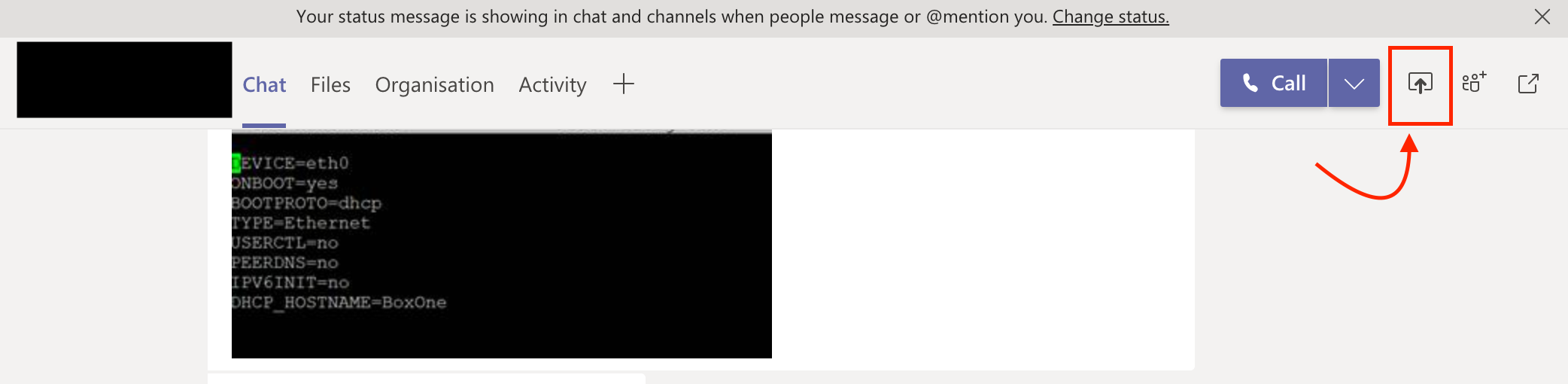
Rather than trying to share the screen from the call/meeting (which obviously gave me the warning and opening of the "Security & Privacy" setting didn't show Teams in Screen Recording" - I tried sharing the screen from the chat window of the same call and it opened a dialog box asking whether I need to deny or allow "Teams from sharing the screen. From there I opened the "Security & Privacy" -> Screen Recording and there it was - "Teams" and selected "Teams"
I attached a screenshot.
PS: Additionally I earlier did add "Teams" to accessibility and not sure whether that helped too.

Aitje Solving this involved these steps for me running macOS 10.15/Catalina:
1. Add Teams manually to the list of apps allowed to control your mac in:
Security & Privacy -> Accessibility
2. Then go to Security & Privacy -> Screen Recording and Teams will have appeared in that list for you with a tick box for you to allow screen sharing permission
3. It will require Teams to restart for the permission to take affect
4. You can now remove Teams from Security & Privacy -> Accessibility if you wish