Forum Discussion

onegina
Aug 05, 2021Copper Contributor
Incorrect hours of work in Teams
Hello, could you please help me? I have wrong work hours in my Teams: they are shown from 08:00 to 17:00. That is not correct, I work from 9 till 18, and in my Outlook I have correct settings...
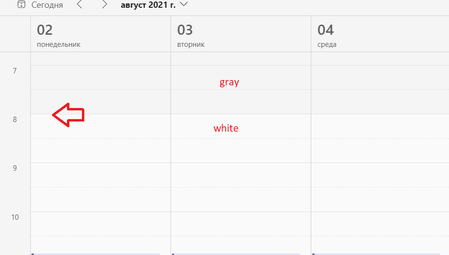

onegina
Aug 05, 2021Copper Contributor
I meant, I signed out. My working hours in Outlook - I have never changed it, they were correct by default after setup...

Mykhailo_Goncharov
Jan 04, 2022Copper Contributor
onegina have you managed this problem somehow? I live with this issue for more than a year already.
- oneginaJan 04, 2022Copper ContributorHello, unfortunately, no. This problem still stays.
- Jan 04, 2022
onegina Mykhailo_Goncharov This shouldn't be an issue really. Just look at all settings related to date & time, such as your W10/11 settings and then go to Outlook on the web "Meeting hours". I tried changing this right now and it was updated immediately in Teams on the web and for the desktop app to apply the new working hours I simply signed out manually from the top right corner and back in.
 YuelinMar 19, 2024Copper Contributor
Thanks ChristianJBergstrom I followed the steps you provided, it worked for me. After I log in to outlook website, I had my work hours updated from 12 am- 5pm to 8 am - 5 pm and it reflected on teams immediately.
