application management
941 TopicsHow do I delete a post?
Hi-----> I submitted a post on Saturday, the 23rd. Microsoft Support was able to provide an answer that worked for me on Tuesday, the 26th. Under my profile it says that my post is "Under Review -- Your post has been received and is awaiting approval." But if I go to the chronological listing of the posts for Windows 11 my post is there. So how do I go about deleting that post? There is no "Report a concern" area or anything like that, so no ellipsis that I can select "Delete" and make the post disappear. Can someone figure this out? It has me baffled!!!!Solved56Views0likes2Comments
Default apps file explorer
Since the last update files in file explorer folders do not use the default apps anymore. If I click on an image file it now always open in photo but my default is set to Photoshop. Same with pdf files they now only open in Acrobat reader. I need to open every file by right clicking and choosing the default app... very annoying...10Views0likes0Comments
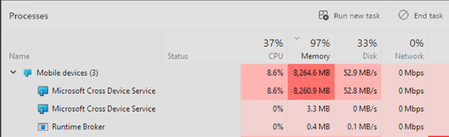
Windows 11 version 26200.8457 experiences a memory leak when transferring files wirelessly
I got a new phone that supports the latest version of Phone Link, which allows me to access my phone's files directly in File Explorer. I tried to wirelessly transfer my entire music library to the phone, but the process frequently froze randomly and even disconnected. The next morning, I found that my laptop hadn't gone to sleep all night and was running extremely slowly. When I opened Task Manager, I saw that the Cross Device Service was using an unusually high amount of resources, and in the end, only a small number of files were successfully transferred. System version: 26200.845720Views0likes0Comments
Thirteen localized Dutch (nl-NL) issues in the latest Windows 11
Subject: Thirteen localized Dutch (nl-NL) issues in the latest Windows 11 (Insider) Beta/Dev/Canary and Stable builds Hello, I have submitted several times Feedback to the Windows Feedback Hub regarding to localization textual issues in Windows 11. The Dutch (nl-NL) related language textual issues hasn't been resolved through the Feedback Hub and there is no response from the Feedback Team in the Feedback Hub. These issues have existed since Windows 10 and still exists in the latest Windows 11 (Insider) Beta/Dev/Canary and Stable builds. The issues don't occur in the en-US versions, but only in the Dutch (nl-NL) localized Windows 11 versions: https://aka.ms/AAxtmr0 A Dutch sentence in a warning message got currently a grammar error https://aka.ms/AAxumnr "Verwijderen" in the Dutch Contextmenu isn't correctly aligned https://aka.ms/AAxumnw Typo in Dutch device drivers https://aka.ms/AAwfasx Typo in "Scanner" Windows Feedback App https://aka.ms/AAuycw7 Six tooltips in the Dutch (nl-NL) region Control Panel in Windows 11 doesn't have a point at the end of the sentence https://aka.ms/AAuy57o Renaming a folder or file isn't possible through the Windows Explorer right click context menu on a FTP site in Windows Explorer https://aka.ms/AAuxxi6 'System Product Name' and 'System manufacturer' aren't translated into Dutch https://aka.ms/AAuxxi8 "weergev" in the tooltip in the Dutch Control Panel is truncated https://aka.ms/AAuycwa Truncated Dutch words in Windows Explorer at the network infrastructure area https://aka.ms/AAuycwb The word "read" in the error message is not translated into Dutch as "gelezen" https://aka.ms/AA11195c Truncated Run dialog box https://aka.ms/AA11195d Text truncated when printing image file to PDF https://aka.ms/AA112m6k Background harddisk icons in properties form sometimes has a different color on first initialization Please submit this to the Dutch (nl-NL) localized team to fix these localization issues.28Views0likes2Comments
Windows Driver Policy - What is Active Use
Hi, I'm using an unsigned Windows driver. In the https://support.microsoft.com/en-us/windows/the-windows-driver-policy-ecd2a78c-750c-415d-93f2-e37302ce0443 article, what is the definition of "Active Use" in the Evaluation Criteria "Your device must have accumulated 100 hours of active use"? And, is there a way to see my computer's remaining number of Active Use hours in Evaluation mode somehow? Thanks!6Views0likes0Comments
Wifi not working after deleting capability access manager db
is there someone here with some computer windows know how - I was having a problem with the capability accessmanager database consuming all my hard drive space and so every bit of advice I found online from even windows forums was to simply delete the db file and windows will automatically recreate it but it will eliminate the enormous file upon next restart I did that and now though I don't have any wifi connection and I get an error message in services when I try to restart the capability access manager service - I don't know what to do now I have windows 11. All the advice I found online was saying that if you delete the database file that is okay because windows just recreates it when you restart as long as Capability Access manager service isn't disabled - well I didn't disable it, I just followed the directions to go into safe.mode and delete the db file But now after restarts the Capability access manager remains disabled and I can't start it in the services.msc4.5KViews0likes12CommentsMonitoring CPU activity
I have just installed an new version of Windows 11. Under my old installation I had a vertical progress bar thingy on my taskbar which showed CPU activity. I found it very comforting when I was trying to decide if W11 was actually working or was just ignoring me. 🤣 How do I get that progress bar thingy again under the new version of W11? ThanksSolved52Views0likes2Comments