developer
1397 Topics
Static Tab and Chat Tab Order Is Not Persisting in Microsoft Teams
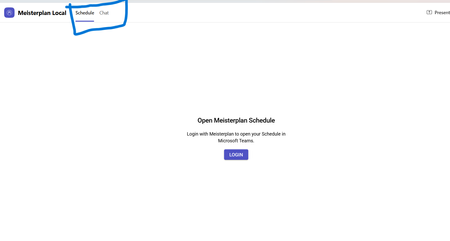
manifest file: "staticTabs": [ { "entityId": "schedule", "name": "Schedule", "contentUrl": "...", "websiteUrl": "...", "scopes": ["personal"] }, { "entityId": "conversations", "scopes": ["personal"] } ] the Schedule tab is intentionally place before conversations: it initially appears correctly, but after navigating away from the app and returning, Teams places Chat/Conversations before Shcedule. I'm using schema version 1.12. The tabs are configured in the specified order in the manifest file, and the expected tab order is displayed correctly when the app is initially opened. However, when I navigate to the Chat section, the tab order changes and does not persist as defined in the manifest file.126Views0likes0Comments
API: get video recording link via Microsoft Teams
Hi teams. What are some ways to get video recording link URLs of a teams meeting via API (Graph/Sharepoint/OneDrive)? Is it possible to get the recording URL from the calendar event? I do see the embedded video link when I am editing a recorded event in my calendar. Saw some previous post of getting access via Chat messages - callRecordingUrl: https://techcommunity.microsoft.com/t5/microsoft-365-developer-platform/get-the-link-to-the-recording-of-teams-meeting-from-the-graph/idi-p/2675306 (what are the auth required to make function calls to get this?) Wondering if there are any update on this, thanks1.6KViews0likes4CommentsHow to Download Video Clip from Microsoft Teams Programmatically
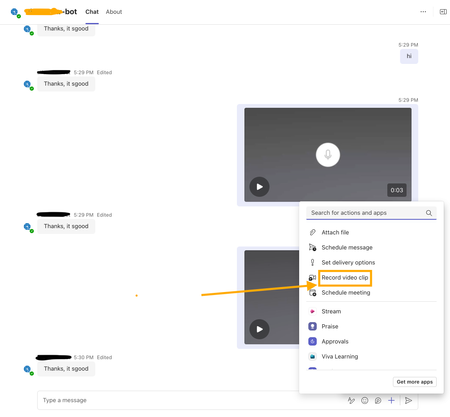
I’m developing a bot app for Microsoft Teams, and part of its functionality involves handling videos recorded using the Teams widget(see screenshot attached). I am receiving a video clip link in the bot app's backend message. Where is this video file uploaded and how can I download the video clip using that link? I have attempted the SSO auth via Entra ID to fetch the auth token and attached it against the GET request to the video clip link as the bearer token. But still getting 401 errors? Need help and guidance in this matter. Thanks.682Views0likes7Comments
Setting app page is not getting localized in windows server OS 2025 with official language pack ISO
We created a VM on ESXi with Windows Server 2025 and installed the language packs offline using the official language pack ISO for Windows Server 2025. Most of the UI was localized successfully, but the Settings app was not localized. We tested this with the Japanese language pack and also tried installing it using both PowerShell and DISM. Is this a known issue? Has anyone else encountered the same behavior? If so, is there any known solution?150Views0likes0Comments
App Validation failing for no clear reason
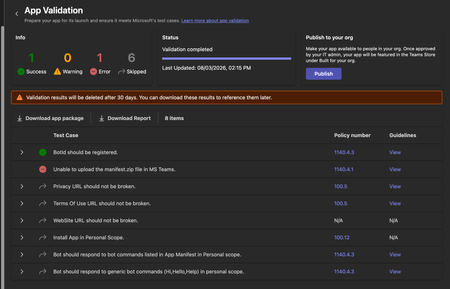
We're trying to get our (very simple) Teams App listed on the app store, but during the App Validation we keep getting the same error: "Unable to upload the manifest.zip file in MS Teams." as seen below: Downloading the report doesn't give any more information, it only lists the only successful validation step ("BotID should be registered") and the error doesn't appear there. I've validated the manifest.json file against the schema, tried reuploading the same manifest to a different org (creating a new app and bot) - validation fails there too. Does anyone have any pointers? Here is my (anonymized) manifest file: { "$schema": "https://developer.microsoft.com/en-us/json-schemas/teams/v1.19/MicrosoftTeams.schema.json", "manifestVersion": "1.19", "version": "1.1.1", "id": "[redacted]", "developer": { "name": "[redacted]", "websiteUrl": "https://www.[redacted].com", "privacyUrl": "[redacted]", "termsOfUseUrl": "[redacted]" }, "icons": { "color": "color.png", "outline": "outline.png" }, "name": { "short": "[redacted]", "full": "[redacted]" }, "description": { "short": "[redacted]", "full": "[redacted]" }, "accentColor": "#4A3AFF", "bots": [ { "botId": "[redacted]", "scopes": ["personal"], "supportsFiles": false, "isNotificationOnly": false, "commandLists": [ { "scopes": ["personal"], "commands": [ { "title": "help", "description": "Show what this bot does and how to connect your account" }, { "title": "connect", "description": "Get a fresh link to (re-)connect your account" } ] } ] } ], "staticTabs": [ { "entityId": "conversations", "scopes": ["personal"] }, { "entityId": "about", "scopes": ["personal"] } ], "permissions": ["identity", "messageTeamMembers"], "validDomains": ["app.[redacted].com", "auth.[redacted].com"] }378Views0likes2Comments
Teams iOS custom tab not appearing in Safari Web Inspector
Hi, I’m trying to debug an intermittent white screen in a custom Teams tab on iPhone, but I am unable to get "DevTools" to work as described here https://learn.microsoft.com/en-us/microsoftteams/platform/tabs/how-to/developer-tools My setup: Teams iOS 8.14.1 iOS 26.6.1 and iOS 27.0 Beta 6 macOS 26.6.2 Developer Preview enabled My user has been in Microsoft 365 Targeted Release for >24 hours Safari Web Inspector enabled on iPhone Safari pages on the same iPhone are inspectable from my Mac However, with the custom tab open in Teams, Safari → Develop → iPhone shows “No Inspectable Applications.” I’ve already signed out/in, force-quit Teams, cleared app data, re-enabled Developer Preview and tested on two different iPhones/Macs. Is Safari Web Inspector for Teams iOS tabs currently supported, and is there any additional setting required to make the Teams WebView inspectable?Solved359Views0likes2Comments
Workflows - Posting a Card
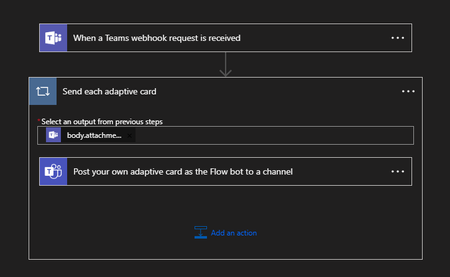
I'm in the process of migrating our Jira integration with teams from using the soon to be deprecated Connectors, to Workflows. I have two problems that I can't see to overcome. 1. All the messages are posted as '[My Name] via Workflows posted a new message'. Is there any way the message can come from another user or no user? 2. The preview for the messages (in the notification popup and Activity screen) is 'Card', instead of anything useful. Together this makes the notifications not very useful. What I have done: The workflow is set up And what is being posted to the webhook is (for example). { "type": "message", "attachments": [{ "contentType": "application/vnd.microsoft.card.adaptive", "contentUrl": null, "content": { "type": "AdaptiveCard", "$schema": "http://adaptivecards.io/schemas/adaptive-card.json", "version": "1.4", "body": [{ "type": "ColumnSet", "columns": [{ "type": "Column", "width": "auto", "items": [{ "type": "Image", "url": "https://i.imgur.com/FrVumxY.png", "size": "Medium" } ] }, { "type": "Column", "width": "stretch", "verticalContentAlignment": "Center", "items": [{ "type": "TextBlock", "size": "Medium", "weight": "Bolder", "text": "Component Missing [ADP-xxx]" } ] } ] }, { "type": "TextBlock", "text": "Initiator: ", "wrap": true }, { "type": "TextBlock", "text": "ADP-xxx: Fixing reset password validation", "wrap": true, "weight": "Bolder", "color": "Accent", }, { "type": "TextBlock", "text": "Status: QA Ready", "wrap": true }, { "type": "TextBlock", "text": "Type: Bug", "wrap": true }, { "type": "TextBlock", "text": "Assignee: ", "wrap": true } ], "actions": [{ "type": "Action.OpenUrl", "title": "Open in Jira", "url": "https://xxx.atlassian.net/browse/ADP-xxx" } ], "$schema": "http://adaptivecards.io/schemas/adaptive-card.json", "version": "1.4" } } ] } I have tried posting various different combinations of summary attributes with no effect. Is there a whole better way of doing this, or is there a few tweaks I can make?3.2KViews0likes4CommentsCS agent OK in M365 Copilot; Teams chat silent / no Studio session
We are troubleshooting a Copilot Studio agent that works correctly in Microsoft 365 Copilot and in the Copilot Studio test surface, but does not receive inbound activities from Microsoft Teams personal chat. Environment and evidence: - Agent: Copilot Studio agent (custom business assistant) - Copilot Studio agent ID: 88901b10-… (truncated) - Teams/Entra app ID: 7e4a53cc-… (truncated) - Manifest version: 1.0.8 - Channel configuration: Microsoft 365 Copilot + Microsoft Teams - Publish: Succeeded / Channel state: Synchronized - Agent Registry: Available - Authentication: Integrated / Tool credentials: Maker-provided - MCP/custom connector runtime: working (Studio tool test HTTP 200) - Microsoft 365 Copilot routing: working Failure specific to Teams: - Messages in Teams web and desktop appear delivered in the agent personal chat - Agent never replies - Studio monitor has M365 Copilot sessions, but no Teams session for those timestamps - Teams Admin Center Manage apps returns 0 results by name or exact app ID despite Agent Registry Available - Intentionally not republishing / reconnecting OAuth / rewiring connectors because M365 Copilot path proves the same agent+connection works Classification: FAIL — Teams inbound activity is not reaching the Copilot Studio agent. Questions focused on Teams delivery: 1. Why would Teams personal 1:1 messages never create a Studio conversation while M365 Copilot does? 2. Is a missing TAC Manage apps row expected under Unified App Management when Registry shows Available? 3. Known gaps: Agent Registry Available + channel Synchronized, but Teams client chat bound to a non-runtime endpoint? 4. Best diagnostic if Monitor shows 0 Teams sessions after a confirmed client send? Looking for production experience / documented workaround. Redacted evidence available; no tokens/secrets.425Views0likes2Comments
Migrating Teams Calling Bot (EchoBot) from VMSS to Windows Containers / ACI?
Hi everyone, I have built a Microsoft Teams Calling Bot using Application-Hosted Media based on the official C# EchoBot sample: https://github.com/microsoftgraph/microsoft-graph-comms-samples/tree/master/Samples/PublicSamples/EchoBot Currently, our signaling logic is fully serverless and runs efficiently on Azure Functions. However, the actual media processing (using the C# Calling SDK which relies on native Windows media binaries) is deployed on VMSS with Windows Server, just like the repository's default deployment guide suggests. Running these Windows VMs continuously is becoming extremely expensive, and we are looking for a cheaper, modern, or "on-demand" alternative to handle the media pipeline. Since raw audio processing strictly requires these native Windows-based Media binaries, I would like to ask the community: 1. Windows Containers (ACI / AKS): Has anyone successfully run this C# EchoBot/Media SDK inside Windows Containers (such as Azure Container Instances or AKS)? If so, how do you handle the public IP and port-binding requirements for the media sockets (since the platform needs direct public connectivity for UDP/TCP traffic)? 2. On-Demand Provisioning: Are there any known architectures or best practices for spinning up the media processor only when a call starts (e.g., triggering an ACI instance via the Azure Function signaling bot) and tearing it down afterwards to keep costs near zero when idle? 3. Alternative Approaches: If you have solved this high-infrastructure cost problem for a real-time raw audio bot in production, what architecture did you end up using? Any documentation, GitHub references, or architectural advice would be highly appreciated! Thanks!334Views0likes2Comments