power bi
851 Topics
Organizational Account authentication problem
I have encountered a new authentication problem using an organizational account with Get Data > From Web. The data source is Dynamics 365 CE on-premises (https://ce.xxx.com/api.data/v9.1), authenticating through ADFS with MFA. This has been working without any issues until recently. When I attempt to refresh the query, I get an ADFS pop-up window for username and password, as expected. However, the window then closes without the expected MFA prompt. The "Access Web content" window does say "You are currently signed in," but does not query successfully, instead displaying the error "We couldn't authenticate with the credentials provided. Please try again." The most distinctive symptom, is that clicking the "Sign in as different user" button does not work. It just quickly opens and closes an empty window, instead of the expected ADFS username/password page. In Power BI Desktop everything works. The connection and query are successful, and the "Sign in as different user" button successfully displays both the initial ADFS username/password window and the subsequent MFA dialog. Excel version: Microsoft® Excel® for Microsoft 365 MSO (Version 2512 Build 16.0.19530.20226) 64-bit48Views0likes1Comment
Power Query - How Do I Count a Number of Entries Based on Another Column?
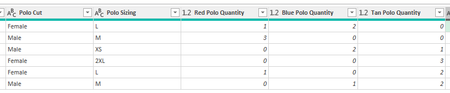
Hello! The title might be a little confusing. Here's the situation. I manage uniforms for my team. I am making a SharePoint list and form that an employee will use to request the uniforms. Then, to give me a digestible table that shows me exactly what I need, I have an Excel Power Query pulling the list in. On the form, instead of having a different entry for each polo in each color, each size, and each cut, I have it separated so that you pick cut, sizing, and color separately. Is there a way to have Power Query pull it to show me, for the screenshot example: Female L Red Polo: 2 Female L Blue Polo: 2 Male M Red Polo: 3 Male M Blue Polo: 1 Male M Tan Polo: 2 So on, and so forth. Is this possible? Thank you!257Views0likes3Comments
Help needed with IF and COUNTIFS Formulas
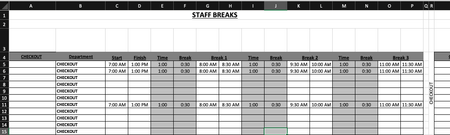
Is anyone able to advise the following formula: =COUNTIFS($B$5:$B$15,$R$4,$C5:$C15,"<=" & V3,$D5:$D15, ">" & V3)-COUNTIFS($B$5:$B$15,"="&$R$4,$G5:$G15,"<=" & V3,$H5:$H15, ">" & V3)-COUNTIFS($B$5:$B$15,"="&$R$4,$K5:$K15,"<=" & V3,$L5:$L15, ">" & V3)-COUNTIFS($B$5:$B$15,"="&$R$4,$O5:$O15,"<=" & V3,$P5:$P15, ">" & V3) Is there a way to simplify this? Is there a way to make this more accurate? Cells in column G & H, I & J, O & P are using the following format: =IF(C6="","",C6+E6) Cells in U4:CC4 are using the following format: =COUNTIFS($B$5:$B$15,$R$4,$C5:$C15,"<=" & U3,$D5:$D15, ">" & U3)-COUNTIFS($B$5:$B$15,"="&$R$4,$G5:$G15,"<=" & U3,$H5:$H15, ">" & U3)-COUNTIFS($B$5:$B$15,"="&$R$4,$K5:$K15,"<=" & U3,$L5:$L15, ">" & U3)-COUNTIFS($B$5:$B$15,"="&$R$4,$O5:$O15,"<=" & U3,$P5:$P15, ">" & U3) Cells in U5:CC15 are using the following format: =IF(U$4>=$T5,1,"") My issue is is when I put in the three break times, the mid break comes out at a shorter time. My other issue is is that when I put in the times in row 5,6and 11, the data is coming up as a combined data in rows 5, 6 and seven on the page two. Just for reference, "page two" is the same spreadsheet. What I need to happen is that I enter in the shift start time and finish time. This then populates through to Break 1, 2 and 3. The Time entry is the time the break starts. ie: 1 hour after start of shift, 1 hour after coming back from break, etc. The break entry is the duration of the break taken. ie: 30 minutes. Once all the info is put in, the relevant "Time Block" on "Page 2" shows a 1. What is happening at the moment is that when I enter all the time data, the time blocks are not populating correctly in accordance to the entry. Basically, If I have numerous people on shiftI need the time blocks to show where I have shortfalls in shift cover and not having too many people on break at the same time. IE: Link to Live Copy: https://www.dropbox.com/scl/fi/eur1j526htu1j8a4d4290/Staff-Breaks.xlsx?rlkey=r4tm9xts4tonofpa2th2cusfw&st=nueyk0d7&dl=0 Any ideas would be greatly appreciated.190Views0likes4Comments
Moving a column of text data into 3 columns of data?
I have a column of text data cells 1,2,3,4,5,6,7,8,9 and longer. I want to create 3 column of data to graph and manipulate Cell in Columns. 1,2,3 3,4,5 5,6,7 8,9,10 and longer. So i need to create 3 columns of data from 1 column of data. I am using Mac Excel 16 and I can not make this happen. I have tried all sorts of solutions. Help? Thank you,198Views0likes3Comments
Calculating hours using pivot table
Hi, I'm making a personell planning sheet and I want to calculate the sum of hours teachers give lessons. I have 2 tables and my data is formatted like this (simplified) Lesson name Hours Teacher 1 Teacher 2 Lesson 1 2 Paul Lesson 2 3 Pete Lesson 3 2 Paul Pete Teacher name Max working hours Paul 10 Pete 15 Now I want to create an overview of how many hours each teacher is teaching using a pivot table. This is easy when there is just one Teachter collumn but I need to calculate the sum using both teacher collumns... I need to overview to be something like this: Paul -> Lesson 1 + Lesson 3 = 4 hours Pete -> Lesson 2 + lessen 3 = 5 hours Then the next step is to use a metric or KPI to calculate if each teacher is exceeding their max working hours... Can anybody hlelp me with these problems? Thanks!152Views0likes2Comments
PivotBy or GroupBy
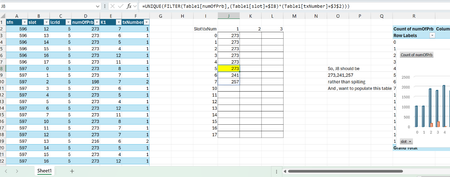
Dear Experts, Quick question, I have a data like this from Column A~F, and want to make a data like in Col J~L So, I want a summary , that for the slot0 && txnum==1, what are the unique values of numOfPrb, but in case of slot5, we have more than one unique value and it spills, could you please suggest a solution for this, I tried Filter function etc.. may be there's solution within , or if Groupby or Pivotby can help here. Attached is the worksheet, Br, AnupamSolved140Views0likes1CommentHow to write a script or any PQ or in Excel to download the zip files from a Webpage
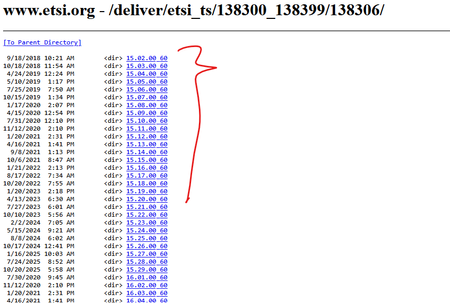
Dear Experts, Greetings! https://www.etsi.org/deliver/etsi_ts/138300_138399/138306/ Could you please help me on how to download the pdf.zip files from above for all the versions? Using a single command in Excel or PQ-option. Thanks in Advance, Br, AnupamSolved254Views1like5Comments