Forum Discussion

Question about categorizing transactions from bank statement in EXCEL
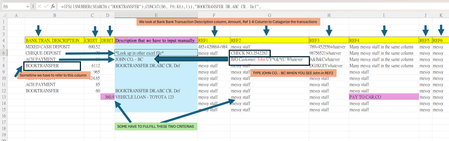
 May 23, 2024
=IFNA(
IFNA(
IFNA(
IFNA(
IFNA(
IFNA(
IFNA(INDEX(Filling!$A$2:$A$11,MATCH(1,ISNUMBER(SEARCH(Filling!$C$2:$C$11,$K2))*(Filling!$B$2:$B$11=$F2),0)),
INDEX(Filling!$A$2:$A$11,MATCH(TRUE,ISNUMBER(SEARCH(Filling!$C$2:$C$11,$H2)),0))
),
INDEX(Filling!$A$2:$A$11,MATCH(TRUE,ISNUMBER(SEARCH(Filling!$C$2:$C$11,$I2)),0))
),
INDEX(Filling!$A$2:$A$11,MATCH(TRUE,ISNUMBER(SEARCH(Filling!$C$2:$C$11,$J2)),0))
),
INDEX(Filling!$A$2:$A$11,MATCH(TRUE,ISNUMBER(SEARCH(Filling!$C$2:$C$11,$K2)),0))
),
INDEX(Filling!$A$2:$A$11,MATCH(TRUE,ISNUMBER(SEARCH(Filling!$C$2:$C$11,$L2)),0))
),
INDEX(Filling!$A$2:$A$11,MATCH(TRUE,ISNUMBER(SEARCH(Filling!$C$2:$C$11,$M2)),0))
),INDEX(Filling!$A$2:$A$11,MATCH(TRUE,ISNUMBER(SEARCH(Filling!$C$2:$C$11,$D2)),0)))In the formula in the bank statement file i've adapted the ranges from e.g. Filling!$A$2:$A$200 to Filling!$A$2:$A$11 because there is only criteria up to row 11 in the Filling sheet.
In addition the INDEX and MATCH highlighted in red is now evaluated in the first step of the whole nested formula. Before it was evaluated in the last step (but only if all other INDEX and MATCH formulas returned an error).
I understand that the formula i suggested earlier works well and i'm glad it does but can't explain how it works at the moment.
I saw you added a column "bank" in Tabelle2, have you changed the formula in Tabelle1 regarding this?
I have tried to refer to tabelle2 with $B:B and $C:C, it looks good.
But, once I tried to write:
INDEX(Tabelle2!$A$2:$A$18,MATCH(1,ISNUMBER(SEARCH(Tabelle2!$C:C,$F38))*(Tabelle2!$B:B=$D38),0))),
INDEX(Tabelle2!$A$2:$A$18,MATCH(1,ISNUMBER(SEARCH(Tabelle2!$C:C,$F38))*(Tabelle2!$B:B=$C38),0))),
which C38 and D38 shares the same reference, F38, it goes #REF.
Can we do it as when C38 on tabelle1 's figure match the one on tabelle 2's column B, at the same time either one figure on tabelle1 's B38, F38:L38 matches that one on tabelle 2's column C?
And
D38 on tabelle1 's figure match the one on tabelle 2's column B, at the same time either one figure on tabelle1 's B38, F38:L38 matches that one on tabelle 2's column C?
https://1drv.ms/x/s!AnmfMbKzoJKpjl7nFE6HeQsc79_a?e=La7Z7P
Sorry for the many questions.
INDEX(Tabelle2!$A$2:$A$18,MATCH(1,ISNUMBER(SEARCH(Tabelle2!$C:$C,$F38))*(Tabelle2!$B:$B=$D38),0)))
This formula doesn't work because the ranges don't have the same size. For example this
Tabelle2!$A$2:$A$18
is from row 2 to row 18 which means 17 rows altogether.
But this
Tabelle2!$C:$C
is equivalent to
Tabelle2!$C$1:$C$1048576
which means 1048576 rows altogether.
In addition a whole column shouldn't be referenced because of possible calculation performance issues.
If the data in Tabelle2 is from row 2 to row 18 then the formula is:
INDEX(Tabelle2!$A$2:$A$18,MATCH(1,ISNUMBER(SEARCH(Tabelle2!$C$2:$C$18,$F38))*(Tabelle2!$B$2:$B$18=$D38),0)))
Do the examples in sheet Tabelle1 in rows 40 to 48 show what you want to do? I've added criteria for this in sheet Tabelle2 but there isn't a formula yet. In the first step i would like to make sure that i correctly understand what should be done.
I didn't change the formula in column E regarding the added "bank" column in Tabelle2. The formula in column E doesn't refer to the "bank" column in Tabelle2. But after your latest reply i've changed the ranges and it returns "payment from Mary" in E38.
- udonloverMay 23, 2024Copper Contributor
Thank you very much for your kind support!
I have tried the formula in the office's spreadsheet, and it works perfectly.
I will keep in mind that the range for searching the separate worksheet should be limited to the rows inputted something, thank you for reminding me.
You move INDEX(Filling!$A$2:$A$11,MATCH(1,ISNUMBER(SEARCH(Filling!$C$2:$C$11,$K2))*(Filling!$B$2:$B$11=$F2),0)), to the beginning, this makes sure that "debit" and "REF4" column will be matched in the first place, so it won't be obstructed be other functions. Am I correct?
I will look into the details later to have a better understanding to this formula.
Once again, thank you very much for your super-patient and sincere support. I have learned a lot from it, and it facilitates my office work. Thanks a lot.
- OliverScheurichMay 23, 2024Gold Contributor
=IFNA(
IFNA(
IFNA(
IFNA(
IFNA(
IFNA(
IFNA(INDEX(Filling!$A$2:$A$11,MATCH(1,ISNUMBER(SEARCH(Filling!$C$2:$C$11,$K2))*(Filling!$B$2:$B$11=$F2),0)),
INDEX(Filling!$A$2:$A$11,MATCH(TRUE,ISNUMBER(SEARCH(Filling!$C$2:$C$11,$H2)),0))
),
INDEX(Filling!$A$2:$A$11,MATCH(TRUE,ISNUMBER(SEARCH(Filling!$C$2:$C$11,$I2)),0))
),
INDEX(Filling!$A$2:$A$11,MATCH(TRUE,ISNUMBER(SEARCH(Filling!$C$2:$C$11,$J2)),0))
),
INDEX(Filling!$A$2:$A$11,MATCH(TRUE,ISNUMBER(SEARCH(Filling!$C$2:$C$11,$K2)),0))
),
INDEX(Filling!$A$2:$A$11,MATCH(TRUE,ISNUMBER(SEARCH(Filling!$C$2:$C$11,$L2)),0))
),
INDEX(Filling!$A$2:$A$11,MATCH(TRUE,ISNUMBER(SEARCH(Filling!$C$2:$C$11,$M2)),0))
),INDEX(Filling!$A$2:$A$11,MATCH(TRUE,ISNUMBER(SEARCH(Filling!$C$2:$C$11,$D2)),0)))In the formula in the bank statement file i've adapted the ranges from e.g. Filling!$A$2:$A$200 to Filling!$A$2:$A$11 because there is only criteria up to row 11 in the Filling sheet.
In addition the INDEX and MATCH highlighted in red is now evaluated in the first step of the whole nested formula. Before it was evaluated in the last step (but only if all other INDEX and MATCH formulas returned an error).
I understand that the formula i suggested earlier works well and i'm glad it does but can't explain how it works at the moment.
- udonloverMay 22, 2024Copper ContributorThank you for the modified formula!
I will study the new formula in detail later but do not understand it well.
It seems that the look-up array of match functions becomes (Tabelle2!$B$2:$B$21=D6)*ISNUMBER(SEARCH(Tabelle2!$C$2:$C$21,$F6))
which column D is matched with all columns.
I have tested if I enter something N/A in the B column, and some value should be matched in F-K column, the function works perfectly, but I am not sure of the mechanism of it.
I would be pleased if you could explain how it works.
I apologize for bothering you too much.
I am looking forward to the Bank statement - returns 0.xlsx solution.
Again, thank you very much for your hard work and patience. - OliverScheurichMay 22, 2024Gold Contributor
=IFNA(
IFNA(
IFNA(
IFNA(
IFNA(
IFNA(
IFNA(
IFNA(
IFNA(
INDEX(Tabelle2!$A$2:$A$21,MATCH(1,ISNUMBER(SEARCH(Tabelle2!$C$2:$C$21,$H5))*(Tabelle2!$B$2:$B$21=$C5),0)),
INDEX(Tabelle2!$A$2:$A$21,MATCH(1,ISNUMBER(SEARCH(Tabelle2!$C$2:$C$21,$I5))*(Tabelle2!$B$2:$B$21=$D5),0))),
INDEX(Tabelle2!$A$2:$A$21,MATCH(1,(Tabelle2!$B$2:$B$21=D5)*ISNUMBER(SEARCH(Tabelle2!$C$2:$C$21,$F5)),0))),
INDEX(Tabelle2!$A$2:$A$21,MATCH(1,(Tabelle2!$B$2:$B$21=D5)*ISNUMBER(SEARCH(Tabelle2!$C$2:$C$21,$G5)),0))),
INDEX(Tabelle2!$A$2:$A$21,MATCH(1,(Tabelle2!$B$2:$B$21=D5)*ISNUMBER(SEARCH(Tabelle2!$C$2:$C$21,$H5)),0))),
INDEX(Tabelle2!$A$2:$A$21,MATCH(1,(Tabelle2!$B$2:$B$21=D5)*ISNUMBER(SEARCH(Tabelle2!$C$2:$C$21,$I5)),0))),
INDEX(Tabelle2!$A$2:$A$21,MATCH(1,(Tabelle2!$B$2:$B$21=D5)*ISNUMBER(SEARCH(Tabelle2!$C$2:$C$21,$J5)),0))),
INDEX(Tabelle2!$A$2:$A$21,MATCH(1,(Tabelle2!$B$2:$B$21=D5)*ISNUMBER(SEARCH(Tabelle2!$C$2:$C$21,$K5)),0))),
INDEX(Tabelle2!$A$2:$A$21,MATCH(TRUE,ISNUMBER(SEARCH(Tabelle2!$C$2:$C$21,$G5)),0))),
INDEX(Tabelle2!$A$2:$A$21,MATCH(TRUE,ISNUMBER(SEARCH(Tabelle2!$C$2:$C$21,$B5)),0)))You are welcome. Thank you for your examples. I've updated the formula in column E of sheet Tabelle1 in the attached file. The formula now distinguishes the different payment amounts from Joe. And "other loan - 345" is returned in cell E11.
I'll take a look at the Excel file (Bank statement - returns 0.xlsx) tomorrow and communicate the result.
- udonloverMay 22, 2024Copper Contributor
Thank you very much for your replies, you are extremely accommodating.
I noted that it is not preferred to do the calculation as a whole column, thank you for your advice.
Yes, the spreadsheet shows almost what I wanted.
In addition, for keyword joe, a loan with different amounts (500 and 124) should be considered as different loans.
The keyword joe may appear in different columns.
The following one should also be considered as a different loan payment
--------------------------------------------
Also, I have some trouble when trying this formula in my office.
I have attached an Excel file (Bank statement - returns 0.xlsx) in which I have changed the figure for reference.
I have entered something like:
=IFNA(
IFNA(
IFNA(
IFNA(
IFNA(
IFNA(
IFNA(
INDEX(Filling!$A$2:$A$200,MATCH(TRUE,ISNUMBER(SEARCH(Filling!$C$2:$C$200,$D2)),0)),
INDEX(Filling!$A$2:$A$200,MATCH(TRUE,ISNUMBER(SEARCH(Filling!$C$2:$C$200,$H2)),0))
),
INDEX(Filling!$A$2:$A$200,MATCH(TRUE,ISNUMBER(SEARCH(Filling!$C$2:$C$200,$I2)),0))
),
INDEX(Filling!$A$2:$A$200,MATCH(TRUE,ISNUMBER(SEARCH(Filling!$C$2:$C$200,$J2)),0))
),
INDEX(Filling!$A$2:$A$200,MATCH(TRUE,ISNUMBER(SEARCH(Filling!$C$2:$C$200,$K2)),0))
),
INDEX(Filling!$A$2:$A$200,MATCH(TRUE,ISNUMBER(SEARCH(Filling!$C$2:$C$200,$L2)),0))
),
INDEX(Filling!$A$2:$A$200,MATCH(TRUE,ISNUMBER(SEARCH(Filling!$C$2:$C$200,$M2)),0))
),
INDEX(Filling!$A$2:$A$200,MATCH(1,ISNUMBER(SEARCH(Filling!$C$2:$C$200,$K2))*(Filling!$B$2:$B$200=$F2),0))
)(Filling is the separate worksheet name)
As the result, the values appeared as 0
I guess because the value in column D goes false, which may affect the rest of the formula.
I also tested the loan payment and found out that the loan payment cannot be differed by different debit amounts.
I would be pleased if you could advise how to modify the formula in this situation.
I truly appreciate your help.