Forum Discussion

StapleRemover
Mar 03, 2024Copper Contributor
Monthly expenses and income - how to calculate formulas
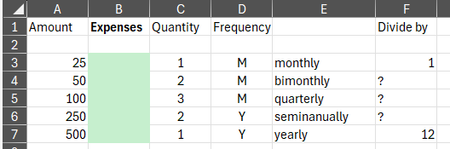
I'm working on creating a monthly expense and income chart for personal reasons. Expenses are paid monthly, quarterly, semiannually, and yearly. From a video I watched, I had the idea to use a Q...
 Mar 03, 2024
If I'm understanding your goal correctly with my solution, there are a few columns that can be removed. My recommendation is to table the data and use SWITCH to simplify the logic:
=SWITCH(
    [@Rate],
    "monthly", [@Amount] * 1,
    "bimonthly", [@Amount] * 6 / 12,
    "quarterly", [@Amount] * 4 / 12,
    "seminanually", [@Amount] * 2 / 12,
    "yearly", [@Amount] * 1 / 12,
    0
)

HansVogelaar
Mar 03, 2024MVP
See the attached workbook. I used Insert > Table to format the range as a table.

StapleRemover
Mar 03, 2024Copper Contributor
I now have my data in a table using Home > Format as Table and created headers.
I found the problem. Since my Rate column does not yet any semiannally amounts, I removed that from the Switch formula so it says:
=SWITCH([@Rate],"monthly",[@Amount]*1,"bimonthly",[@Amount]*6/12,"quarterly",[@Amount]*4/12,"yearly",[@Amount]*1/12,0)
It now shows all my Expenses correctly.
Patrick2788 and HansVogelaar - thanks much for all your help!
I found the problem. Since my Rate column does not yet any semiannally amounts, I removed that from the Switch formula so it says:
=SWITCH([@Rate],"monthly",[@Amount]*1,"bimonthly",[@Amount]*6/12,"quarterly",[@Amount]*4/12,"yearly",[@Amount]*1/12,0)
It now shows all my Expenses correctly.
Patrick2788 and HansVogelaar - thanks much for all your help!
- Patrick2788Mar 03, 2024Silver ContributorGlad to help. You're welcome!