Forum Discussion

MIN of a 3D Array to Spill
- May 26, 2023
I think the approaches you are exploring are important.
I regard the grid as providing the means for manipulating multidimensional arrays and displaying the results. To most users it provides a default referencing framework for formulas but I haven't used an A1-type reference for 8 years. I use defined names to declare a region of the sheet to be part of my model and to indicate what data should be placed within the region.
Back to your problem. I didn't bother about the individual parts of the 3D range (strictly speaking a 2D representation of the implied 3D array) but named the overall data structure 'Array3D'.
= LET(
      MINλ,     LAMBDA(x, MIN(x)),
      reshaped, WRAPCOLS(TOCOL(Array3D), 30),
      minima,   BYROW(reshaped, MINλ),
      DROP(WRAPROWS(minima, 5), -1)
  )
The differences are that I used LET to split a nested formula into steps, tended to run the longer array dimensions down the sheet rather than across, and named the Lambda function rather than using it as an anonymous function. All of these are minor aesthetic points and others are free to disagree.

Have you achieved a satisfactory solution to this question unaided?
Without an annotated workbook it is difficult to see the intent of this calculation. I am also left guessing what the quantities are that are referenced by name.
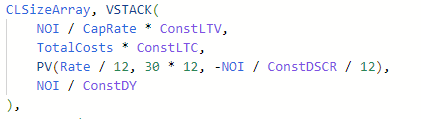
I think you are combining each row of a 2D array with another vector and two broadcast scalars.
It is not clear what is gained by combing the arrays with VSTACK rather than waiting to combe them within the calculation.
 jsmith-icodevelopmentMay 25, 2023Copper Contributor
PeterBartholomew1 Still haven't been able to find a solution to this. I have uploaded a desensitized and annotated version of the model to hopefully explain the situation better. The formula itself is quite long, but I have highlighted the problem area I am having.
https://www.dropbox.com/scl/fi/cbmckrmx4r6780v32we8s/Array-Help-Workbook.xlsx?dl=0&rlkey=gp3nupfg9d5j4zfqdo63n92pu
- PeterBartholomew1May 25, 2023Silver Contributor
I spent some time looking at your workbook, but some of the formulas are monsters!
It would help if you could replace nested IFs by SWITCH or, better still, arrange the data so that a simple XLOOKUP would return the appropriate values from the data table, both row and column.
A few more Lambda functions to encapsulate messy formulas might help (eg to expand in increments of 1% horizontally or 5% vertically. I have yet to look at how the rows and columns are combined but a Lambda function that combines a single pair of values could then be fed array values either directly or using MAP.
Where there are problems caused by scalars that need to be vectors EXPAND will work
= EXPAND(value,1,11,value)To expand a vector to return an array requires something a bit longer
= IF(boolean, vector)I will try to get some more time to look at the problem but, meanwhile, I hope that the comments still contribute something of relevance.