Forum Discussion

Lookup
 Nov 10, 2021
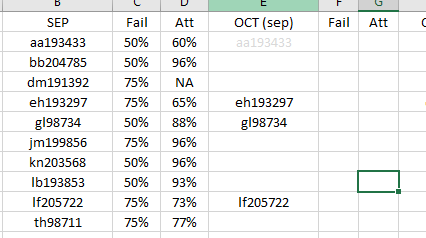
In F5:
=VLOOKUP(E5,$B$2:$D$11,2,FALSE)
In G5:
=VLOOKUP(E5,$B$2:$D$11,3,FALSE)
Are these the formulas you are looking for?
In F5:
=VLOOKUP(E5,$B$2:$D$11,2,FALSE)
In G5:
=VLOOKUP(E5,$B$2:$D$11,3,FALSE)
Are these the formulas you are looking for?
 rhockmanNov 10, 2021Brass Contributor
I used the Lookup function and it has one hiccup that I don't understand. The last value in column B is not in the OCT data and it is returning the previous cell data. UGH
- OliverScheurichNov 10, 2021Gold Contributor
LOOKUP understands that the search column is in ascending order and always looks for an approximate match. If there isn't an exact match, LOOKUP returns the next smaller value. Compare the search value in cell B3 and the return value in E3 in your file as well.
I suggest to apply VLOOKUP (exact match) instead of LOOKUP. You can try the formulas i suggested in my last post.