Forum Discussion

Leading and Trailing Zero in Excel

SergeiBaklan No worries... whatever works for you. 😃 I haven't used AFE or Excel Labs yet, because I find it easy enough to build and test custom lambda functions directly in a worksheet, then copy them to Name Manager if they'll be used multiple times in the workbook.
PeterBartholomew1 My main objective was to find a way to spill the results for the entire range using standard functions. It was merely a happy accident that it also returned an empty string for blank cells within the range, lol. Nice addition to cover that scenario in yours too.
As an aside, the two key elements that I found to be responsible for making the recursive lambda function spill the correct results for the entire range include:
- using the LET function to declare variables for the LEFT / RIGHT calculations first, then passing those variables to the next iteration of the function (as opposed to passing the calculation directly)
- using the OR function as part of the logical test to exit the recursive function
If either of the above methods were not used, it would return the #NUM! error or incorrect results, when attempting to pass it the entire range of values. For example, consider the following versions of a simplified LTrim function and the different results they produce:
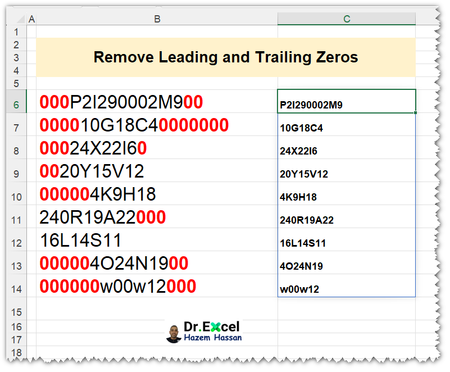
=LTrim(B6:B14, "0")
Version 1: no LET statement and no OR function used; returns #NUM!
LTrim =
LAMBDA(str,chr,
   IF(LEFT(str)=chr, LTrim(RIGHT(str, LEN(str)-1), chr), str)
)
Version 2: using LET statement, but no OR function; returns #NUM!
LTrim =
LAMBDA(str,chr,
   LET(
      a, IF(LEFT(str)=chr, RIGHT(str, LEN(str)-1), str),
      IF(LEFT(a)=chr, LTrim(a, chr), a)
   )
)
Version 3: using OR function, but no LET statement; returns INCORRECT results
LTrim =
LAMBDA(str,chr,
   IF(OR(LEFT(str)=chr), LTrim(RIGHT(str, LEN(str)-1), chr), str)
)
Version 4: using LET statement and OR function; returns CORRECT results
LTrim =
LAMBDA(str,chr,
   LET(
      a, IF(LEFT(str)=chr, RIGHT(str, LEN(str)-1), str),
      IF(OR(LEFT(a)=chr), LTrim(a, chr), a)
   )
)
All of the above versions work correctly when used with a single cell; however, only Version 4 will spill the correct results when used with a range. Not exactly sure what the reason is, but I thought it was interesting. Cheers!

OR(LEFT(str)=chr) returns single Boolean value, TRUE if at least one text starts from chr.
LEFT(str)=chr returns an array of boolean values, for each of them IF repeats LTrim or return a. That obviously doesn't work.