Forum Discussion

itsMonty
Oct 08, 2024Brass Contributor
Is there a way to get a cell to show alternate text based off deliberate characters found in a cell?
Hello, Is there a formula that will either place "Discount" or "Received" in a cell if another cell contains the characters "%" or "-" in it respectively. I have enclosed a image to better demon...
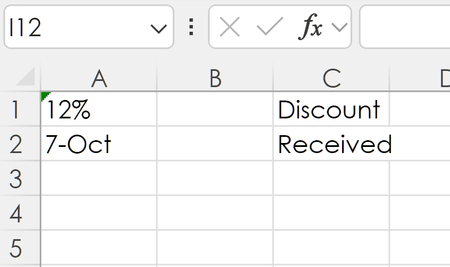
- Oct 08, 2024try
=IFS(ISNUMBER(SEARCH("%",A1)),"Discount",ISNUMBER(SEARCH("-",A1)),"Received",1,"")
if you have an older version of excel and IFS() doesn't work then:
=IF(ISNUMBER(SEARCH("%",A1)),"Discount",IF(ISNUMBER(SEARCH("-",A1)),"Received",""))

m_tarler
Oct 08, 2024Bronze Contributor
it would seem to me that in the template area A:L you would know what format each cell should be shown in and could manually set that format for those cells. Then the general format with just value in the column Q. Then 0.5 or 50% in column Q will show as 50% in the Percent Yield field or what not because that Percent Yield field is specifically set to 'Percent' format

itsMonty
Oct 08, 2024Brass Contributor
In this case, J36 source of data will come from Q19 which will either be:
- a percentage discount offer that is inputted before the invoice is sent out and then thereafter J37 and below will keep record of any receivables.
- Or there is no discount offer on the sent invoice, so any receivables coming in will be inputted as a date in Q19 to be shown in J36.
Here is a screen snip of what I mean
- itsMontyOct 11, 2024Brass ContributorSorry this took so long to respond to, its been crazy these past days.
Thank you for this additional information. My issue with adding the different descriptions in I36 and J36 is that the J36 description won't align under the description in I35.
However the last option given works perfectly, plus it requires only the one cell which is great.
Thank you again for sharing and following through to ensure I had options that best fit my application. It is appreciated. - m_tarlerOct 08, 2024Bronze Contributora slight alternative to avoid complexity (but I suppose that might be in the eye of the beholder if this is less complex):
move the formula for Received/Discount to G36 (right justified) and then in I36 (formatted as Date) is something like:
=IF(G36="Received", Q19, "")
and then in J36 (formatted as Percent) is something similar:
=IF(G36="Discount", Q19, "")
Then they are in 2 different cells and each formatted accordingly (no conditional formatting needed)
BTW the CELL("format",) function is not compatible with online Excel or mobile so if you plan to use either of those options you might want an alternative. for example using the text trick you were using or just adding another cell in the Q column so if Q19 is the "DISCOUNT" cell then Q20 is the "RECEIVED" cell (yes you will have an extra key stroke to 'ENTER' over/past one or the other. But then you can easily compare.
A last option to consider is dependent on what ELSE could be in Q19. You said if "%", if "date", else leave blank but what would be entered then? if you know that would be blank or text or even only numbers >1 but less than maybe 30K (i.e. less than the value for 1982) then you could just based it on the value:
=IFS(NOT(ISNUMBER(Q19)),"", Q19<=1, "Discount", Q19>30000, "Received", 1, "")