Forum Discussion

Index match not working on 365 for mac
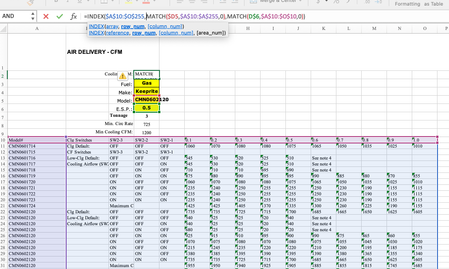

im away from my computer and can’t look at your sheet just yet but to answer your questions:
Im in HVAC design and these are a manufactures fan specs for several sizes of a specific model. ESP stands for External Static Pressure and is a pressure rating a piece of equipment uses to determine how much air the equipment is able to move. These are lab tested numbers. Currently when I design a system I have to reference this data manually but I am trying to automate my process as much as possible.
currently another calculation in my report tells me the model # and ESP and minimum air volume based on my hvac design calculations. I then have to pick the closest air volume in the data >= the minimum air colume. It takes me seconds manually which is why I thought it would be easy in excel but realizing it is more complicated than I originally thought. Lol.

I then have to pick the closest air volume in the data >= the minimum air colume. It takes me seconds manually which is why I thought it would be easy in excel but realizing it is more complicated than I originally thought.
It may not be all that complicated in fact, although shaving a few seconds off of what is already only seconds may not be worth much more effort. I think the challenge (for me) is understanding the data more deeply, and therefore how to navigate the maze to automate that process. You DO understand the data, and inevitably take for granted some of the process your mind goes through in guiding you to the point. The challenge is to get that out into words that make sense to me....a challenge made more difficult by the medium of this forum.
- mathetesApr 11, 2023Gold Contributor
Wow! That is quite a solution. I'm pretty sure that a single formula could accomplish it, but it will take some time percolating. I see that you employed LAMBDA in one of the new formulas. That confirms that you're quite sophisticated about Excel's more advanced (recent) functions. So I assume you've also been exposed to LET. And it's LET that my intuition tells me would be the way to incorporate all of these into a single formula, quite possible then converting all of that into a single custom (LAMBDAized) function.
- Chris_WalshApr 11, 2023Copper Contributor
Here is the formula working with a separate lookup table. Let me know if this makes anything in one formula possible.
Thanks.
- mathetesApr 09, 2023Gold ContributorPlease. If a separate true/false table can be employed it still might be possible to get a single formula. So please share your (interim) solution.
- Chris_WalshApr 09, 2023Copper Contributor
Thanks for looking into it for me. I figured out a way to accomplish the task with a separate true false look up table. So at least it’s working for me. Just thought it must be possible in one formula… maybe it is but certainly beyond my current skill level in excel.
again, thanks and if you’d like to see how I “solved it”, let me know and I’ll attach the sheet.
have a great day.