Forum Discussion

INDEX & MATCH interrupted by Inconsistent Dates
 Dec 20, 2019
Hi,
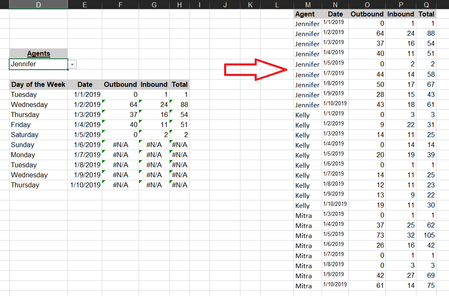
The formula you use isn't correct, and some dates in column N are treated as text not as numeric dates.
Please check out the fix in the attached file.
Regards

What steps did you EXACTLY take to fix the dates in the sample i sent you?
I've been told the solution to my dates problem before and no matter what I do even following yours and Allan's lead right now i'm unable to fix the dates problem aside from individually formatting the cells and than retyping in the correct date which is not feasible for 6000 rows... you have the 30 rows from the sample, what did you to in those 30 rows as i see their Syntax is still the same Haytham Amairah

shade206I have written an article here which describes different techniques - http://bit.ly/2Hvig1h
For your data, I selected the problematic dates (MM-DD-YYYY ones). Clicked Data > Text to Columns. Bypassed the first two steps as insignificant. On Step 3 I changed the Date option to M-D-Y.
- shade206Dec 20, 2019Brass Contributor
Thank you sir, that does most definitely work in the sample, but sadly those same steps will not correct the issue in my actual worksheet.... its odd because i deliberately copied the dates from my actual worksheet into the sample... Alan_Murray
- Alan_MurrayDec 20, 2019MVPOk, we would need to know what is causing the text formatting to lead us to a solution. The problem in the sample was the mixture of D-M-Y and M-D-Y formats.
If that is not true on the actual worksheet, then something else is causing it and made need a different response.- shade206Dec 20, 2019Brass Contributor
Here is a more complete worksheet so you can see what i'm dealing with... Alan_Murray