Forum Discussion

MAVOTRP
Mar 14, 2024Copper Contributor
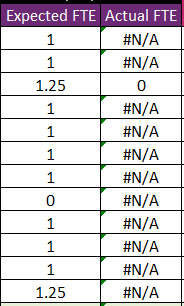
IFERROR formula still returning #N/A
Hello. I have a formula to return either 0 or the cell value * the corresponding match in Table 1: =IF(AND(ISNUMBER(MATCH(1, (Table1[Name adjusted]=A6)*(Table1[Leave Date]=$C$4), 0)), INDEX(Tabl...

SandeepMarwal
Mar 18, 2024Brass Contributor
Highlight this portion of your formula in formula bar:
Press F9.
Check what it is returning.
if it is returning #N/A, then problem is with your logical test, not in the iferror part.

MAVOTRP
Mar 18, 2024Copper Contributor
Hi Sandeep. Thank you for your assistance. I have followed your instruction and it is returning #N/A so it seems that the problem is with the logical test. Would you be able to provide guidance on how to adjust?
AND(ISNUMBER(MATCH(1, (Table1[Name adjusted]=A10)*(Table1[Leave Date]=$C$4), 0)), INDEX(Table1[Activity duration - For part-day availability], MATCH(A10&$C$4, Table1[Name adjusted]&Table1[Leave Date], 0))=1)
I have extracted the logical test component of the formula. I am trying to achieve the following:
Sheet 1
Column A Name
Column C Numerical value (generally 1 or 0)
Sheet 2
Table 1
Column A Name adjusted
Column B Leave Date
Column C Activity duration - For part-day availability
The formula is checking all three columns in Table 1 on Sheet 2 for a match. If there is a match for all three, and the value in Column C is 100%, return 0. If it is NOT a match for all three, or Column C is not 100%, e.g., 25%, then return value in C6 (Sheet 1) * the corresponding value in Table 1 Column C (25% / 50% / 75%).
The formula works fine when there is a match for all three, and the value in Column C is 100%, the formula returns 0. However, when it is NOT a match for all three or it is not 100%, it returns #N/A instead of returning the value in C6 (Sheet 1) * the corresponding value in Table 1 Column C (25% / 50% / 75%).
AND(ISNUMBER(MATCH(1, (Table1[Name adjusted]=A10)*(Table1[Leave Date]=$C$4), 0)), INDEX(Table1[Activity duration - For part-day availability], MATCH(A10&$C$4, Table1[Name adjusted]&Table1[Leave Date], 0))=1)
I have extracted the logical test component of the formula. I am trying to achieve the following:
Sheet 1
Column A Name
Column C Numerical value (generally 1 or 0)
Sheet 2
Table 1
Column A Name adjusted
Column B Leave Date
Column C Activity duration - For part-day availability
The formula is checking all three columns in Table 1 on Sheet 2 for a match. If there is a match for all three, and the value in Column C is 100%, return 0. If it is NOT a match for all three, or Column C is not 100%, e.g., 25%, then return value in C6 (Sheet 1) * the corresponding value in Table 1 Column C (25% / 50% / 75%).
The formula works fine when there is a match for all three, and the value in Column C is 100%, the formula returns 0. However, when it is NOT a match for all three or it is not 100%, it returns #N/A instead of returning the value in C6 (Sheet 1) * the corresponding value in Table 1 Column C (25% / 50% / 75%).