Forum Discussion

IF Formula does not return corresponding "true" value
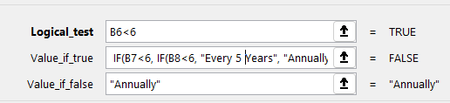

JoeUser2004 here is my entire formula and spreadsheet:
I have cell C8 selected; it is supposed to be returning "Annually" but instead it returned "False"

So if Excel considers B6 > 6 and B7 > 6, the formula returns FALSE because you do not have a "value if false" part for the expression
IF(B7<6, IF(....) [, missing value-if-false part here]).
Perhaps you want:
IF(B6<6, IF(B7<6, IF(...), "Annually"), "Annually")
or more simply:
IF(AND(B6<6, B7<6, B8<6), "Once Every 5 Years", "Annually")
Nevertheless....
My guess is: B6 is text, not numeric. Confirm with =ISTEXT(B6). Looks can be deceiving, and the format of the cell does not matter.
It is also possible that B7 is text. Again, confirm with =ISTEXT(B7). But even if B7 is numeric, it appears to be the number 7. So B7<6 would indeed be false.
(Excel considers all text to be greater than any numeric value.)