Forum Discussion

How to filter by subtotals if over $5000 - Pivot Table/VBA?
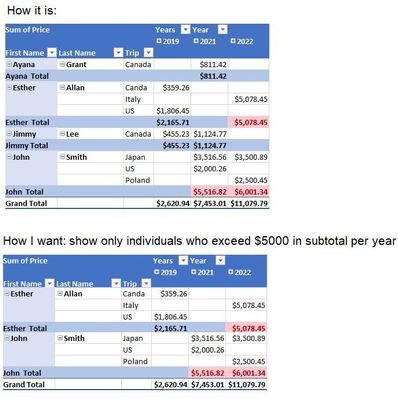
- Jun 19, 2022
We may play with Power Query. For such model
first prepare the source table
let
    Source = Excel.CurrentWorkbook(){[Name="Table1"]}[Content],
    #"Changed Type" = Table.TransformColumnTypes(
        Source,
        {
            {"Year", type date},
            {"Price", Currency.Type},
            {"Trip", type text}
        }         ),
    #"Merged Columns" = Table.CombineColumns(
        #"Changed Type",
        {"First Name", "Last Name"},
        Combiner.CombineTextByDelimiter(" ", QuoteStyle.None),"Name"),
    #"Extracted Year" = Table.TransformColumns(
        #"Merged Columns",
        {{"Year", Date.Year, Int64.Type}})
in
    #"Extracted Year"
Next generate list of people who spent more than 5000 annually. We ignore years with no trips.
let
    Source = Table,
    Bar = Excel.CurrentWorkbook(){[Name="PriceBar"]}[Content]{0}[Column1],

    #"Grouped Rows" = Table.Group(
        Source,
        {"Name", "Year"},
        { {"Total", each List.Sum([Price]), type nullable number}}),
    #"Grouped Rows1" = Table.Group(
        #"Grouped Rows",
        {"Name"}, {{"Data", each List.Min( _[Total] ) > Bar }}),
    #"Filtered Rows" = Table.SelectRows(
        #"Grouped Rows1",
        each ([Data] = true)),
    #"Removed Other Columns" = Table.SelectColumns(
        #"Filtered Rows",{"Name"}),
    Name = #"Removed Other Columns"[Name]
in
    Name
Finally filter source table by these names and land query to the grid as PivotTable
let
    Source = Table,
    #"Filtered Rows" = Table.SelectRows(
        Source,
        each List.Contains(#"Names Filtered", [Name] ))
in
    #"Filtered Rows"

SergeiBaklan Thank you so much, Sergei. Can this method be used for a pre-existing Excel Table? Thank you.

Another way could be with DAX measure only. Load you table and parameter to data model and use measure like
Cost :=
VAR bar =
    VALUES ( PriceBar[Bar] )
RETURN
    SUMX (
        Table1,
        IF (
            CALCULATE (
                SUM ( Table1[Price] ),
                ALLEXCEPT ( Table1, Table1[Name], Table1[Year (Year)] )
            ) > bar,
            Table1[Price],
            BLANK ()
        )
    )
Result is the same, see second PivotTable
- zander140Jun 23, 2022Copper ContributorHi Sergei, I sent you a direct message. Thank you.
- SergeiBaklanJun 21, 2022Diamond Contributor
Perhaps you may share small sample file removing sensitive information? Your dates could be actually texts and/or format is not the same as default one for your Power Query locale.
You may right click on the column on Source step, select column and from right click menu select
and here something like
Perhaps something else, hard to say without sample file.
- zander140Jun 21, 2022Copper Contributor
Hi Sergei, I thought everything was fine but when I put in new data and press refresh for the dataset I adapted your model for, I am getting the following error. Can you please help resolve this. Thanks.
- SergeiBaklanJun 20, 2022Diamond Contributor
zander140 , you are welcome, glad to help
- zander140Jun 20, 2022Copper ContributorThank you, Sergei. Thanks to you, I learned Power Query and applied it to my other project to do the same function. Power Query is amazing. I will look into DAX as well. Thank you.