Forum Discussion

Jagodragon
May 24, 2022Iron Contributor
Find if range has pictures [Solved with ongoing improvements?]
I have to find if each cell in a range has a picture in it. I have the script below running in VB and need to figure out how to make it work for a range of cells. Function HASpic(Cell...
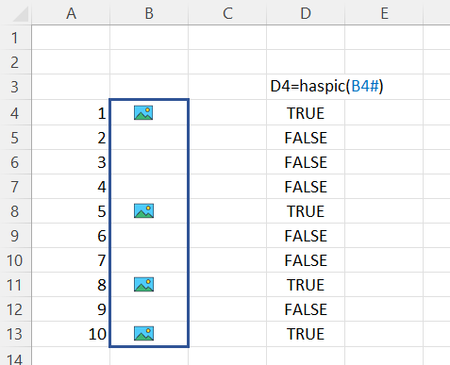
- May 27, 2022
Jagodragon good point. this should address that issue (i.e. search for pictures on the same sheet as the range your select)
Function HASpicR(x As Range) As Variant

'  Yields TRUE if the cell identified by row and col contains a picture,
'  otherwise FALSE
    Application.Volatile

   Dim p As Range
   Dim r, c         As Long
    Dim s() As Variant

   r = x.Rows.Count
   c = x.Columns.Count
   ReDim s(1 To r, 1 To c)

   For Each Pict In x.Parent.Pictures
      Set p = Pict.TopLeftCell
      If Not Intersect(p, x) Is Nothing Then
         s(p.Row - x.Row + 1, p.Column - x.Column + 1) = True
      End If
   Next Pict
   HASpicR = s

End Function

Jagodragon
May 27, 2022Iron Contributor
Well, this is now the best response. But, I don't know how to change that flag..

mtarler
May 27, 2022Silver Contributor
You can go to the ... of the message and select not best response and then select new but that's ok, I appreciate the "Likes" just as well and knowing that it was helpful 🙂
- JagodragonMay 27, 2022Iron ContributorReally? It's that simple? OMG I'm such a newb... Thank you!
- mtarlerMay 27, 2022Silver Contributor
Jagodragon good point. this should address that issue (i.e. search for pictures on the same sheet as the range your select)
Function HASpicR(x As Range) As Variant ' Yields TRUE if the cell identified by row and col contains a picture, ' otherwise FALSE Application.Volatile Dim p As Range Dim r, c As Long Dim s() As Variant r = x.Rows.Count c = x.Columns.Count ReDim s(1 To r, 1 To c) For Each Pict In x.Parent.Pictures Set p = Pict.TopLeftCell If Not Intersect(p, x) Is Nothing Then s(p.Row - x.Row + 1, p.Column - x.Column + 1) = True End If Next Pict HASpicR = s End Function - JagodragonMay 27, 2022Iron Contributor
I actually need this to work across worksheets so I've made a slight change. this works (and I'm happy with it), but I would rather not have to include the SHT string as an optional variable.
also, I just thought i would share incase some one else had the same need.
Function HASpicR(x As Range, Optional SHT As String = "") As Variant ' Yields TRUE if the cell identified by row and col contains a picture, ' otherwise FALSE Application.Volatile Dim p As Range Dim r, c As Long Dim s() As Variant r = x.Rows.Count c = x.Columns.Count ReDim s(1 To r, 1 To c) If SHT = "" Then For Each Pict In Application.Caller.Parent.Pictures Set p = Pict.TopLeftCell If Not Intersect(p, x) Is Nothing Then s(p.Row - x.Row + 1, p.Column - x.Column + 1) = True End If Next Pict Else For Each Pict In Worksheets(SHT).Shapes Set p = Pict.TopLeftCell If Not Intersect(p, x) Is Nothing Then s(p.Row - x.Row + 1, p.Column - x.Column + 1) = True End If Next Pict End If HASpicR = s End Function - JagodragonMay 27, 2022Iron ContributorDONE! thank you