Forum Discussion

Custom Excel List help!
Excel version 2109
I'm trying to create a custom list. It consists of two columns.
The first column (column a) is just numbers but they are not ascending or descending, they're in a custom order.
I need the second column (column B) to correspond to column A. Column B in descending order "1C, 2C, 3C" along with the column A number in brackets. See image below.
Is there any way to create a formula to complete this? It's super long to do manually.
Thanks!
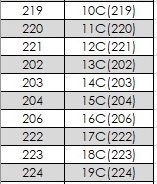
=ROW()&"C("&A1&")"
Enter above formula in B1 and copy down.
I understand you want 1C, 2C, 3C and so on in column B in ascending order according to your example.
2 Replies
 OliverScheurichGold Contributor
=ROW()&"C("&A1&")"
Enter above formula in B1 and copy down.
I understand you want 1C, 2C, 3C and so on in column B in ascending order according to your example.
 BCBrookeCopper Contributor
Thank you!! This saved me so much time!