Forum Discussion

Bourrinho
Feb 28, 2024Copper Contributor
Count the number of dates that fall within a certain month
Hi, I'm looking for a formula that counts the number of dates in a list fall within a certain month. If at all possible without intermediate steps. To be more specific, I'm wondering if there's...
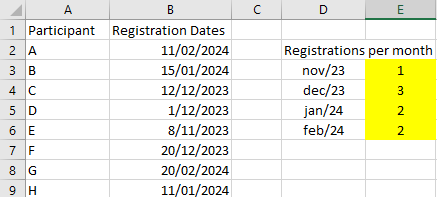
- Feb 29, 2024
In general that could be
=SUMPRODUCT(
    ( IFERROR( N(MONTH($B$2:$D$7)), 0) = MONTH($F2) ) *
    ( IFERROR( N(YEAR($B$2:$D$7)), 0) = YEAR($F2) )*
    ISODD( ROW($B$2:$D$7) )
)
by adding one more criteria. Details depends on content, do you mean odd row within the grid, or odd row counting from the start of the range.

SergeiBaklan
Feb 28, 2024Diamond Contributor
Nope, PivotTable won't work such way, at least directly. As variant that could be like
=SUMPRODUCT( --(MONTH(range)=MONTH(fromDateCell))assuming in range are dates

Bourrinho
Feb 28, 2024Copper Contributor
Problem here could be that months can have a different year. (could e.g. be Feb 2023 and 2024 in list)
- SergeiBaklanFeb 28, 2024Diamond Contributor
- BourrinhoFeb 29, 2024Copper ContributorThis formula works. Thanks!
Just an advanced question: is it also possible to look only look for the dates in odd rows with the same formula?- SergeiBaklanFeb 29, 2024Diamond Contributor
In general that could be
=SUMPRODUCT(
    ( IFERROR( N(MONTH($B$2:$D$7)), 0) = MONTH($F2) ) *
    ( IFERROR( N(YEAR($B$2:$D$7)), 0) = YEAR($F2) )*
    ISODD( ROW($B$2:$D$7) )
)
by adding one more criteria. Details depends on content, do you mean odd row within the grid, or odd row counting from the start of the range.