Forum Discussion

tytds
Feb 02, 2022Copper Contributor
Apply different date filters to specific column values in a pivot table
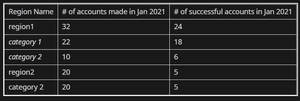
Suppose I have the following pivot table from one data source The source data is essentially a spreadsheet of accounts which indicates 3 items (3 columns)- date account was created, date ...

SergeiBaklan
Feb 04, 2022Diamond Contributor
tytds
thank you, but that doesn't explain the logic. In sample file we have 12 accounts submitted in January. Each of them has Date Successful, thus all 12 of January accounts are successful.
Or you mean count successful accounts only if Date Successful is in January, doesn't matter when they were submitted?
Or some other logic?

tytds
Feb 05, 2022Copper Contributor
When you setup a pivot table, there should be number of submitted accounts as a column, number of successful accounts in another column, and the hit ratio (simple formula successful/submitted). The number of submitted accounts in January should be 12. There should be a "sub column" for months. The number of successful accounts in the January column should be 4, meaning, those accounts turned successful in January. The number of successful accounts in March column (regardless when they were submitted) should be 2
- SergeiBaklanFeb 06, 2022Diamond Contributor
You may start from
Relationships between tables in a Data Model (microsoft.com)
- tytdsFeb 06, 2022Copper ContributorIs there a tutorial on creating the relationships from the first picture? I'm not familiar with creating the measures either
- SergeiBaklanFeb 05, 2022Diamond Contributor
With that you need to create separate Date (aka Calendar) table. That could be done by Power Query or directly in PowerPivot. Make relationships with main table and hide date fields in the latest.
Create measures
Submitted:=CALCULATE (
    COUNTROWS ( Range ),
    USERELATIONSHIP ( 'Calendar'[Date], Range[Date Submitted] )
)
and
Successed:=CALCULATE (
    COUNTROWS ( Range ),
    USERELATIONSHIP ( 'Calendar'[Date], Range[Date Successful] )
)
use them in PivotTable