Pinned Posts

Forum Widgets
Latest Discussions

Excluding break-glass account from MFA Registration Campaign – impact on existing users?
Hi everyone, I'm currently reviewing the configuration of a break-glass (emergency access) account in Microsoft Entra ID and I have a question regarding MFA registration enforcement. We currently have an Authentication Methods Registration Campaign enabled for all users for quite some time. We identified that the break-glass account is being required to register MFA due to this configuration. The account is already excluded from all Conditional Access policies that enforce MFA, so the behavior appears to be specifically coming from the registration campaign (Microsoft Authenticator requirement). Our goal is to exclude this break-glass account from the MFA registration requirement, following Microsoft best practices. My question is: If we edit the existing registration campaign and add an exclusion (user or group), could this have any impact on users who are already registered? Specifically, could it re-trigger the registration process or affect existing MFA configurations? We want to avoid any unintended impact, considering this campaign has been in place for a long time. Has anyone implemented a similar exclusion for break-glass accounts within an active registration campaign? Any insights or confirmation would be really helpful. Thanks in advance!schiachrisApr 17, 2026Copper Contributor45Views0likes1Comment
Running Commands Across VM Scale Set Instances Without RDP/SSH Using Azure CLI Run Command
If you’ve ever managed an Azure Virtual Machine Scale Set (VMSS), you’ve likely run into this situation: You need to validate something across all nodes, such as: Checking a configuration value Retrieving logs Applying a registry change Confirming runtime settings Running a quick diagnostic command And then you realize: You’re not dealing with two or three machines you’re dealing with 40… 80… or even hundreds of instances. The Traditional Approach (and Its Limitations) Historically, administrators would: Open RDP connections to Windows nodes SSH into Linux nodes Execute commands manually on each instance While this may work for a small number of machines, in real‑world environments such as: Azure Batch (user‑managed pools) Azure Service Fabric (classic clusters) VMSS‑based application tiers This approach quickly becomes: Operationally inefficient Time‑consuming Sometimes impossible Especially when: RDP or SSH ports are blocked Network Security Groups restrict inbound connectivity Administrative credentials are unavailable Network configuration issues prevent guest access Azure Run Command To address this, Azure provides a built‑in capability to execute commands inside virtual machines through the Azure control plane, without requiring direct guest OS connectivity. This feature is called Run Command. You can review the official documentation here: Run scripts in a Linux VM in Azure using action Run Commands - Azure Virtual Machines | Microsoft Learn Run scripts in a Windows VM in Azure using action Run Commands - Azure Virtual Machines | Microsoft Learn Run Command uses the Azure VM Agent installed on the virtual machine to execute PowerShell or shell scripts directly inside the guest OS. Because execution happens via the Azure control plane, you can run commands even when: RDP or SSH ports are blocked NSGs restrict inbound access Administrative user configuration is broken In fact, Run Command is specifically designed to troubleshoot and remediate virtual machines that cannot be accessed through standard remote access methods. Prerequisites & Restrictions. Before using Run Command, ensure the following: VM Agent installed and in Ready state Outbound connectivity from the VM to Azure public IPs over TCP 443 to return execution results. If outbound connectivity is blocked, scripts may run successfully but no output will be returned to the caller. Additional limitations include: Output limited to the last 4,096 bytes One script execution at a time per VM Interactive scripts are not supported Maximum execution time of 90 minutes Full list of restrictions and limitations are available here: https://learn.microsoft.com/en-us/azure/virtual-machines/windows/run-command?tabs=portal%2Cpowershellremove#restrictions Required Permissions (RBAC) Executing Run Command requires appropriate Azure RBAC permissions. Action Permission List available Run Commands Microsoft.Compute/locations/runCommands/read Execute Run Command Microsoft.Compute/virtualMachines/runCommand/action The execution permission is included in: Virtual Machine Contributor role (or higher) Users without this permission will be unable to execute remote scripts through Run Command. Azure CLI: az vm vs az vmss When using Azure CLI, you’ll encounter two similar‑looking commands that behave very differently. az vm run-command invoke Used for standalone VMs Also used for Flexible VM Scale Sets Targets VMs by name az vmss run-command invoke Used only for Uniform VM Scale Sets Targets instances by numeric instanceId (0, 1, 2, …) Example: az vmss run-command invoke --instance-id <id> Unlike standalone VM execution, VMSS instances must be referenced using the parameter "--instance-id" to identify which scale set instance will run the script. Important: Uniform vs Flexible VM Scale Sets This distinction is critical when automating Run Command execution. Uniform VM Scale Sets Instances are managed as identical replicas Each instance has a numeric instanceId Supported by az vmss run-command invoke Flexible VM Scale Sets Each instance is a first‑class Azure VM resource Instance identifiers are VM names, not numbers az vmss run-command invoke is not supported Must use az vm run-command invoke per VM To determine which orchestration mode your VMSS uses: az vmss show -g "${RG}" -n "${VMSS}" --query "orchestrationMode" -o tsv Windows vs Linux Targets Choose the appropriate command ID based on the guest OS: Windows VMs → RunPowerShellScript Linux VMs → RunShellScript Example Scenario - Retrieve Hostname From All VMSS Instances The following examples demonstrate how to retrieve the hostname from all VMSS instances using Azure CLI and Bash. Flexible VMSS, Bash (Azure CLI) RG="<ResourceGroup>" VMSS="<VMSSName>" SUBSCRIPTION_ID="<SubscriptionID>" az account set --subscription "${SUBSCRIPTION_ID}" VM_NAMES=$(az vmss list-instances \ -g "${RG}" \ -n "${VMSS}" \ --query "[].name" \ -o tsv) for VM in $VM_NAMES; do echo "Running on VM: $VM" az vm run-command invoke \ -g "${RG}" \ -n "$VM" \ --command-id RunShellScript \ --scripts "hostname" \ --query "value[0].message" \ -o tsv done Uniform VMSS, Bash (Azure CLI) RG="<ResourceGroup>" VMSS="<VMSSName>" SUBSCRIPTION_ID="<SubscriptionID>" az account set --subscription "${SUBSCRIPTION_ID}" INSTANCE_IDS=$(az vmss list-instances -g "${RG}" -n "${VMSS}" --query "[].instanceId" -o tsv) for ID in $INSTANCE_IDS; do echo "Running on instanceId: $ID" az vmss run-command invoke \ -g "${RG}" \ -n "${VMSS}" \ --instance-id "$ID" \ --command-id RunShellScript \ --scripts "hostname" \ --query "value[0].message" \ -o tsv done Summary Azure Run Command provides a scalable method to: Execute diagnostics Apply configuration changes Collect logs Validate runtime settings …across VMSS instances without requiring RDP or SSH connectivity. This significantly simplifies operational workflows in large‑scale compute environments such as: Azure Batch (user‑managed pools) Azure Service Fabric classic clusters VMSS‑based application tiersvdivizinschiApr 15, 2026Microsoft33Views0likes0Comments
Excited to share my latest open-source project: KubeCost Guardian
After seeing how many DevOps teams struggle with Kubernetes cost visibility on Azure, I built a full-stack cost optimization platform from scratch. 𝗪𝗵𝗮𝘁 𝗶𝘁 𝗱𝗼𝗲𝘀: ✅ Real-time AKS cluster monitoring via Azure SDK ✅ Cost breakdown per namespace, node, and pod ✅ AI-powered recommendations generated from actual cluster state ✅ One-click optimization actions ✅ JWT-secured dashboard with full REST API 𝗧𝗲𝗰𝗵 𝗦𝘁𝗮𝗰𝗸: - React 18 + TypeScript + Vite - Tailwind CSS + shadcn/ui + Recharts - Node.js + Express + TypeScript - Azure SDK (@azure/arm-containerservice) - JWT Authentication + Azure Service Principal 𝗪𝗵𝗮𝘁 𝗺𝗮𝗸𝗲𝘀 𝗶𝘁 𝗱𝗶𝗳𝗳𝗲𝗿𝗲𝗻𝘁: Most cost tools show you generic estimates. KubeCost Guardian reads your actual VM size, node count, and cluster configuration to generate recommendations that are specific to your infrastructure not averages. For example, if your cluster has only 2 nodes with no autoscaler enabled, it immediately flags the HA risk and calculates exactly how much you'd save by switching to Spot instances based on your actual VM size. This project is fully open-source and built for the DevOps community. ⭐ GitHub: https://github.com/HlaliMedAmine/kubecost-guardian This project represents hours of hard work, and passion. I decided to make it open-source so everyone can benefit from it 🤝 ,If you find it useful, I’d really appreciate your support . Your support motivates me to keep building and sharing more powerful projects 👌. More exciting ideas are coming soon… stay tuned! 🔥.52Views0likes0CommentsBuilding a Production-Ready Azure Lighthouse Deployment Pipeline with EPAC
Recently I worked on an interesting project for an end-to-end Azure Lighthouse implementation. What really stood out to me was the combination of Azure Lighthouse, EPAC, DevOps, and workload identity federation. The deployment model was so compelling that I decided to build and validate the full solution hands-on in my own personal Azure tenants. The result is a detailed article that documents the entire journey, including pipeline design, implementation steps, and the scripts I prepared along the way. You can read the full article here70Views0likes1CommentAI-102 Develop computer vision solutions in Azure (deprecated)
I have my AI-102 certification exam next week, but Microsoft Learn shows the following: Develop computer vision solutions in Azure (deprecated) Does that mean that section won't be covered on the exam?SolvedAnSoMo28Apr 10, 2026Copper Contributor125Views0likes2CommentsPipeline Intelligence is live and open-source real-time Azure DevOps monitoring powered by AI .
Every DevOps team I've worked with had the same problem: Slow pipelines. Zero visibility. No idea where to start. So I stopped complaining and built the solution. So I built something about it. ⚡ Pipeline Intelligence is a full-stack Azure DevOps monitoring dashboard that: ✅ Connects to your real Azure DevOps organization via REST API ✅ Detects bottlenecks across all your pipelines automatically ✅ Calculates exactly how much time your team is wasting per month ✅ Uses Gemini AI to generate prioritized fixes with ready-to-paste YAML solutions ✅ JWT-secured, Docker-ready, and fully open-source Tech Stack: → React 18 + Vite + Tailwind CSS → Node.js + Express + Azure DevOps API v7 → Google Gemini 1.5 Flash → JWT Authentication + Docker 𝗪𝗵𝗮𝘁 𝗺𝗮𝗸𝗲𝘀 𝗶𝘁 𝗱𝗶𝗳𝗳𝗲𝗿𝗲𝗻𝘁? Most tools show you generic estimates. Pipeline Intelligence reads your actual cluster config, node count, and pipeline structure and gives you recommendations specific to your infrastructure. 🎯 This year, I set myself a personal challenge: Build and open-source a series of production-grade tools exclusively focused on Azure services tools that solve real problems for real DevOps teams. This project represents weeks of research, architecture decisions, and late-night debugging sessions. I'm sharing it with the community because I believe great tooling should be accessible to everyone not locked behind enterprise paywalls. If this resonates with you, I have one simple ask: 👉 A like, a comment, or a share takes 3 seconds but it helps this reach the DevOps engineers who need it most. Your support is what keeps me building. ❤️ GitHub: https://github.com/HlaliMedAmine/pipeline-intelligence40Views0likes0Comments
Azure support team not responding to support request
I am posting here because I have not received a response to my support request despite my plan stating that I should hear back within 8 hours. It has now gone a day beyond that limit, and I am still waiting for assistance with this urgent matter. This issue is critical for my operations, and the delay is unacceptable. The ticket/reference number for my original support request was 2410100040000309. And I have created a brand new service request with ID 2412160040010160. I need this addressed immediately._Adrian_Apr 08, 2026Copper Contributor833Views1like8Comments
Azure Devops - Best way to create a burndown chart for an Epic
Hi, What is the best way to create a chart that would should the burndown (or burnup) of Story Points completed on User Stories under one or more Epics? I have never been able to do this within Azure DevOps itself. Have just picked up PowerBi and can't do it there either! Regards MMaseyBoyApr 08, 2026Copper Contributor1.8KViews0likes2CommentsHow to Use the Azure Pricing Calculator Effectively – A Step-by‐Step Guide
When you’re planning to move workloads to Microsoft Azure, one of the first questions that comes up is simple but important: How much is this going to cost? Cloud pricing can be tricky. Between different regions, service tiers, storage options, and licensing models, it’s easy to underestimate or overestimate costs. Thankfully, Microsoft provides a free tool called the Azure Pricing Calculator to help you get a clear, customized cost estimate before you deploy anything. In this guide, we’ll walk through how to use the calculator effectively, the best practices for accurate estimates, and a few tips that can help you plan your Azure budget with confidence. https://dellenny.com/how-to-use-the-azure-pricing-calculator-effectively-a-step-by%e2%80%90step-guide/191Views0likes1Comment
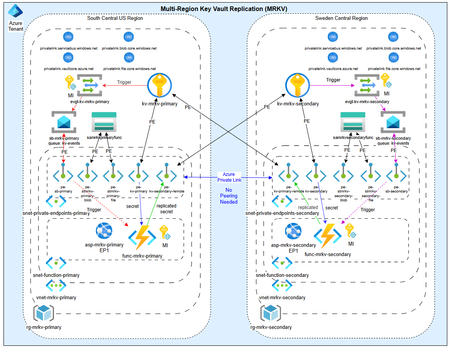
Azure Key Vault Replication: Why Paired Regions Alone Don’t Guarantee Business Continuity
As customers modernize toward multi‑region architectures in Azure, one question comes up repeatedly: “If my region goes down, will Azure Key Vault continue to work without disruption?” The short answer: it depends on what you mean by “work.” Azure Key Vault provides strong durability and availability guarantees, but those guarantees are often misunderstood—especially when customers assume paired‑region replication equals full disaster recovery. In reality, Azure Key Vault replication is designed for survivability, not uninterrupted write access or customer‑controlled failover. This post explains: How Azure Key Vault replication actually works (per Microsoft Learn) Why paired‑region failover does not equal business continuity Two reference architectures that implement true multi‑region Key Vault availability, with Terraform How Azure Key Vault Replication Works (Per Microsoft Learn) Azure Key Vault includes multiple layers of Microsoft‑managed redundancy. In‑Region and Zone Resiliency Vault contents are replicated within the region. In regions that support availability zones, Key Vault is zone‑resilient by default. This protects against localized hardware or zone failures. Paired‑Region Replication If a Key Vault is deployed in a region with an Azure‑defined paired region, its contents are asynchronously replicated to that paired region. This replication is automatic and cannot be configured, observed, or tested by customers. Microsoft‑Managed Regional Failover If Microsoft declares a full regional outage, requests are automatically routed to the paired region. After failover, the vault operates in read‑only mode: ✅ Read secrets, keys, and certificates ✅ Perform cryptographic operations ❌ Create, update, rotate, or delete secrets, keys, or certificates This is a critical distinction. Paired‑region replication preserves access — not operational continuity. Why Paired‑Region Replication Is Not Business Continuity From a reliability and DR perspective, several limitations matter: Failover is Microsoft‑initiated, not customer‑controlled No write operations during regional failover No secret rotation or certificate renewal No way to test DR Accidental deletions replicate No point‑in‑time recovery without backups Microsoft Learn explicitly states that critical workloads may require custom multi‑region strategies beyond built‑in replication. For many customers, this means Azure Key Vault becomes a single‑region dependency in an otherwise multi‑region application design. The Multi‑Region Key Vault Pattern The two GitHub repositories below implement a common architectural shift: Multiple independent Key Vaults deployed in separate regions, with customer‑controlled replication and failover. Instead of relying on invisible platform replication, the vaults become first‑class, region‑scoped resources, aligned with application failover. Solution 1: Private, Locked‑Down Multi‑Region Key Vault Replication Repository: 👉 https://github.com/jclem2000/KeyVault-MultiRegion-Replication-Private Architecture Highlights Independent Key Vault per region Private Endpoints only No public network exposure Terraform‑based deployment Controlled replication using Event Based synchronization What This Enables ✅ Full read/write access during regional outages ✅ Continued secret rotation and certificate renewal ✅ Customer‑defined failover and RTO ✅ DR testing and validation ✅ Strong alignment with zero‑trust and regulated environments Trade‑offs Higher operational complexity Requires automation and application awareness of multiple vaults Solution 2: Low‑Cost Public Multi‑Region Key Vault Replication Repository: 👉 https://github.com/jclem2000/KeyVault-MultiRegion-Replication-Public Architecture Highlights Independent Key Vault per region Public endpoints Minimal networking dependencies Terraform‑based Controlled replication using Event Based synchronization Optimized for simplicity and cost What This Enables ✅ Full read/write availability in any region ✅ Clear and testable DR posture ✅ Lower cost than private endpoint designs ✅ Suitable for many non‑regulated workloads Trade‑offs Public exposure (mitigated via firewall rules, RBAC, and conditional access) Not appropriate for all compliance requirements Requires automation and application awareness of multiple vaults Azure Native Replication vs Customer‑Managed Multi‑Region Vaults Capability Azure Paired Region Multi‑Region Vaults Read access during outage ✅ ✅ Write access during outage ❌ ✅ Secret rotation during outage ❌ ✅ Customer‑controlled failover ❌ ✅ DR testing ❌ ✅ Isolation from accidental deletion ❌ ✅ Predictable RTO ❌ ✅ Azure Key Vault’s native replication optimizes for platform durability. The multi‑region pattern optimizes for application continuity. When to Use Each Approach Paired‑Region Replication Is Often Enough When: Secrets are mostly static Read‑only access during outages is acceptable RTO is flexible You prefer Microsoft‑managed recovery Multi‑Region Vaults Are Recommended When: Secrets or certificates rotate frequently Applications must remain writable during outages Deterministic failover is required DR testing is mandatory Regulatory or operational isolation is needed Closing Thoughts Azure Key Vault behaves exactly as documented on Microsoft Learn—but it’s important to be clear about what those guarantees mean. Paired‑region replication protects your data, not your ability to operate. If your application is designed to survive a regional outage, Key Vault must follow the same multi‑region design principles as the application itself. The reference architectures above show how to extend Azure’s native durability model into true operational resilience, without waiting for a platform‑level failover decision.183Views0likes0Comments


Tags
- azure2,385 Topics
- azure devops1,395 Topics
- Data & Storage379 Topics
- networking243 Topics
- Azure Friday229 Topics
- App Services208 Topics
- devops178 Topics
- blockchain169 Topics
- security & compliance162 Topics
- analytics142 Topics