security & compliance
164 Topics
Should AI agents receive permissions dynamically instead of having fixed access?
Hi everyone, As AI agents move from simple chat-based assistants toward performing real actions—such as querying databases, creating resources, modifying configurations, sending notifications, or executing workflows—I have been thinking about how their permissions should be designed. A traditional application typically has a relatively well-defined permission model. An AI agent, however, may perform different tasks depending on the conversation and the user's request. For example: • Task A may only require read access. • Task B may require creating a resource. • Task C may require modifying an existing configuration. • Task D may involve a potentially destructive operation. This raises an interesting security question: Should an AI agent have a fixed set of permissions for its entire lifetime, or should permissions be granted progressively based on the task it is currently performing? For example: User → AI Agent → Read-only permissions Then, if the user explicitly requests a change: User approval → Temporary elevated permission → AI Agent performs the operation → Permission revoked I see some potential advantages to this approach: 1. Reduced blast radius if the agent behaves unexpectedly. 2. Better alignment between permissions and the actual task. 3. Easier auditing of elevated operations. 4. Reduced risk from prompt injection or unintended actions. 5. Human approval could be required only for high-impact operations. However, it also introduces additional complexity around identity, token issuance, approval workflows, session management, and auditing. I'm curious how others are approaching this. Would you prefer: A. Fixed least-privilege permissions for each agent B. Dynamic/task-based permissions C. Fixed permissions with human approval for sensitive operations D. A combination depending on the workload For production AI agents, which model do you think provides the best balance between security and usability? Would be particularly interested in experiences from people implementing agents in enterprise environments.4Views0likes0Comments
Azure Networking: Request for Granular Control of “Allow Azure Services and Resources”
I would like to get the Azure community’s thoughts on a networking/security improvement that I believe could help organizations implement a stronger least-privilege model. Several Azure resources provide an option similar to: “Allow Azure services and resources to access this resource.” This is useful when an Azure service needs to access another Azure resource, but the current option can be quite broad. Example: Power BI → Azure SQL For example, suppose Power BI Service needs to access an Azure SQL Server. The actual requirement might be: Power BI → Specific Azure SQL Server = Allow However, the available option may require enabling: “Allow Azure services and resources to access this server” This effectively creates a much broader trusted-service exception than the actual requirement. Ideally, I would like to see something like: Azure SQL Server │ ├── Power BI Service → Allow ├── Azure Data Factory → Deny ├── Azure Functions → Deny ├── Azure App Service → Deny └── Other Azure Services → Deny Proposed improvement Could Microsoft provide an additional option such as: “Allow selected Azure services and resources” where customers can explicitly select which Azure service/resource is allowed to bypass the network restriction? Depending on the Azure service, the selection could potentially be based on: Specific Azure service Specific Azure resource Resource ID Subscription Resource group Tenant Managed identity / Entra identity Specific service instance For example: Trusted Azure Services / Resources Power BI → Production Analytics → Allow All other Azure services → Deny Why I think this would be useful This would give customers a middle ground between: Disabling public access and implementing Private Endpoint/private connectivity, or Allowing all Azure services/resources through the broad trusted-service exception. A granular trusted-service model would allow: Only the Azure service/resource that actually requires access is trusted. This would better support least privilege, Zero Trust, security, and compliance requirements. Broader Azure applicability My suggestion is not specifically for Azure SQL. The Power BI → Azure SQL scenario is just an example. I think this could be a common Azure networking capability for all Azure resources that currently support a trusted Azure services / “Allow Azure services and resources” type of bypass. I would be interested to hear from the Azure community and Microsoft: Is there already a way to achieve this level of granularity? Are there architectural/security reasons why this cannot currently be implemented? Is Microsoft considering a more granular trusted-service model? Would a feature like “Allow selected Azure services/resources” be technically feasible? I would appreciate any feedback or guidance from the Azure networking/service teams.314Views0likes1Comment
Oath hardware token
Hi All, I just received my hardware tokens to set up for a few users in our organization that do not have access to company mobile devices. I have uploaded the .csv files with the required information in our Azure portal and it successfully uploaded. I am not able to activate the token, it keeps failing but I’m not sure why and I don’t really get a reason. Is there a clearer way to set this up or do I need to enable something before I set this up. I would like this set up before the end of the week, any help is appreciated. Thanks,6.7KViews0likes11CommentsCan't setup MFA on Azure personal account
I'm unable to use the az cli with a personal account because of MFA requirements. I have a free trial of Azure which I'm using for some basic testing. I'd like to deploy some Bicep from az cli, when I do I get: AADSTS50076: Due to a configuration change made by your administrator, or because you moved to a new location, you must use multi-factor authentication to access 'subscription GUID'. The docs say to go to Per-user multifactor authentication and enable MFA. I did this, but I can't set it up. Trying to login to https://aka.ms/MFASetup gives: You can't sign in here with a personal account. Use your work or school account instead. My personal account is the only user on the tenant. There is no other account I can use and I'm prevented from setting up MFA on it.541Views0likes3Comments🚀 Azure Application Gateway: Smart Load Balancing & Security
Ensuring high availability and efficient load balancing is crucial for web applications. Azure offers several traffic management solutions, including Application Gateway, Front Door, Load Balancer, and Traffic Manager. Today, let's focus on why Application Gateway stands out as a powerful tool for managing web traffic. 🚀 Why we should use Azure Application Gateway? 🔹 Layer 7 Load Balancing: Unlike Layer 3 or 4 solutions, Application Gateway makes intelligent routing decisions based on HTTP request properties. For example, requests to /images/ can be directed to dedicated image servers, while /videos/ traffic is routed to specialized video servers. 🔹 SSL/TLS Termination (Offloading): Reduces processing load on backend servers by decrypting traffic at the gateway before forwarding it unencrypted. Note: This might conflict with compliance requirements, so verify your app’s security needs !! 🔹 Autoscaling: Dynamically scales up or down based on traffic patterns, ensuring cost-effective resource utilization. 🔹 Zone Redundancy: Operates across multiple Availability Zones, enhancing fault tolerance without needing separate gateways in each zone. 🔹 Web Application Firewall (WAF): Provides centralized security against common exploits like SQL injection and cross-site scripting (XSS). Built on OWASP 3.1 (WAF_v2), it can function in Detection Mode (alerting admins) or Prevention Mode (blocking threats proactively). 🔹 URL-Based Routing: Enables smart traffic distribution by directing different types of content to the most appropriate backend pools. Example: http://contoso.com/video/* → VideoServerPool 🔹 Multiple-Site Hosting: Hosts multiple web applications on a single gateway, routing requests based on hostname or domain. Example: http://contoso.com → ContosoServerPool 🔹 Redirection & Rewrite Capabilities: ✔ Redirect HTTP → HTTPS to enforce encrypted traffic. ✔ Rewrite HTTP headers & URLs to enhance security (e.g., add HSTS or remove sensitive response headers). 🔹 Cookie-Based Session Affinity: Ensures users maintain session continuity by always connecting to the same backend server. Useful when session state is stored locally. ⚙️ How to Deploy & Configure Azure Application Gateway ⚙️ ✅ Dedicated Subnet: Create a subnet (e.g., myAGSubnet) within a Virtual Network. ✅ Frontend IP: Define whether to use a public or private IP or both (If you configured multiple listeners) to receive client requests. ✅ Backend Pool: Assign backend servers via NICs, Virtual Machine Scale Sets, public/internal IPs, or FQDNs. ✅ HTTP/HTTPS Listener: Specify which port (e.g., 80, 443) will handle incoming requests. ✅ Routing Rules: Set up domain-based (host-based routing) or path-based routing logic. 🔹 Host-Based Routing means routing traffic based on the hostname in the HTTP request header 🔹 Path-based Routing allows you to direct traffic to different backend pools based on the URL path in the request. ✅ Health Probes: Ensure backend servers are online using TCP or HTTP-based monitoring.422Views1like1Comment🔥The Power of Azure’s Security Arsenal 🔥
◆ Using a Public IP without securing your Azure applications and resources exposes you to security threats. Today, we’ll explore the most powerful security solutions from Azure’s arsenal. ◆ Azure provides a multi-layered approach (more than one layer of protection) to secure your resources when using a Public IP. Organizations can now transform this open gateway into a fortified checkpoint. Here’s how these tools work together to mitigate risks: 🚀 Azure DDoS Protection 🚀 ■ Protects your resources and services from being overwhelmed by malicious traffic. This excellent service is available for Network & IP Protection SKUs. ■ Uses Machine Learning to distinguish between normal traffic patterns and malicious flooding attempts (such as SYN floods or UDP amplification attacks) before they impact your applications and services ensuring availability. 🚀 Azure Web Application Firewall (WAF) 🚀 ■ Adds application-layer protection, intercepting HTTP/HTTPS traffic for inspection. ■ Blocks suspicious attacks like SQL injection or XSS by applying OWASP core rule sets, which define how attacks occur and how to defend against them, with continuous updates. ■ Enhances security for customer-facing services, ensuring trust and protection for your website and users. 🚀 Network Security Groups (NSGs) 🚀 ■ Acts as a virtual firewall at the subnet or network interface level, filtering traffic based on predefined rules. ■ Can allow only trusted HTTPS (port 443) connections while blocking unsolicited RDP or SSH attempts. ■ Implements the critical security principle of reducing attack surface, ensuring only authorized traffic reaches your target resources. 🚀 Azure Private Link 🚀 ■ In some scenarios, avoiding Public IPs altogether is the best security approach. This powerful service allows secure access to Azure SQL Database or Storage via Private Endpoints inside your virtual network. ■ Helps organizations minimize external exposure while maintaining secure, private connections to necessary services. 🚀 Azure Bastion 🚀 ■ Provides secure access to Azure VMs without Public IPs, using RDP/SSH over encrypted TLS 1.2 traffic. ■ Uses a browser-based HTML5 web client to establish RDP/SSH sessions over TLS on port 443, fully compatible with any firewall. ■ Connects to VMs via Private IPs while enforcing NSG rules to allow access only through Azure Bastion. If you found this valuable, consider sharing so more professionals can benefit. Let's keep the conversation growing! 🚀356Views0likes1Comment🚀 Mastering Azure Management with Global Admin Elevation 🌐
◆ Microsoft Entra ID and Azure resources are secured independently from one another. ◆ Microsoft Entra role assignments do not grant access to Azure resources. ◆ Azure role assignments do not grant access to Microsoft Entra ID. ◆ As a Global Administrator in Microsoft Entra ID, you can assign yourself access to all Azure subscriptions and management groups in your tenant. ◆ Use this capability if you don't have access to Azure subscription resources, such as virtual machines or storage accounts, and you want to use your Global Administrator privilege to gain access to those resources. ◆ When you elevate your access, you are assigned the User Access Administrator role in Azure at root scope (/). This allows you to view all resources and assign access in any subscription or management group in the tenant. ◆ User Access Administrator role assignments can be removed using Azure PowerShell, Azure CLI, or the REST API. 🚀 Why would you need to elevate your access? If you are a Global Administrator, there might be times when you want to do the following actions: ■ Regain access to an Azure subscription or management group when a user has lost access ■ Grant another user or yourself access to an Azure subscription or management group ■ See all Azure subscriptions or management groups in an organization ■ Allow an automation app (such as an invoicing or auditing app) to access all Azure subscriptions or management groups # Perform steps at root scope # Follow these steps to elevate access for a Global Administrator using the Azure portal. (1) Sign in to the Azure portal as a Global Administrator. Note : If you are using Microsoft Entra Privileged Identity Management, activate your Global Administrator role assignment !! (2) Browse to Microsoft Entra ID > Manage > Properties. (3) Under Access management for Azure resources, set the toggle to Yes. (4) Select Save to save your setting. If you found this valuable, consider sharing so more professionals can benefit. Let's keep the conversation growing! 🚀652Views0likes1Comment
How to Fix Azure Event Grid Entra Authentication issue for ACS and Dynamics 365 integrated Webhooks
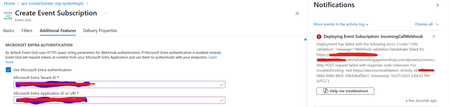
Introduction: Azure Event Grid is a powerful event routing service that enables event-driven architectures in Azure. When delivering events to webhook endpoints, security becomes paramount. Microsoft provides a secure webhook delivery mechanism using Microsoft Entra ID (formerly Azure Active Directory) authentication through the AzureEventGridSecureWebhookSubscriber role. Problem Statement: When integrating Azure Communication Services with Dynamics 365 Contact Center using Microsoft Entra ID-authenticated Event Grid webhooks, the Event Grid subscription deployment fails with an error: "HTTP POST request failed with unknown error code" with empty HTTP status and code. For example: Important Note: Before moving forward, please verify that you have the Owner role assigned on app to create event subscription. Refer to the Microsoft guidelines below to validate the required prerequisites before proceeding: Set up incoming calls, call recording, and SMS services | Microsoft Learn Why This Happens: This happens because AzureEventGridSecureWebhookSubscriber role is NOT properly configured on Microsoft EventGrid SP (Service Principal) and event subscription entra ID or application who is trying to create event grid subscription. What is AzureEventGridSecureWebhookSubscriber Role: The AzureEventGridSecureWebhookSubscriber is an Azure Entra application role that: Enables your application to verify the identity of event senders Allows specific users/applications to create event subscriptions Authorizes Event Grid to deliver events to your webhook How It Works: Role Creation: You create this app role in your destination webhook application's Azure Entra registration Role Assignment: You assign this role to: Microsoft Event Grid service principal (so it can deliver events) Either Entra ID / Entra User or Event subscription creator applications (so they can create event grid subscriptions) Token Validation: When Event Grid delivers events, it includes an Azure Entra token with this role claim Authorization Check: Your webhook validates the token and checks for the role Key Participants: Webhook Application (Your App) Purpose: Receives and processes events App Registration: Created in Azure Entra Contains: The AzureEventGridSecureWebhookSubscriber app role Validates: Incoming tokens from Event Grid Microsoft Event Grid Service Principal Purpose: Delivers events to webhooks App ID: Different per Azure cloud (Public, Government, etc.) Public Azure: 4962773b-9cdb-44cf-a8bf-237846a00ab7 Needs: AzureEventGridSecureWebhookSubscriber role assigned Event Subscription Creator Entra or Application Purpose: Creates event subscriptions Could be: You, Your deployment pipeline, admin tool, or another application Needs: AzureEventGridSecureWebhookSubscriber role assigned Although the full PowerShell script is documented in the below Event Grid documentation, it may be complex to interpret and troubleshoot. Azure PowerShell - Secure WebHook delivery with Microsoft Entra Application in Azure Event Grid - Azure Event Grid | Microsoft Learn To improve accessibility, the following section provides a simplified step-by-step tested solution along with verification steps suitable for all users including non-technical: Steps: STEP 1: Verify/Create Microsoft.EventGrid Service Principal Azure Portal → Microsoft Entra ID → Enterprise applications Change filter to Application type: Microsoft Applications Search for: Microsoft.EventGrid Ideally, your Azure subscription should include this application ID, which is common across all Azure subscriptions: 4962773b-9cdb-44cf-a8bf-237846a00ab7. If this application ID is not present, please contact your Azure Cloud Administrator. STEP 2: Create the App Role "AzureEventGridSecureWebhookSubscriber" Using Azure Portal: Navigate to your Webhook App Registration: Azure Portal → Microsoft Entra ID → App registrations Click All applications Find your app by searching OR use the Object ID you have Click on your app Create the App Role: Display name: AzureEventGridSecureWebhookSubscriber Allowed member types: Both (Users/Groups + Applications) Value: AzureEventGridSecureWebhookSubscriber Description: Azure Event Grid Role Do you want to enable this app role?: Yes In left menu, click App roles Click + Create app role Fill in the form: Click Apply STEP 3: Assign YOUR USER to the Role Using Azure Portal: Switch to Enterprise Application view: Azure Portal → Microsoft Entra ID → Enterprise applications Search for your webhook app (by name) Click on it Assign yourself: In left menu, click Users and groups Click + Add user/group Under Users, click None Selected Search for your user account (use your email) Select yourself Click Select Under Select a role, click None Selected Select AzureEventGridSecureWebhookSubscriber Click Select Click Assign STEP 4: Assign Microsoft.EventGrid Service Principal to the Role This step MUST be done via PowerShell or Azure CLI (Portal doesn't support this directly as we have seen) so PowerShell is recommended You will need to execute this step with the help of your Entra admin. # Connect to Microsoft Graph Connect-MgGraph -Scopes "AppRoleAssignment.ReadWrite.All" # Replace this with your webhook app's Application (client) ID $webhookAppId = "YOUR-WEBHOOK-APP-ID-HERE" #starting with c5 # Get your webhook app's service principal $webhookSP = Get-MgServicePrincipal -Filter "appId eq '$webhookAppId'" Write-Host " Found webhook app: $($webhookSP.DisplayName)" # Get Event Grid service principal $eventGridSP = Get-MgServicePrincipal -Filter "appId eq '4962773b-9cdb-44cf-a8bf-237846a00ab7'" Write-Host " Found Event Grid service principal" # Get the app role $appRole = $webhookSP.AppRoles | Where-Object {$_.Value -eq "AzureEventGridSecureWebhookSubscriber"} Write-Host " Found app role: $($appRole.DisplayName)" # Create the assignment New-MgServicePrincipalAppRoleAssignment ` -ServicePrincipalId $eventGridSP.Id ` -PrincipalId $eventGridSP.Id ` -ResourceId $webhookSP.Id ` -AppRoleId $appRole.Id Write-Host "Successfully assigned Event Grid to your webhook app!" Verification Steps: Verify the App Role was created: Your App Registration → App roles You should see: AzureEventGridSecureWebhookSubscriber Verify your user assignment: Enterprise application (your webhook app) → Users and groups You should see your user with role AzureEventGridSecureWebhookSubscriber Verify Event Grid assignment: Same location → Users and groups You should see Microsoft.EventGrid with role AzureEventGridSecureWebhookSubscriber Sample Flow: Analogy For Simplification: Lets think it similar to the construction site bulding where you are the owner of the building. Building = Azure Entra app (webhook app) Building (Azure Entra App Registration for Webhook) ├─ Building Name: "MyWebhook-App" ├─ Building Address: Application ID ├─ Building Owner: You ├─ Security System: App Roles (the security badges you create) └─ Security Team: Azure Entra and your actual webhook auth code (which validates tokens) like doorman Step 1: Creat the badge (App role) You (the building owner) create a special badge: - Badge name: "AzureEventGridSecureWebhookSubscriber" - Badge color: Let's say it's GOLD - Who can have it: Companies (Applications) and People (Users) This badge is stored in your building's system (Webhook App Registration) Step 2: Give badge to the Event Grid Service: Event Grid: "Hey, I need to deliver messages to your building" You: "Okay, here's a GOLD badge for your SP" Event Grid: *wears the badge* Now Event Grid can: - Show the badge to Azure Entra - Get tokens that say "I have the GOLD badge" - Deliver messages to your webhook Step 3: Give badge to yourself (or your deployment tool) You also need a GOLD badge because: - You want to create event grid event subscriptions - Entra checks: "Does this person have a GOLD badge?" - If yes: You can create subscriptions - If no: "Access denied" Your deployment pipeline also gets a GOLD badge: - So it can automatically set up event subscriptions during CI/CD deployments Disclaimer: The sample scripts provided in this article are provided AS IS without warranty of any kind. The author is not responsible for any issues, damages, or problems that may arise from using these scripts. Users should thoroughly test any implementation in their environment before deploying to production. Azure services and APIs may change over time, which could affect the functionality of the provided scripts. Always refer to the latest Azure documentation for the most up-to-date information. Thanks for reading this blog! I hope you found it helpful and informative for this specific integration use case 😀918Views4likes1Comment👉 Securing Azure Workloads: From Identity to Monitoring
Hi everyone 👋 — following up on my journey, I want to share how I approach end-to-end security in Azure workloads. - Identity First – Microsoft Entra ID for Conditional Access, PIM, and risk-based policies. - Workload Security – Defender for Cloud to monitor compliance and surface misconfigurations. - Visibility & Monitoring – Log Analytics + Sentinel to bring everything under one pane of glass. Through my projects, I’ve been simulating enterprise scenarios where security isn’t just a checklist — it’s integrated into the architecture. Coming soon: - A lab demo showing how Defender for Cloud highlights insecure configurations. - A real-world style Conditional Access baseline for Azure workloads. Excited to hear how others in this community are securing their Azure environments! #Azure | #AzureSecurity | #MicrosoftLearn | #ZeroTrust | #PerparimLabs278Views0likes1Comment
Azure Key Vault Replication: Why Paired Regions Alone Don’t Guarantee Business Continuity
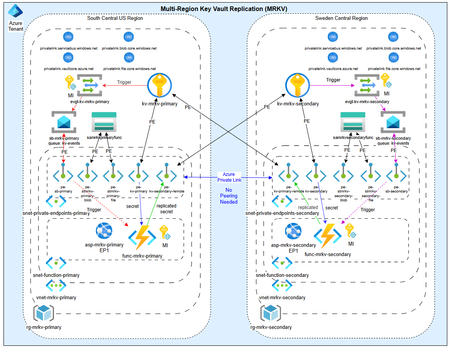
As customers modernize toward multi‑region architectures in Azure, one question comes up repeatedly: “If my region goes down, will Azure Key Vault continue to work without disruption?” The short answer: it depends on what you mean by “work.” Azure Key Vault provides strong durability and availability guarantees, but those guarantees are often misunderstood—especially when customers assume paired‑region replication equals full disaster recovery. In reality, Azure Key Vault replication is designed for survivability, not uninterrupted write access or customer‑controlled failover. This post explains: How Azure Key Vault replication actually works (per Microsoft Learn) Why paired‑region failover does not equal business continuity Two reference architectures that implement true multi‑region Key Vault availability, with Terraform How Azure Key Vault Replication Works (Per Microsoft Learn) Azure Key Vault includes multiple layers of Microsoft‑managed redundancy. In‑Region and Zone Resiliency Vault contents are replicated within the region. In regions that support availability zones, Key Vault is zone‑resilient by default. This protects against localized hardware or zone failures. Paired‑Region Replication If a Key Vault is deployed in a region with an Azure‑defined paired region, its contents are asynchronously replicated to that paired region. This replication is automatic and cannot be configured, observed, or tested by customers. Microsoft‑Managed Regional Failover If Microsoft declares a full regional outage, requests are automatically routed to the paired region. After failover, the vault operates in read‑only mode: ✅ Read secrets, keys, and certificates ✅ Perform cryptographic operations ❌ Create, update, rotate, or delete secrets, keys, or certificates This is a critical distinction. Paired‑region replication preserves access — not operational continuity. Why Paired‑Region Replication Is Not Business Continuity From a reliability and DR perspective, several limitations matter: Failover is Microsoft‑initiated, not customer‑controlled No write operations during regional failover No secret rotation or certificate renewal No way to test DR Accidental deletions replicate No point‑in‑time recovery without backups Microsoft Learn explicitly states that critical workloads may require custom multi‑region strategies beyond built‑in replication. For many customers, this means Azure Key Vault becomes a single‑region dependency in an otherwise multi‑region application design. The Multi‑Region Key Vault Pattern The two GitHub repositories below implement a common architectural shift: Multiple independent Key Vaults deployed in separate regions, with customer‑controlled replication and failover. Instead of relying on invisible platform replication, the vaults become first‑class, region‑scoped resources, aligned with application failover. Solution 1: Private, Locked‑Down Multi‑Region Key Vault Replication Repository: 👉 https://github.com/jclem2000/KeyVault-MultiRegion-Replication-Private Architecture Highlights Independent Key Vault per region Private Endpoints only No public network exposure Terraform‑based deployment Controlled replication using Event Based synchronization What This Enables ✅ Full read/write access during regional outages ✅ Continued secret rotation and certificate renewal ✅ Customer‑defined failover and RTO ✅ DR testing and validation ✅ Strong alignment with zero‑trust and regulated environments Trade‑offs Higher operational complexity Requires automation and application awareness of multiple vaults Solution 2: Low‑Cost Public Multi‑Region Key Vault Replication Repository: 👉 https://github.com/jclem2000/KeyVault-MultiRegion-Replication-Public Architecture Highlights Independent Key Vault per region Public endpoints Minimal networking dependencies Terraform‑based Controlled replication using Event Based synchronization Optimized for simplicity and cost What This Enables ✅ Full read/write availability in any region ✅ Clear and testable DR posture ✅ Lower cost than private endpoint designs ✅ Suitable for many non‑regulated workloads Trade‑offs Public exposure (mitigated via firewall rules, RBAC, and conditional access) Not appropriate for all compliance requirements Requires automation and application awareness of multiple vaults Azure Native Replication vs Customer‑Managed Multi‑Region Vaults Capability Azure Paired Region Multi‑Region Vaults Read access during outage ✅ ✅ Write access during outage ❌ ✅ Secret rotation during outage ❌ ✅ Customer‑controlled failover ❌ ✅ DR testing ❌ ✅ Isolation from accidental deletion ❌ ✅ Predictable RTO ❌ ✅ Azure Key Vault’s native replication optimizes for platform durability. The multi‑region pattern optimizes for application continuity. When to Use Each Approach Paired‑Region Replication Is Often Enough When: Secrets are mostly static Read‑only access during outages is acceptable RTO is flexible You prefer Microsoft‑managed recovery Multi‑Region Vaults Are Recommended When: Secrets or certificates rotate frequently Applications must remain writable during outages Deterministic failover is required DR testing is mandatory Regulatory or operational isolation is needed Closing Thoughts Azure Key Vault behaves exactly as documented on Microsoft Learn—but it’s important to be clear about what those guarantees mean. Paired‑region replication protects your data, not your ability to operate. If your application is designed to survive a regional outage, Key Vault must follow the same multi‑region design principles as the application itself. The reference architectures above show how to extend Azure’s native durability model into true operational resilience, without waiting for a platform‑level failover decision.898Views0likes1Comment