azure
2419 Topics
URGENT: Microsoft Edge incorrectly flags paytracc.com as typosquatting after multiple reports
Microsoft Edge Website Typo Protection incorrectly flags https://paytracc.com as a possible misspelling of paytrace.com. Paytracc.com is the legitimate official domain of PayTracc, an independent financial technology product. “PayTracc” is the intentional registered brand spelling and is not impersonating or affiliated with PayTrace. The warning has continued despite repeated reports through the “Report that this site URL is not a misspelling” option. Technical verification: • https://paytracc.com returns HTTP 200 OK. • http://paytracc.com returns HTTP 301 and redirects to HTTPS. • A valid TLS certificate and HSTS are enabled. • Chrome and other browsers do not display this warning. • The issue is reproducible only in Microsoft Edge Website Typo Protection. This false positive is discouraging customers from accessing the website. Anyways to resolve this please? Affected domain: https://paytracc.com Incorrect suggested domain: paytrace.com16Views0likes0Comments
Is APIM Standard_V2 tier viable option from security standpoint if you have Developer portal enabled
From my understanding with APIM Standard_v2 tier you can only configure the gateway endpoint with private endpoint and have that behind something like application gateway to allow the ability to have WAF in front of it. But, the developer portal is reachable only over its public address and cannot have private endpoint. Even after adding a custom domain on the Developer portal endpoint, the default <name>.developer.azure-api.net address keeps responding and returns 200. If you set all your APIs to require approval for subscription , then for a production scenario where you would allow "Try this operation" functionality on your APIs through developer portal, is it safe to still use standard_v2 tier. Or are there some security problems associated with that?12Views0likes0CommentsWindows Autopilot ESP App Failures: My Troubleshooting Approach
Hi everyone, I’ve been working with Windows Autopilot and Microsoft Intune deployments and wanted to share a troubleshooting approach I use when a device fails during the Enrollment Status Page (ESP) Apps phase. When I see an Apps-stage failure, I normally start by checking: Which application failed in Intune. Whether the application is actually required during ESP. Win32 detection rules and installation commands. Application dependencies and assignment targeting. Autopilot/MDM diagnostic logs. Whether too many applications are being installed during ESP. One thing I’ve found particularly useful is separating applications that truly need to block provisioning from applications that can be installed after Autopilot has completed. I also try to avoid immediately resetting the device. Finding the failing application and understanding why it failed gives us a much better chance of preventing the same problem on future deployments. My basic workflow is: ESP failure → Identify failed app → Check assignment → Check install/detection → Review logs → Test with a controlled app set → Re-test Autopilot I'm interested in hearing how other Intune admins approach this. What logs or checks have helped you the most when troubleshooting ESP application failures? Thanks, Jayesh Kedar6Views0likes0Comments
Cannnot delete tenant
Hello, I am trying to delete one of our customers MS 365 Tenant, however this seems to keep failing due to a single Application Registration which cannot be deleted through Entra ID. The error i am getting is "Failed to delete application Tenant Schema Extension App. Error detail: Deletion of system application is not allowed." I have looked online for solutions but the only solution i can find is "Create a support ticket". I would love to do this but there is no support contract linked to this tenant so that option is not available. Any help would be appreciated! Kind regards, Jos Verhallen118Views0likes3CommentsSend Desk365 Ticket information to Azure DevOps
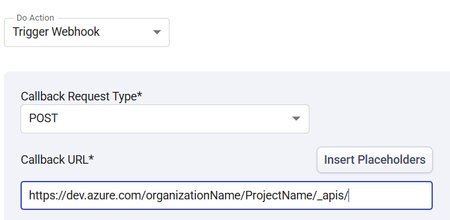
I am trying to send ticket data from Desk365 Helpdesk software to Azure DevOps. I am having trouble with what the Callback URL should be. Any ideas what URL I should be sending the Desk365 data to in order to create a workitem (Feature) in A specific Azure DevOps project? Thank you in advance!252Views0likes4Comments
Should AI agents receive permissions dynamically instead of having fixed access?
Hi everyone, As AI agents move from simple chat-based assistants toward performing real actions—such as querying databases, creating resources, modifying configurations, sending notifications, or executing workflows—I have been thinking about how their permissions should be designed. A traditional application typically has a relatively well-defined permission model. An AI agent, however, may perform different tasks depending on the conversation and the user's request. For example: • Task A may only require read access. • Task B may require creating a resource. • Task C may require modifying an existing configuration. • Task D may involve a potentially destructive operation. This raises an interesting security question: Should an AI agent have a fixed set of permissions for its entire lifetime, or should permissions be granted progressively based on the task it is currently performing? For example: User → AI Agent → Read-only permissions Then, if the user explicitly requests a change: User approval → Temporary elevated permission → AI Agent performs the operation → Permission revoked I see some potential advantages to this approach: 1. Reduced blast radius if the agent behaves unexpectedly. 2. Better alignment between permissions and the actual task. 3. Easier auditing of elevated operations. 4. Reduced risk from prompt injection or unintended actions. 5. Human approval could be required only for high-impact operations. However, it also introduces additional complexity around identity, token issuance, approval workflows, session management, and auditing. I'm curious how others are approaching this. Would you prefer: A. Fixed least-privilege permissions for each agent B. Dynamic/task-based permissions C. Fixed permissions with human approval for sensitive operations D. A combination depending on the workload For production AI agents, which model do you think provides the best balance between security and usability? Would be particularly interested in experiences from people implementing agents in enterprise environments.50Views0likes0CommentsEngineering an Azure Data Layer for Odoo Analytics Without Changing the ERP
One thing I have learned from working on ERP-driven data projects is that the ERP is rarely the place where you want to solve every analytics problem. We saw this firsthand in a manufacturing engagement where Odoo was being used across finance, inventory, procurement, and manufacturing, but reporting still involved substantial manual extraction and Excel-based consolidation. The interesting engineering question wasn't “How do we replace the ERP?” It was: “How do we build a reliable analytical layer around it without changing the transactional system?” That shaped the architecture. We used Odoo APIs and Azure Data Factory for ingestion, landing the data in Azure Data Lake Storage Gen2. From there, the data was organized into Bronze, Silver, and Gold layers: Bronze: Source-aligned Odoo data was retained with minimal transformation. Silver: Data was cleansed, standardized, and prepared across finance, inventory, procurement, and manufacturing domains. Gold: Analytics-ready data was prepared for downstream reporting and consumption. Azure Databricks with Spark handled transformation and KPI standardization, while Synapse/SQL layers provided structured analytical models for reporting. Power BI datasets consumed the prepared data, with Row-Level Security applied for role-based access. Why did this separation matter for the project? The important architectural boundary was: Odoo → transactional operations Azure data platform → ingestion, storage, transformation, standardization Power BI → analytical consumption That separation meant the reporting layer did not have to repeatedly extract and reshape data directly from the ERP. It also gave us a dedicated place to handle historical data and standardize information across business domains before it reached the reporting layer. What changed? The implementation automated 15+ Odoo-based reports and provided governed Power BI dashboards to 60+ business users. More importantly, teams moved away from repeated ERP extraction and spreadsheet consolidation toward a reusable analytical data layer. For our team, the bigger takeaway was that ERP modernization does not necessarily mean modifying the ERP. For teams building Azure data platforms around ERP systems, how are you drawing the boundary between API ingestion, historical storage, transformation, and analytical modeling?80Views0likes0CommentsLakeflow in Azure Databricks
Anyone who has ever built a data engineering stack from scratch knows the pattern: one ingestion tool to pull data from CRM and ERP, a separate orchestrator to stitch together the dependencies between jobs, notebooks or scripts doing the actual transformation, and a fourth system just to check whether all of that ran correctly last night. Each piece comes from a different vendor, with its own authentication, its own logs, and its own SLA. When something breaks at three in the morning, the first job isn't fixing the problem, it's figuring out which of the four tools it lives in. Lakeflow attacks that fragmentation head-on: it brings ingestion, transformation, and orchestration together into a single surface inside Azure Databricks, with Unity Catalog providing end-to-end governance. This isn't marketing repackaging of three products that already existed separately, it's the promise that the dependency between ingestion and transformation, column-level lineage, and access control stop being reconciled by hand across systems and start existing natively in the same graph. The three pieces that make up Lakeflow Lakeflow Connect covers ingestion, with point-and-click connectors for SaaS applications (Salesforce, Workday, ServiceNow), databases (SQL Server), and messaging, plus Zerobus Ingest, a serverless direct-write API for anyone with events coming from their own applications who doesn't want to stand up a message bus in the middle. Spark Declarative Pipelines is the transformation layer: instead of hand-writing the orchestration of streaming tables and materialized views, you declare the target table and the business logic, and the engine infers the dependency graph on its own, builds the DAG, and takes care of operational details like backfill and versioning. The name has changed over time (anyone who has followed the platform for a while will recognize it as the direct evolution of what used to be Delta Live Tables), but the underlying mechanism, declaring the desired result instead of the procedural step-by-step, remains the central idea. Lakeflow Jobs orchestrates all of it as a unified DAG: SQL workloads, Python code, declarative pipelines, dashboards, and external systems live in the same job definition, with data-driven triggers (a table was updated, a file landed in a volume), control-flow tasks, and no-code backfill runs. Hands-on: a simple end-to-end pipeline To make it concrete, here's how the three pieces fit together in a basic ingestion and declarative transformation pipeline: import dlt from pyspark.sql.functions import col # Streaming table: incremental ingestion via Auto Loader @dlt.table( comment="Raw order ingestion via Auto Loader" ) def orders_bronze(): return ( spark.readStream.format("cloudFiles") .option("cloudFiles.format", "json") .load("/Volumes/sales/bronze/orders_raw") ) # Materialized view: validation and enrichment @dlt.table( comment="Validated orders, with a quality filter" ) @dlt.expect_or_drop("positive_amount", "total_amount > 0") def orders_silver(): return ( dlt.read_stream("orders_bronze") .withColumn("total_amount", col("total_amount").cast("decimal(10,2)")) .filter(col("customer_id").isNotNull()) ) This snippet doesn't run on its own, it becomes a task inside a Lakeflow Job that can also kick off an AI/BI dashboard as soon as the "orders_silver" table is updated, using a data-driven trigger instead of a fixed time-based schedule. That binding between ingestion, transformation, and the next step in the flow, all in the same place, is what eliminates much of the glue work that today lives in a separate Airflow or Azure Data Factory. Governance without manual reconciliation The point that usually goes unnoticed by anyone looking only at the product surface is what happens underneath with Unity Catalog. Because ingestion, transformation, and orchestration share the same catalog, data lineage is captured end to end automatically, from the source table in SQL Server all the way to the final dashboard, without relying on manual annotation or on a third-party lineage system trying to infer relationships from logs. My take: this unification of governance is, in my view, Lakeflow's strongest argument, stronger even than the convenience of having a ready-made Workday connector. I've seen more than one data engineering project fail an audit not because the pipeline was wrong, but because nobody could prove with confidence where a specific number had come from, and how many transformations sat in between. Having that guaranteed structurally, rather than as a manual documentation process that is always out of date, changes the kind of conversation you have with the compliance team. System Tables come in as the observability piece: instead of building your own monitoring dashboard by querying each separate tool's API, you can build alerts and health reports directly on top of native SQL tables, with retention and schema standardized by Databricks itself. Cost: where the promise requires your own verification Databricks publishes some impressive cost-reduction figures, including a case of up to 83% lower ETL cost and up to 90x performance improvement reported by a specific customer. Those numbers deserve the standard skepticism any vendor benchmark does: they usually reflect a specific migration, from a poorly optimized stack to a new, well-tuned configuration. In practice, I'd test the real savings by running the same representative workload from your own environment on old vs. new, with equivalent cluster policies and compute mode (Performance vs. Standard on serverless compute), before using the marketing number in a budget justification to leadership. The mechanism behind the savings is real and makes technical sense: serverless compute with automatic optimization eliminates cold starts between sequential tasks in the same job, and granular per-task resource control avoids over-provisioning a cluster for a lightweight stage of the pipeline. That's different from guaranteeing that any migration will hit an 83% reduction. What this doesn't solve Consolidating ingestion, transformation, and orchestration into one platform doesn't remove the need for well-thought-out data modeling, nor does it replace architecture decisions about partitioning and clustering large tables. It also doesn't, on its own, solve the problem for teams that already have a heavy investment in Airflow with custom plugins that are hard to port, migrating legacy orchestration is still manual rewrite work, even with the dbt task and third-party integrations easing part of the path. And Lakeflow Connect's point-and-click connectors cover a specific set of sources, legacy systems or proprietary APIs without a native connector still depend on custom ingestion via Auto Loader or your own API. Bottom line Lakeflow doesn't invent a new data engineering paradigm, it removes the friction of coordinating three different tools to do what was always conceptually a single thing: bring data in from outside, transform it with confidence, and deliver it in the right shape to the next consumer. In practice: for anyone on Azure Databricks who already feels the pain of maintaining Data Factory, a third-party orchestrator, and a separate lineage catalog, it's worth piloting on a real pipeline before promising Databricks' cost-reduction number to anyone. References Databricks Blog, "Modernize your Data Engineering Platform with Lakeflow on Azure Databricks": https://www.databricks.com/blog/modernize-your-data-engineering-platform-lakeflow-azure-databricks Databricks Docs, "Get started: Build an ETL pipeline": https://docs.databricks.com/aws/en/getting-started/data-pipeline-get-started Microsoft Learn, "Tutorial: Build an ETL pipeline with Lakeflow pipelines - Azure Databricks": https://learn.microsoft.com/en-us/azure/databricks/getting-started/data-pipeline-get-started Microsoft Learn, "System tables": https://learn.microsoft.com/en-us/azure/databricks/admin/system-tables/129Views0likes0Comments"Authorization failed" error for Logic app writing a comment to Sentinel Incident
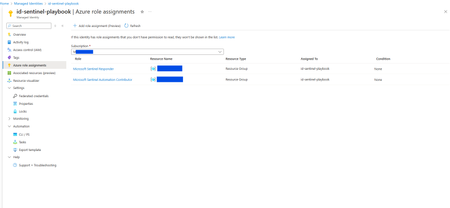
I have created a managed identity named id-sentinel-playbook that is used in 2 logic apps. Both the logic apps retrieve information from different external apis and writes the results as comments into the Sentinel incident. The managed identity id-sentinel-playbook has been assigned 2 roles - Microsoft Sentinel Responder and Microsoft Sentinel Automation Contributor role (See screenshot). However when one of the logic apps transacts with Sentinel such as checking the watchlist or writing comment into a Sentinel incident, there is the 403 forbidden error (See screenshot). It works fine when I use my Azure account as connection for the logic app. The other logic app also works fine when the same managed identity id-sentinel-playbook is used as connection to Sentinel. I have compared the identity of both the logic apps and they are the same. I have also searched online for existing answers and all point to the managed identity having insufficient roles, however id-sentinel-playbook already has the Microsoft Sentinel Responder role and strangely the other logic app that writes comments into the Sentinel incident as well, works. Here is the screenshot of the logic app having the user managed identity. The other logic app has the same. Please help. I spent 2 days investigating this and have no more ideas on how to further investigate this😓.662Views0likes2CommentsHow to update the proxyAddresses of a Cloud-only Entra ID user
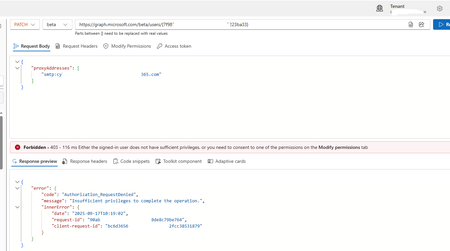
I currently have a client with an Entra ID user (not migrated from on-premises) that is cloud-based, but has proxyAddresses values assigned. Now, I want to update the proxyAddresses through the Graph Explorer and have used this link as a guide: https://learn.microsoft.com/en-us/answers/questions/2280046/entra-connect-sync-blocking-user-creation-due-to-h. Now this guide is suggesting you can use the BETA model and this URL format... https://graph.microsoft.com/beta/users/%USERGUID% It states you can use that URL to do both 'GET' and 'PATCH' queries - the PATCH query being the one that will change the settings. You have to put forth a body for the proxyAddresses property in the PATCH query, which represents all of the addresses you want the user to utilise as proxy addresses. Now the GET query works... The PATCH query does not... Screenshot provided: Now, regarding the error message, I have applied ALL possible permissions in the 'Modify Permissions' tab. It is still erroring, Now I cannot use Exchange Online PowerShell, as the user does not have a mailbox! Aside from potentially using a license for Exchange Online or provisioning a mailbox for the user, and making the necessary changes, would the only other option be to delete/recreate the user?Solved1.8KViews0likes4Comments