Forum Widgets
Latest Discussions

Access VBA performance dramatically slowed since June Update
We are running an access based application with a large vba project. One customer with four different instances of this project experience extreme slow down in performance on all instances during the last week. We made no changes. The Microsoft Office Update was applied automatically. We believe the problem happened then. We have tried reverting to several different previous versions of Office but symptoms still remain.DavidReedJun 12, 2026Copper Contributor54Views0likes1CommentRegression in v2606: continuous forms redraw/flicker on main form
As soon as I installed Version 2606 (Build 16.0.20131.20012), all of my continuous subforms on parent forms began constantly redrawing and flickering, making the application almost unusable. Reverting to Version 2605 (Build 16.0.20026.20140) immediately resolved the issue without any changes to the database. I have since disabled automatic updates and am remaining on Version 2605 until this issue is addressed. Has anyone else experienced this problem with Version 2606? Is this a known bug, or has Microsoft acknowledged the regression?DeRochierJun 12, 2026Copper Contributor70Views0likes4CommentsFull account lock (Error 0x80004005) on multiple devices and networks. Automated support fails.
Greetings to the community and the Microsoft support team, I am turning to this forum because the automated support system and bots keep me in a closed loop, preventing me from reaching a human agent to resolve a critical lockout on my account. Currently, I am unable to sign in to my Xbox Live account under any circumstances. The system constantly throws the following error: Error code: 0x80004005 Message: "We couldn't sign you in to Xbox Live. Sorry, something went wrong. Try again in a while." As a technician, I have rigorously isolated the variables and can confirm the following to save time on diagnostics: It is not a local hardware failure: The exact same error replicates when trying to sign in from my Xbox console, my PC, and the mobile app. It is not a local connectivity (ISP) issue: I have tested this through my home Wi-Fi and different cellular data networks, getting the exact same access denial. All diagnostics point to the failure being directly at the server level: a token generation issue with my profile, an invisible security lock, or an internal synchronization failure. I kindly request that a Microsoft Agent or moderator send me a Private Message (DM) here so I can provide the affected email address and have this case escalated to Tier 2 support. I need the internal status of my profile to be checked. My Xbox Gamertag is: #Non9969 I look forward to your help. Thank you very much.johangironJun 11, 2026Copper Contributor47Views0likes1Comment
Text Truncation in Access Report Controls
Around May 14, 2026, we began experiencing text truncation on the right side of text box controls in Access (Office 365) reports. Approximately 2–4 characters are cut off whenever font size is below 10pt. All reports in our environment are affected and the problem was not present prior to May 14. We ruled out layout as a contributing factor by verifying page size, margins, report width, control dimensions, padding, and layering were all correctly set. No layout changes resolved the issue. The problem does not occur when font size is set to 10pt or higher, suggesting the update affected font metric calculations for small font sizes. Steps taken without resolution include adjusting all report and control sizing properties, testing multiple default printer configurations including Microsoft Print to PDF and Adobe PDF, and verifying Windows display scaling was set to 100%. If anyone has any solutions, please let me know! Thank you for your time.khippenJun 11, 2026Copper Contributor30Views0likes1Comment
Can't Run Report
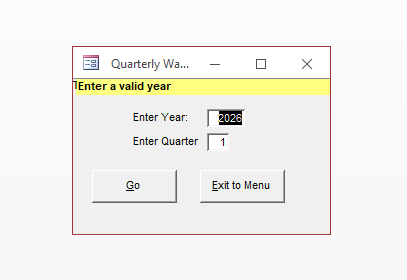
When I try to run a report, I get this error message. I made sure all of my quarters are accounted for. Any ideas of a fix?jmp2025Jun 09, 2026Copper Contributor35Views0likes1CommentRegression in v2605: Subform with overlapping controls breaks timer in unrelated form
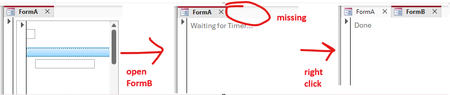
I found another issue (sorry) which might be caused by the zoom-related changes in 2605. The following repro example works fine in 2604 (Monthly Enterprise Channel) but breaks in 2605 (Current Channel). Again, this issue is unrelated to zooming itself. Prepare database The repro requires three forms and a few controls. Since those are tedious to get right manually, I wrote some VBA code to do that for us. Execute BuildRepro() in the Immediate Window to create the forms and controls. Option Compare Database Option Explicit Public Sub BuildRepro() CreateFormASubform CreateFormA CreateFormB End Sub Private Sub CreateFormASubform() Dim frm As Form Dim ctl As Control Set frm = CreateForm() Set ctl = CreateControl(frm.Name, acTextBox, acDetail, , , 345, 1140, 1746, 260) ctl.TabStop = False Const textBoxTop = 260 Set ctl = CreateControl(frm.Name, acTextBox, acDetail, , , 56, textBoxTop, 270, 270) ctl.TabStop = False Set ctl = CreateControl(frm.Name, acImage, acDetail, , , 56, 0, 270, 270) Set ctl = CreateControl(frm.Name, acCommandButton, acDetail, , , 60, 795, 5895, 260) SaveAndClose frm, "FormA_Subform" End Sub Private Sub CreateFormA() Dim frm As Form Dim ctl As Control Set frm = CreateForm() Set ctl = CreateControl(frm.Name, acSubform, acDetail, , , 100, 100, 3000, 3000) ctl.SourceObject = "FormA_Subform" SaveAndClose frm, "FormA" End Sub Private Sub CreateFormB() Dim frm As Form Dim ctl As Control Set frm = CreateForm() frm.TimerInterval = 1 Set ctl = CreateControl(frm.Name, acLabel, acDetail, , , 100, 100, 5000, 1000) ctl.Name = "my_label" ctl.Caption = "Waiting for Timer..." frm.HasModule = True frm.Module.InsertText _ "Private Sub Form_Timer()" & vbCrLf & _ " Me.TimerInterval = 0" & vbCrLf & _ " Me.my_label.Caption = ""Done""" & vbCrLf & _ "End Sub" frm.OnTimer = "[Event Procedure]" SaveAndClose frm, "FormB" End Sub Private Sub SaveAndClose(ByVal frm As Form, ByVal newname As String) Dim oldname As String oldname = frm.Name DoCmd.Save acForm, oldname DoCmd.Close acForm, oldname DoCmd.Rename newname, acForm, oldname End Sub Run repro 1. Open FormA. 2. Open FormB (while FormA is still open). Expected result: FormB opens completely, the timer runs and the label reads "Done". Actual result: FormB opens "halfway" (it's visible, but it's tab is still missing, see screenshot below) and the label still shows "Waiting for Timer...". As soon as you right-click anywhere, the form finishes opening and the timer runs, changing the label to "Done". Notes: I tried to make the repro as simple as possible. If you remove one of the controls from FormA_Subform (or enable TabStops), the problem disappears. It might have something to do with overlapping controls: If you change textBoxTop from 260 to 280, so that it no longer overlaps with the image, the problem also disappears. We need the overlapping controls because in our real code the subform is continuous and displays data at different indentation levels (like a treeview).HeinziATJun 08, 2026Iron Contributor162Views0likes6Comments
Access selecting specific date on a calendar
I'm pulling my hair out because everything I've found through my research says my VBA code should work, but it doesn't! Here's the story. I have a calendar (form) that shows events going on for each month. What I want is for a person to click on a specific day and have a pop-up form appear showing more details of the events for whatever day they clicked on. I used the below code, which mostly works... When I click on a date, the month and year will be correct, but not the day of the month. The day of the month is always today's day. For example, let's say I click on the day Feb. 2, 2024 and today's date is May 21, 2026. My pop-up form will show the events for Feb. 21, 2024. This is the code I have: Private Sub lblTue3_Click() Dim txtSelectDate As Date (probably don't need this) Dim iDayOfMonth As Integer Dim iMonth As Integer Dim iYear As Integer Dim dSelectDate as Date iDayOfMonth= Format(Me.txtSelectDate.Value, "d") iMonth = Format(Me.txtSelectDate, "mm") iYear = Format(Me.txtSelectDate, "yyyy") dSelectDate = CDate(iMonth & "/" & iDayOfMonth & "/" & iYear) DoCmd.OpenForm "frmThatContainsMyData", acNormal, , "[DateOnFormUsedForFilter]=#" & dSelectDate & "#", , acDialog Update: I think I figured out where the problem is. When the calendar form is loaded, that's where txtSelectDate is defined. However, I don't know how to define txtSelectDate to whatever date I click on in the calendar. It defaults to today's date when I load the form. When I change the month or year, those number change in the txtSelectDate box, but not the day. This is the code I currently have. (DisplayMonthName displays the month and year; don't think it's part of my issue) Private Sub Form_Load() Me.txtSelectDate = Date Call DisplayMonthName End Sub Any help is greatly appreciated!nicoleethierJun 02, 2026Brass Contributor184Views1like11CommentsTab header font issue when the "new zoom" feature is enabled
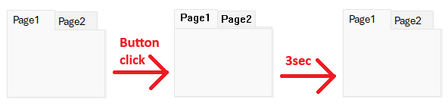
We found a curious font display issue, which can only be reproduced if the "new zoom" feature flag is active: We can reproduce it with build 20026.20076 with the zoom slider visible (e.g. in the "Current Channel (Preview)"), but we cannot reproduce it on the same build with the zoom slider invisible (e.g. on a freshly updated system in the Current Channel, which has not received the staged rollout yet) or with older builds (e.g. the current Monthly Channel build). The problem itself is unrelated to zooming. Repro 1. Create a new Access database. 2. Create a new form in Design View. 3. Add a Tab Control. 4. Set the tab control's "Use Theme" property to "No". 5. Add a button with the following code: Private Sub Command3_Click() Dim start As Double ' Localize the page name, if you use a non-English version of Access Me.Page2.Visible = True ' Simulate long-running operation (3 seconds) start = Timer Do Until Timer > start + 3: Loop End Sub 6. Save and open the form in Form View. 7. Click the button. Expected result: Nothing happens for 3 seconds. Actual result: The tab header's font switches to some old raster system font (MS Sans Serif?). After 3 seconds, the form returns to the 21st century. This issue is easy to work around: just do the long-running operation before setting the Visibility property, this will reduce the font-change to a short flicker. Still, this appears to be an unintended side effect of the changes made for the "new zoom" feature, so I thought it might be helpful to report it while that feature is still being worked on.SolvedHeinziATMay 26, 2026Iron Contributor82Views0likes2Comments
How to change the color of each pie chart slice in access?
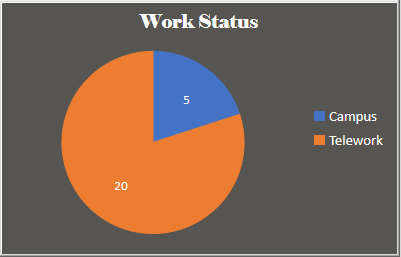
I need to set standard colors for Pie charts in our Access database. Currently, this is what I see. But our organization has standard colors used in other applications and want to use it in access charts as well. I am also attaching a screenshot of the chart settings. Any advice would be greatly appreciated. Thank you!abrsa2285May 20, 2026Copper Contributor1.1KViews0likes2Comments
How do I get support with Authentication when it doesn't work?
I have a business 365 account but changed address and so my credit card payments stopped. However, I can't log in to my account because I have an authentication problem (my authentication app on iPhone is still working but the entry for this account has gone and there is a new one called "Microsoft Entra ID" but when I go to get the authentication code this "Entra ID" authenticator does not produce it). To get help from Microsoft it always asks for authentication. I would like to keep this account and start paying again but I can't find a way to get help to fix the authentication problem because raising a ticket or talking to an agent requires authentication.worklessMay 05, 2026Copper Contributor107Views0likes3Comments

Tags
- access1,712 Topics
- office 365396 Topics
- 2016205 Topics
- developer199 Topics
- Access Web Database104 Topics
- Access Web App60 Topics
- sharepoint55 Topics
- 201354 Topics
- admin46 Topics
- 201044 Topics