access
1735 Topics
I Can't get Microsoft's help
Why is it that it is so difficult to get Microsoft to help me access my account? I have been trying for a few months now and have not had any issues resolved. I can no longer access some of my accounts. My Authenticator app on my iphone is asking for a code from my Authenticator app which is circular reasoning. This is impossible. I have also tried to call Microsoft multiple times but their automated system hangs up on me because they are experimenting technical issues. We'll, guess what! I'M HAVING TECHNICAL ISSUES AS WELL.. I'm hoping someone from Microsoft well see this and reach out. I need to log into my new PC I purchased and I can't.18Views0likes0Comments
Recommended: Excellent MS Access TreeView Control by Marcus Dieterle
Hi everyone, I just wanted to share an amazing resource I found for anyone looking to modernise their MS Access applications. The TreeView control developed by Marcus Dieterle (DIETERLE programmierung) is absolutely top-tier! If you are tired of dealing with the constant compatibility headaches, crashes, and bitness issues (32-bit vs 64-bit) of the traditional Microsoft ActiveX TreeView, this is the ultimate alternative. It looks modern, runs incredibly smooth, and is beautifully documented.Highly recommended for anyone trying to take their Access GUI to the next level. Publisher: DIETERLE programmierung Website: dieterle-programmierung.de Support: email address removed for privacy reasonsSolved333Views0likes2Comments
Preview report out of memory error with Access Version 2609 (Build 20430.20092)
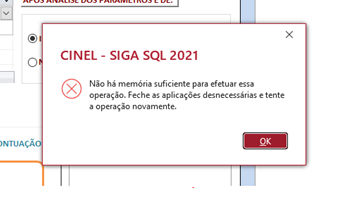
We have multiple customers reporting issues with latest Access version 2609 Build 20430.20092 when previewing reports. (2004) There isn't enough memory to perform this operation. Close unneeded programs and try the operation again. This error seems to occur right when we preview a report and the report will not open. At the moment, we have been rolling Office back to version 2608 to resolve the issue.1KViews1like10CommentsErro de Limite de memoria
Boa tarde Sem ter sido feito qualquer alteração de programação começou a aparecer em muitos relatórios este aviso "Não há memoria suficiente. feche todas aplicações desnecessárias e tente a operação de novo" Dá ideia que este aviso não corresponde à verdade..... Podem ajudar ? Good afternoon Without any programming changes being made, this warning has started appearing in many reports: "Not enough memory. Close all unnecessary applications and try the operation again." It seems that this warning is not true... Can you help?Solved126Views0likes1Comment
Microsoft Account Access Blocked Due to an Old Encoded Full Name
Hello, I am experiencing a serious issue with my Microsoft account. When I sign in, Microsoft still shows my old email address and old phone number as security information, even though I have already added a new phone number, a new Outlook email address, and updated recovery information. After signing in, many Microsoft pages do not work correctly. The page often becomes blank, reloads continuously, or signs me out and back in repeatedly. When I click on "Account" or "Your Info", I get a white screen and the page enters an endless loop. Because of this, I cannot access the account settings page. I believe the issue is related to an old encoded full name that I set on the account years ago. I need to change my full name and remove the encoded text, but I cannot access the profile page to do it myself. I am not requesting account recovery. I can still access the account, but I need a Microsoft support agent to manually review my profile and help correct or reset the full name information so I can access my account settings again. Thank you for your assistance.277Views0likes3CommentsWiederherstellung der Sicherheitsinformationen. Was tun, wenn die 30 Tage rum sind?
Ich habe eine neue Mailadresse angegeben. Was muss ich tun, wenn die 30 Tage Wartezeit in ein paar Tagen vorbei sind? Was ist, wenn ich dann mein altes Passwort nicht mehr habe? Wie läuft das alles genau ab? Werde ich über den Ablauf der 30 Tage informiert? Warum bekomme ich nicht direkt von Microsoft Informationen, wie das abläuft? Besten Dank für kompetente und verständnisvolle Hilfe.181Views0likes1CommentMicrosoft account locked
My current gmail, which I have full access to, is currently linked to an old Microsoft account which I have been trying to get into. The account in question has 2FA enabled with an old deleted gmail account linked, so whenever I try to log in with my current account, Microsoft keeps sending emails to that dead account. I have many emails of recovery codes and security notices from 2022 when the account was still active. Am I able to recover the Microsoft account, or, at the very least, remove my current gmail from the Microsoft account.185Views0likes1CommentExplore and edit Microsoft Access databases (.accdb / .mdb) directly from VS Code.
Hi everyone, I'm looking for a way to move away from the native Access VBE and start using Visual Studio Code as my primary text editor. I mostly want to leverage its modern features like Dark Mode, multi-cursors, and better shortcuts. During my research, I came across the "Access Explorer" extension, which claims to let you "Explore and edit Microsoft Access databases (.accdb / .mdb) directly from VS Code". Before I risk running this on any live database, I wanted to ask the community: How stable is it? Does it work well for daily development? Is there any risk of database corruption when it saves and injects the edited code back into the .accdb file? How does it handle form/report class modules (Form_FormName), or is it only reliable for standard modules (.bas)? If you have used this extension or have a smooth alternative workflow to read/write code directly between VS Code and Access without manual copy-pasting, I would love to hear your thoughts!Solved448Views0likes6CommentsLocked out of Microsoft 365 Business Tenant
I am the sole global admin for my Microsoft 365 Business tenant and I have been completely locked out due to an MFA issue. I cannot access the admin portal, cannot reset MFA, and cannot verify my identity through the automated system. When I call Microsoft support, the automated system incorrectly states that I am not a global admin and immediately disconnects. All UK support numbers (0800 026 0329, 0344 800 6006, etc.) hang up instantly before reaching an agent. No callbacks have been received despite multiple requests. I now have an open case with the Data Protection team: Microsoft 365 Data Protection – TrackingID#2609030040002192 This situation has caused: Business disruption Financial loss Inability to manage users or services Customer service impact Complete loss of administrative control over our tenant I urgently need escalation to the Data Protection team for identity verification and MFA reset. The normal support channels are not functioning, and I cannot reach a human through any published phone number. Any assistance or escalation from Microsoft moderators or engineers would be greatly appreciated. Thank you.272Views0likes1Comment