Forum Widgets
Latest Discussions

Embedded Object Keeps Returning
At some point, while working with Kidasa's Milestones Professional, I must have copied one of the charts I was working and pasted it into the Gantt section of my Project file as a drawing. I have deleted it countless times, but it always comes back whenever I close and reopen the program. It was initially attached to a timescale but I'm able to change the timescale or attach it to a task, with those changes remaining after closing and reopening the program. The chart is depicting an older version of the Milestones Professional file, rather than what it looks like currently, so it doesn't seem to be actively linked to the other file, if that's even possible with these embedded drawings. I've tried closing down the program and restarting the computer before reopening, and I've wanted to try to clear my cache, but the option to do so is greyed out. Any insights would be helpful. This isn't the end of the world, but it's annoying.PaulKottmyerApr 02, 2026Occasional Reader9Views0likes0CommentsProject Server - Column Headers Misaligned with Gantt Chart
We are using On-Premises Project Server, and in all views (Project, Project Center, Resources, etc.), the Column Headers are larger than normal, so that the bar in the Gantt Chart does not align with the project/task/resource associated with it. The browser we are using is Edge but I switched to Chrome and had the same issue. Does anyone know what causes this and how to fix it?SolvedBrett_Phifer_SCIApr 02, 2026Copper Contributor18Views0likes2CommentsProject Server Column Header/Gantt Chart misalignment
We are using On-Premises Project Server, and in all views (Project, Project Center, Resources, etc.), the Column Headers are larger than normal, so that the bar in the Gantt Chart does not align with the project/task/resource associated with it. The browser we are using is Edge but I switched to Chrome and had the same issue. Does anyone know what causes this and how to fix it?Brett_Phifer_SCIApr 01, 2026Copper Contributor5Views0likes0CommentsData access after Project Online (PWA) retirement
As the retirement of Project Online (PWA) approaches, some questions have come up regarding what will happen to the data and related content. I’d like to ask if anyone has information or guidance on the following points: What happens to the data currently stored in Project Online after the retirement date? Will this data still be available for viewing, export, or migration after that date? If so, for how long? Regarding the SharePoint sites linked to PWA, will they remain available? Will it still be possible to access or modify their content? Does Microsoft plan to publish official guidance on this transition? Any references or practical experiences on this topic would be greatly appreciated.SolvedLeandro Cesar de Melhado e LimaMar 26, 2026Brass Contributor1.6KViews1like11CommentsSchedule Level of Detail for Metrics and Task Management in Project
What is a best practice for achieving the proper level of detail in MS Project Schedules? I work in a manufacturing environment, where most tasks are ultimately driven by product delivery dates, but with each product, there are multiple steps involving different trades and departments at each step. In a schedule, the lowest level of detail needs to have task dependencies and resources assigned, however, this is usually a Level 3 "middle ground" level of detail (not too broad and not too specific), representing a window of a few days or a few weeks in which a certain group of steps needs to be completed so we can move to the next stage in the process. Each of these steps/tasks often need to be broken down into daily (or sometimes portions of a day) for the actual assigning and managing of tasks in the organization. Each of these subtasks could have multiple people working on them at different points. Obviously, the dates for these detailed task management assignments should dynamically move as the schedule is updated, but including too much detail in MS Project schedules is problematic when trying to update progress, especially with multiple resources assigned to a short-duration task. It almost seems that you should be able to assign task dependencies and resources to tasks at a certain level, then you should be able to break those tasks down into subtasks for the day-to-day managment of tasks, but this will cause your scheduling metric tools to go haywire. Has anyone experienced this challenge and what did you do to be able to break down your schedule into task management-level detail while still maintaining a coherent schedule which people can understand, and which meets the industry-standard schedule metrics of task dependencies, resources, and critical path traceability?Brett_Phifer_SCIMar 20, 2026Copper Contributor49Views0likes1Comment
Project Accelerator de Microsoft
I am running some tests with the Project Accelerator tool. I assigned a Planner Plan 1 trial license based on the documentation and previous guidance. At the beginning of February 2026 everything was working correctly, and I was able to view tasks inside the Project Accelerator application. However, as of today (February 25, 2026), the task view no longer loads, and I receive a Microsoft authentication error. It seems as if the system is now blocking access to the plan view even though the Planner Plan 1 license is still active. My question is: Have the licensing requirements changed recently?Wilbar1Feb 25, 2026Copper Contributor53Views0likes0CommentsProject Server Error when exporting to a Pivot Table using Visual Reports
Since migrating all our schedules to on-premises Project Server last year, we are getting an error message when trying to export a schedule to a pivot table using Viusal Reports. The error reads: "An error occurred and the requested action could not be completed at this time." This doesn't happen on 100% of our schedules, but the vast majority of them. What causes this error and how do we fix the issue?Brett_Phifer_SCIFeb 23, 2026Copper Contributor80Views0likes2CommentsPower Automate 'Send an HTTP request to SharePoint" only returning 300 rows of data
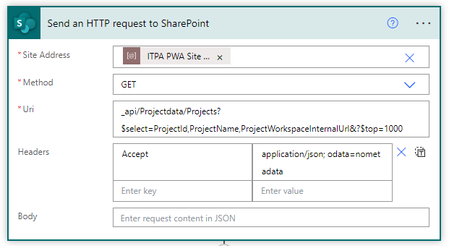
My PWA site has over 900 projects, but the following action only returns exactly 300 items. This feels like a returned rows limit of some sort, but I still get only 300, even when I use "&?top=1000". Any ideas?SolvedhumphrieskFeb 19, 2026Copper Contributor2.9KViews0likes9Comments
What MS Project Online Retiring Means
Hey all - there is probably a decent amount of confusion as to what the recent announcement from Microsoft regarding Project Online means and who it affects, so I made a video to explain. You can check it out here: https://youtu.be/x9efcEEHt_EKennyArnold_SSIFeb 05, 2026Brass Contributor490Views1like3CommentsProject Changing % Complete when entered
Why does MS Project change the % Complete value entered? We have a task with a Start date of 11/12/25 and Finish date of 1/20/27. The duration is 223.9 days based on a 4 day/10 hrs per day calendar (it is a long lead time material procurement task). The status date is 1/5/26 and the task has an Actual Start of 11/12/25. When I enter 10 in the % complete column and hit enter, Project changes this to 0%. When I enter 15 in the % complete column and hit enter, Project changes this to 5%. When I enter 50 in the % complete column and hit enter, Project changes this to 44%. I believe % Complete is either calculated or entered, but it seems if you enter a value in this field, Project shouldn't change it. What causes Project to change your % Complete value entered, and how do you get Project to display the desired % Complete for a task like this?Brett_Phifer_SCIJan 23, 2026Copper Contributor314Views0likes4Comments



Tags
- Project704 Topics
- Online290 Topics
- Project Server160 Topics
- Project Desktop157 Topics
- office 365100 Topics
- developer76 Topics
- 201666 Topics
- On Premise62 Topics
- api51 Topics
- Reporting43 Topics