Forum Discussion

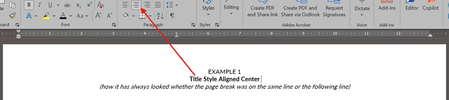
Word - Same Line Page Breaks Visibly Change Formatting
 Mar 03, 2026
Hi,
The issue has been fixed through one of the latest updates.
Lisa

That looks like a frustrating bug, especially when it disrupts years of established templates. It seems like the page break character is accidentally inheriting or overriding the paragraph's alignment settings.
You might try these quick troubleshooting steps:
Check Hidden Formatting: Click the Show/Hide icon to see if the page break is sitting inside the paragraph block, which can force the line to align to the break rather than the margin. Paragraph Settings: Verify that the "Keep with next" or "Widow/Orphan control" settings haven't been toggled, as these can conflict with manual page breaks. Alternative Breaks: Try using a Section Break (Next Page) instead of a standard Page Break; it often acts as a more stable container for formatting.