Forum Discussion

Text layout
- Mar 03, 2022
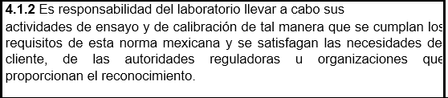
oxvill77 If you put the selection in the Table and then go to the Layout tab of the ribbon and click on Properties and then on Options on the Table tab of the Table Options dialog, you will see that the Left and Right cell Margins are set to 0,
that combined with the heavy border applied to the table causes the last character on some of the lines to be partly covered by that border. If you increase the margin setting, particularly that for the Right margin, the text will no longer be obliterated by the border.
This is the result of setting it to the default of 0.08", though you could set it to more if desired.

oxvill77 After clicking on Reply, click on "Open full text editor"
and you will then see an area into which you can drag and drop files, or browse to files to be attached

Doug_Robbins_Word_MVP Theres no option to upload files other that JPEGS, PNG and other image files but not .docx or .pdf; it says that .docx files are not supported to be uploaded
- Mar 02, 2022
oxvill77 I just uploaded the Sample File for Upload.docx.
You may need to be a Member of the Community to be able to upload other file types.
- oxvill77Mar 03, 2022Copper Contributor
Doug_Robbins_Word_MVP Tried again and now I was able to; I uploaded a sample file to see if you can find the error, again thank you so much for the help so far!