Forum Discussion

CGKalexander
Aug 10, 2026Copper Contributor
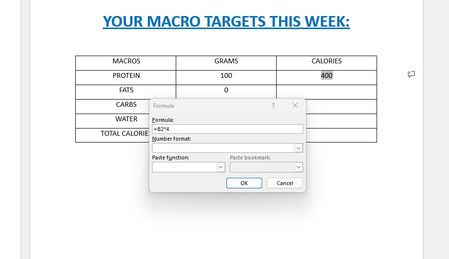
PLEASE HELP ME. Can't Get Formulas In Word To Work?
I know how to use formulas in EXCEL and I know WORD isn't EXCEL. But I'm trying to enter a very simple formula into a table in a WORD document to calculate simple macro-nutrients. The formula is very...

NathanReed
Aug 20, 2026Iron Contributor
The formula has not disappeared. Word stores it as a field but displays only the result, such as 400. Press Alt + F9 to switch between the result and the formula code.
To recalculate it:
- Change the value in B2.
- Select the result cell.
- Press F9, or right-click it and choose Update Field.
- To update every formula in the document, press Ctrl + A, then F9.
Word table formulas do not recalculate automatically like Excel formulas. You can enable File > Options > Display > Update fields before printing, but live recalculation is not supported. If the totals must update immediately whenever a value changes, Excel or an embedded Excel worksheet is the better choice.