Forum Discussion

New Bug in Word Word (Version 2607 Build 16.0.20228.20124): QAT is not saved in template?
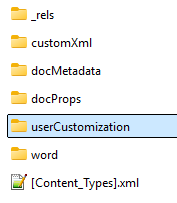

I, too, have had problems modifying the QAT for a particular template or document. It is not a problem with a new template or document, but when I try to modify ones that already have a number of QAT modifications, the change does not stick. I posted a question in Q&A about it.
I have been doing this, through the interface for more than 15 years. See Modifying the Quick Access Toolbar (QAT) in Microsoft Word.
Here is a link to my feedback on the issue: https://feedbackportal.microsoft.com/feedback/idea/796f5936-3f35-f111-9a91-000d3a05c4f5
Note, default storage location for changes to all documents is NOT the Normal.dotm file. It is the Word.OfficeUI file which also holds customization of the Ribbon done through the UI.
The UI-based process no longer creates the “User Customization” subfolder—an annoying bug! As a result, template-based QAT customizations are lost when a template is closed and reopened.
In my implementation, Word does create the subfolder, but it refuses to add more items.
I get the following message when trying to save.
It is not a matter of memory or disk space. This only comes up after trying to save a template with changes to the QAT. Here is a temporary link to a problem file that already has many QAT entries.