Forum Discussion

New Bug in Word Word (Version 2607 Build 16.0.20228.20124): QAT is not saved in template?
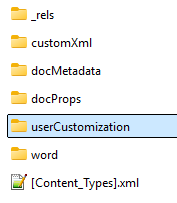

Your conclusion is reasonable. The userCustomization part and its package relationship are how Word persists template-specific QAT changes. If Word accepts the change in the QAT dialog, but a newly created local .dotx template does not retain it after saving, closing, and reopening, that points to a regression in this Word build rather than a problem with the template itself.
Before treating it as confirmed, test with a new blank .dotx stored locally, not in OneDrive, SharePoint, or a protected location. In File > Options > Quick Access Toolbar, make sure that the “Customize Quick Access Toolbar” drop-down is set to that template, add one built-in command, save the template, close Word completely, and reopen it. If the command is gone, the test rules out an existing template issue.
There is no reliable template-side fix if Word is no longer writing the required package part. Manually editing the ZIP package may work, as you found, but it should be treated as a temporary workaround only: make a copy first, and do not modify a signed or production template without testing, as package changes can invalidate a signature or damage the file.
For an immediate supported workaround, use a global QAT customization instead of a template-specific one, or have a Microsoft 365 Apps administrator test a rollback to the previous working Office build.