Forum Discussion

MS Word is throwing up 'Error 4608' I haven't a clue what to do.
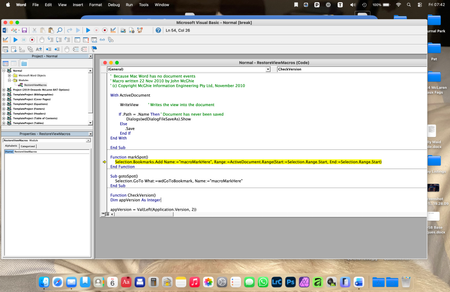
- Mar 09, 2026
If you put a ' at the start of the line that is in yellow, it will stop you getting the error message. I recommend trying Stefan's suggested language instead.
Note, this is the same as erasing that line. Word will ignore it. This lets you figure out what the problem is. Stefan's suggestion may fix things so it works as intended.


Charles,
I followed your advice to insert the ' at the start of Stefan's suggested text in the yellow highlight, and it worked! Magic!
Thanks ever so much.
I still haven't any real idea of what this Visual Basic debugging thing is, though; it is all a bit 'what goes on in the works behind the scenes' to me. I'm sure MS could think of a far less clanky way of informing users of what the error is, and provide an in-program solution to correct it, or better still have Word itself auto-correct it.