Forum Discussion

MS Word is throwing up 'Error 4608' I haven't a clue what to do.
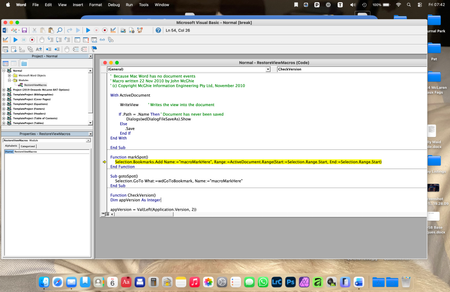
- Mar 09, 2026
If you put a ' at the start of the line that is in yellow, it will stop you getting the error message. I recommend trying Stefan's suggested language instead.
Note, this is the same as erasing that line. Word will ignore it. This lets you figure out what the problem is. Stefan's suggestion may fix things so it works as intended.


Captain,
If your process ever worked, then you will almost certainly have a bookmark named macroMarkerHere in the last successfully saved document. It appears that you have several global add-ins loaded and without seeing more of your code, it is impossible to pinpoint why you are now experiencing this issue. Somewhere in your VB Project, you have an event procedure that is calling the function MarkSpot. Now, if Stefan's proposed solution doesn't work and if you really don't need the bookmark, you can simply stet out that line of code (put an apostrophe at the start of the line) and let the code continue to run without error.