Forum Discussion

MS Word is throwing up 'Error 4608' I haven't a clue what to do.
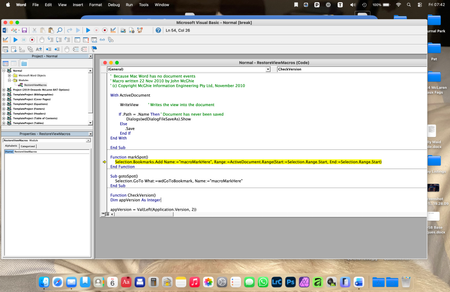
- Mar 09, 2026
If you put a ' at the start of the line that is in yellow, it will stop you getting the error message. I recommend trying Stefan's suggested language instead.
Note, this is the same as erasing that line. Word will ignore it. This lets you figure out what the problem is. Stefan's suggestion may fix things so it works as intended.


Stefan,
Thanks for trying to help. I wasn't completely sure what your reply meant, but I assumed you meant for me to delete the yellow highlighted text in that new window that gets thrown up, and paste your line of text where it had been.
I did that, but then I wasn't sure how to apply it. I clicked the floppy-disk icon top left of toolbar in attempt to save my change. Yes?
Unfortunately, it had no effect on things, and when I try to save changes to the Word document it still throws up that error message, and if I click on the Debug button in it the new window still gets launched, but now the yellow highlighted line of text is the text I pasted in from your reply.
I still cannot save any charges to my document and I end up having to Force Quit Word because there is no other way to close it.