Forum Discussion

Why can't I get into recovery or startup settings after running reagentc commands?
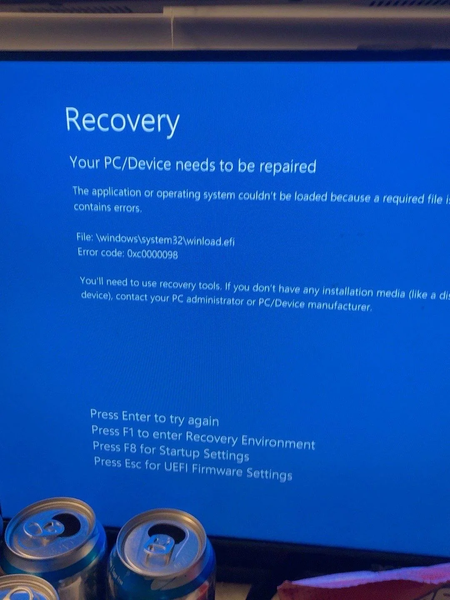

You can boot recovery tools from a Windows installation USB without first repairing the internal boot configuration. F1 and F8 still rely on components on the internal drive, which explains why they can return to the same failure.
Your screenshot identifies winload.efi and error 0xc0000098. That points to a boot-loading problem, but doesn’t prove that reagentc caused it. /info only displays information; /enable enables Windows Recovery Environment—it doesn’t repair damaged boot files.
- On another working PC, create an official Windows installation USB using Microsoft’s download tools. Creating it erases the USB.
- Boot the affected PC from the USB’s UEFI entry in its boot menu.
- Choose Repair your computer, then Troubleshoot > Advanced options > Startup Repair.
If repair fails, back up important files before attempting manual boot repair or reinstalling. Have your BitLocker recovery key ready if encryption is enabled. Don’t run generic partition-formatting or BCD commands without identifying the Windows and EFI partitions first.
A black screen alone doesn’t confirm a virus. If malware is confirmed, repairing startup won’t necessarily remove it; a clean installation from trusted media is the safer recovery route after backing up your documents.