Forum Discussion

Which method is better for resetting a Windows 11 computer?
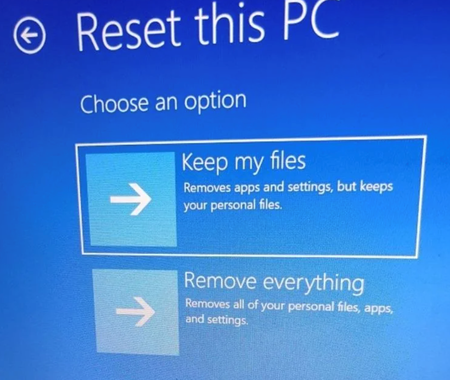

Both entries start the same Windows recovery reset feature, so the choice of menu path does not normally change the reset result. Use Settings > System > Recovery when Windows is stable and you can sign in. Use Shift + Restart > Troubleshoot when the desktop is unreliable, Settings will not open, or you need to start recovery before loading the normal shell.
The more important choices are “Keep my files” versus “Remove everything,” and “Cloud download” versus “Local reinstall.” Keep my files preserves personal files but removes apps and resets system settings; it is not a backup. Remove everything is better when handing the PC to someone else or after a serious compromise. Cloud download obtains fresh Windows files and is preferable if local system files may be damaged, provided the internet connection is reliable. Before either method, back up data, save the BitLocker recovery key, disconnect nonessential external drives, and record installed applications. If Reset this PC itself fails, use Microsoft installation media for repair or a clean installation.