Forum Discussion

The installation of Windows 11 gets stuck and won't continue
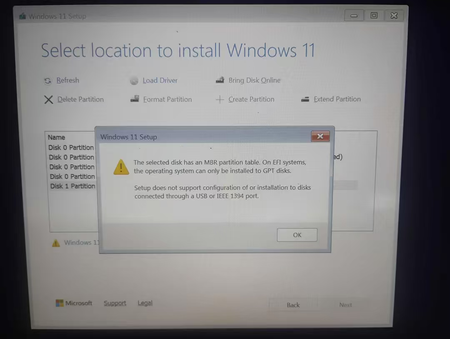

The screenshot shows two blockers: Windows Setup was started in UEFI mode, but the internal target disk uses MBR, and Setup refuses installation to a disk connected through USB. If this is a clean installation and everything on the internal drive is backed up, select each partition on that internal disk and choose Delete until only unallocated space remains, then select that space and continue. Setup will create the required GPT layout. Do not delete the USB installer, and do not follow this procedure if you need files from the internal drive, because deleting its partitions erases them. If the 119 GB target is actually an external USB drive, move the installation target to the laptop’s internal storage. The GPT error does not mean the laptop cannot run Windows 11. Before continuing, run Microsoft PC Health Check or verify the processor, TPM 2.0, Secure Boot, memory, and storage requirements independently.