Forum Discussion

How much space does Windows 11 Need?
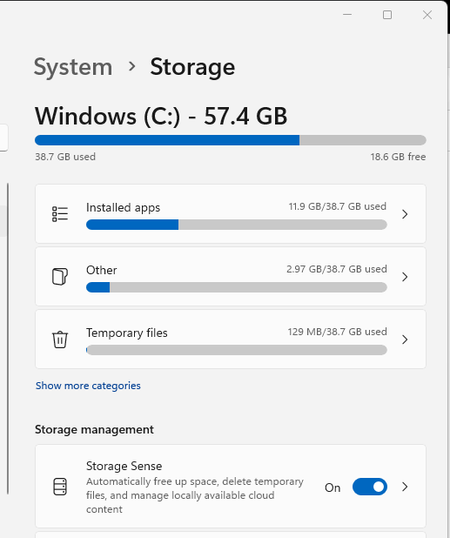

Hello, KaiPonte1,
I don't know if you still get answers, but as far as I know, yes, the screenshot you uploaded is typical for all Windows 11 computers. Windows 11 OS does take about 20 to 30 GBs and some basic apps that it also installs when you set up your PC (such as Microsoft Edge, Microsoft Store, Calculator, Pictures, Settings, and more) adds up to several gigabytes. There isn't a way to free up space in your drive right now because all data stored are for your PC to run. To be honest, if you want to install Office 365 and apps related to it like MS Word, Excel, PPT, Teams, and more, and store some files, I recommend you to get your drive replaced with at least 128GB SSD or bigger, even though Microsoft says that 64GB is enough to run Windows 11.
I found out that your laptops uses eMMC memory and it might be upgradable or not. If your laptop mainboard has an additional M.2 NVMe slot or a SATA port, you can increase your storage by simply buying an NVMe SSD or SATA SSD/SATA HDD (but they should fit into your laptop, they will probably labeled 2.5'') and plug it in for just extra storage or clone your eMMC to your new SSD for faster booting. If your mainboard doesn't have one of these ports, you can still upgrade them by desoldering the eMMC chip and clone it to a new, bigger eMMC chip and resoldering it onto the mainboard. However, this may require more skill and tools, so you might want to go to a local computer repair shop or HP repair store (if they would do this for you).
If you don't want to upgrade your local storage, you can use cloud storage like Onedrive (which is included in Office 365) to store your files like images and videos and text. However, you can't store WIndows program files in the cloud storage because you won't be able to run it without a Wi-Fi connection.
I hope this reply helps you.
Thank you.