Forum Discussion

Excessive DMP Files in System32
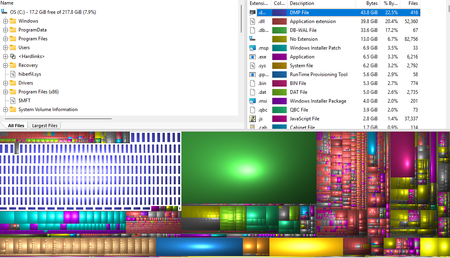

Those files are diagnostic snapshots, not components Windows needs to boot. Deleting one removes debugging evidence but does not damage the program that created it. Keep the newest one or two, then use Settings > System > Storage > Cleanup recommendations or Temporary files first. If Windows does not list them, move only the .dmp files to another drive before deleting the originals.
The location is the clue. Windows normally writes system-crash dumps as %SystemRoot%\MEMORY.DMP or under %SystemRoot%\Minidump. Dozens directly in System32 therefore suggest an application, service, driver, or custom Windows Error Reporting LocalDumps configuration.
Sort them by date and compare names and timestamps with Reliability Monitor and Event Viewer. Also check HKLM\SOFTWARE\Microsoft\Windows\Windows Error Reporting\LocalDumps for DumpFolder and DumpCount values. Update or repair the repeating process; otherwise the space will fill again. Avoid deleting unrelated System32 files.