Forum Discussion

Alt+TAB Bug
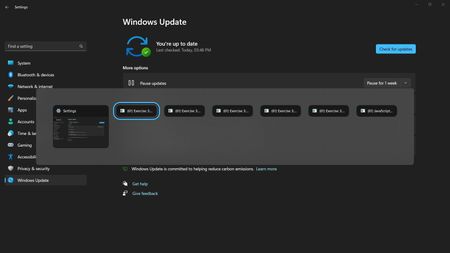

I'm surprised that this is still a problem... I've seen people having this problem for 2 years... What is Microsoft doing. They fix some of the most useless things that people don't even use and ignore something as basic as alt-tabbing. I've found a work around and I haven't had any issues since. From what I've found is that, this happens because of how Windows 11 handles alt-tabbing or "windows-switcher" from what it's called. For some odd reason, it will do this with certain applications that are full screened and you alt-tab fast enough that it makes a ghost window. It's not only from web browsers. This is most prevalent with browsers playing a video on full screen. All of these browsers suffer from this so it's not just a specific one. I downloaded something from github called explorerpatcher. It has an option that lets you change from windows 11 style back to windows 10 window switcher style of alt-tabbing. There are a few problems with this though. You are downloading a third-party app, which you shouldn't have to. I personally never had a problem using explorerpatcher, but I've seen plenty of people that are having random issues while using this program. Lastly, any video that you have full screened and is the main window you have upfront will not show on the alt-tab list. But would reappear on the list when it's not the main window that you're viewing. But I rather have it not listed on the alt-tab list just because it's the main focused window, but will reappear if it's a background window rather than alt-tabbing making 10 different ghost windows of one program...