Forum Discussion

ErdYar
Sep 06, 2018Brass Contributor
Why is a "document library"-property not showing for my custom content type?
Hi, I have a SharePoint list "Customers" and a document library. In the document library I have added a property "Customer" that refers to list "Customers" (title field). Now, I can fi...
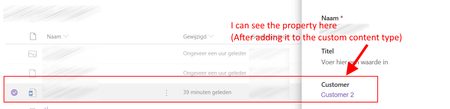
- Sep 06, 2018
Since the Site Column already exists on the Site Collection i would delete both Site Columns from the Document library and then add the existing Site Column again. That way you would be sure of that both content types use the same Site Column.

ErdYar
Sep 06, 2018Brass Contributor
Hi,
Thanks. That setting seems to be fine....
I do notice that I see Customer 2 times in the Document library Settings… Could this have anything to do with the problem perhaps….

MagnusGoksoyrOLDProfile
Sep 06, 2018Bronze Contributor
Yes it does. The difficult part is to find out which one to delete :-)
- ErdYarSep 06, 2018Brass ContributorI know where they come from.The top one (customer) is from the template content type:And the bottom one is the property that I have defined in the Document library...But obviously knowing this doesn't help me whatsoever….
- MagnusGoksoyrOLDProfileSep 06, 2018Bronze Contributor
Since the Site Column already exists on the Site Collection i would delete both Site Columns from the Document library and then add the existing Site Column again. That way you would be sure of that both content types use the same Site Column.
- ErdYarSep 06, 2018Brass Contributor
Unbelievable. This worked. Thanks a lot!
(I would have sworn that I looked in site columns before when trying to add an extra property to the template content type, but could not find "customer" there.)